Knowledge base
1000 FAQs, 500 tutorials and instructional videos. Here, there are only solutions!
Add a DNS zone (for external domain)
This guide explains how to order a DNS zone from Infomaniak.
Introduction
- Having your DNS zone with Infomaniak is useful if your domain name is registered elsewhere (with a third-party provider/registrar) and you want to easily link this domain to Infomaniak products.
- Indeed, simply having a
domain.xyzwebsite with Infomaniak and specifying the 2 Infomaniak DNS addresses with the domain name registrar (if it is not Infomaniak) is not enough for the website to be displayed when you typedomain.xyzin a browser. - You must add a DNS zone in the same location as your hosting to ensure your website functions correctly.
- This will also be particularly useful if the provider managing your domain name does not offer DNS zone management.
Order a DNS zone
To do this:
- Click here to access the Infomaniak domain Shop.
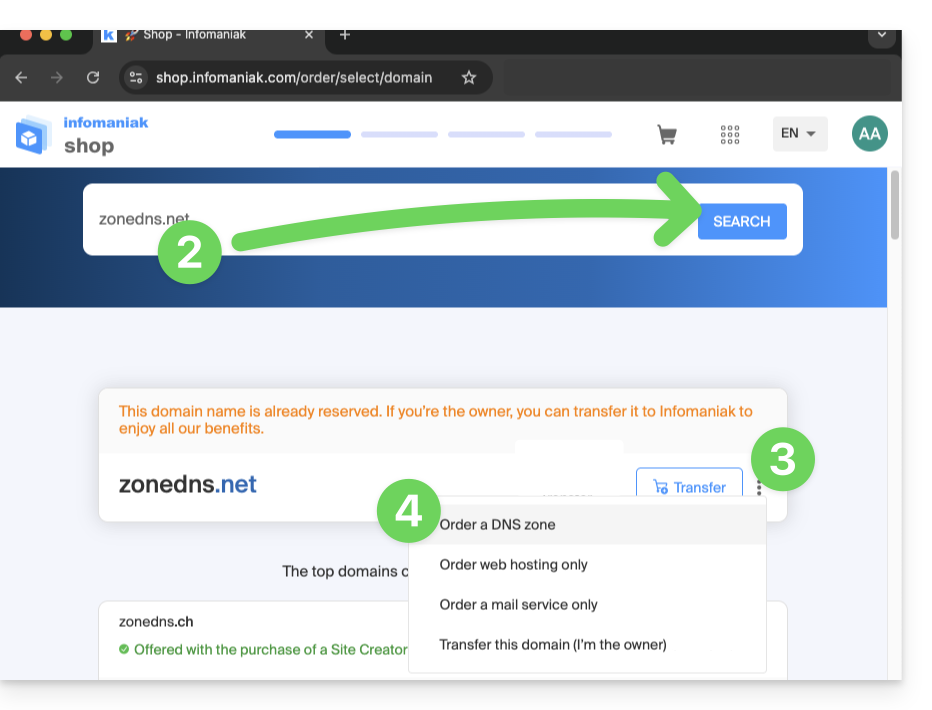
- Start a search with the name of the domain registered elsewhere.
- Click on the action menu ⋮ located to the right of the result.
- Select Order a DNS zone:
- Complete the purchase.
- Once added to your Manager, the zone can be edited.
Link to this FAQ: https://faq.infomaniak.com/1914
Has this FAQ been helpful?