Knowledge base
1000 FAQs, 500 tutorials and instructional videos. Here, there are only solutions!
Show Mail Infomaniak keyboard shortcuts
Update 10/12/2026
This guide explains how to increase your productivity with the Infomaniak Web Mail app (online service ksuite.infomaniak.com/mail) by using its keyboard shortcuts, which allow you to perform certain actions without using the mouse.
Enable or disable shortcuts
To enable or disable keyboard shortcuts throughout the Infomaniak Mail interface:
- Click here to access your emails in your Infomaniak kSuite (❓: help).
- Click on Settings in the top right corner.
- Click on Shortcuts.
- Enable or disable the use of shortcuts:
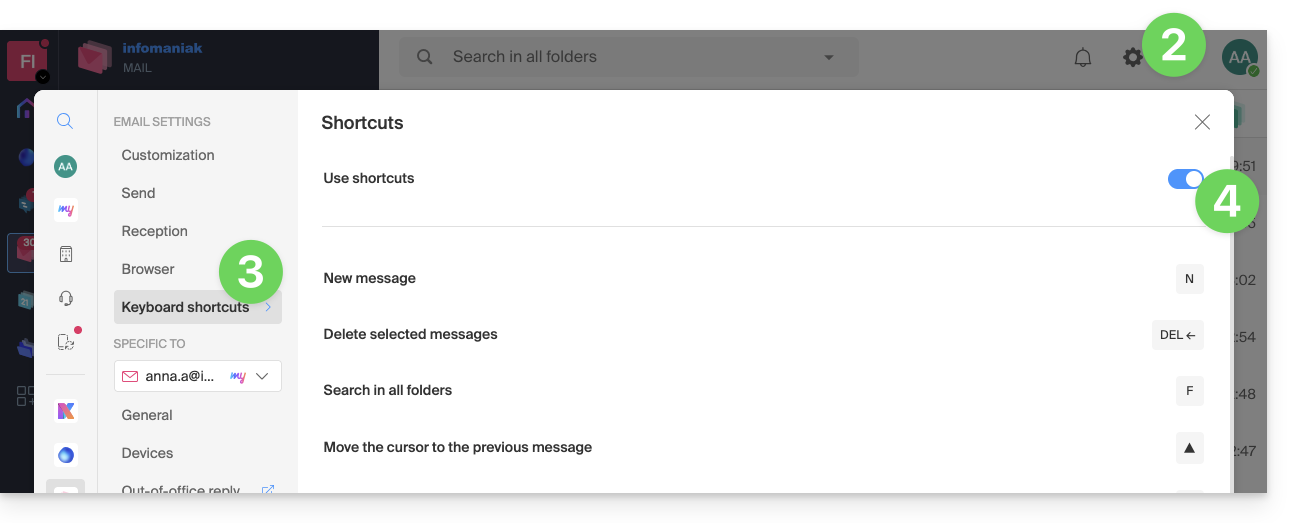
You can also access it using the key combination SHIFT+ALT+H (OPTION+MAJ+H on macOS).
Keyboard shortcut examples
Here are some keyboard shortcuts (refer to the chapters above to go directly to the complete list):
| Keyboard shortcuts | Definition | Action |
|---|---|---|
SHIFT+ALT+H | List of shortcuts | Displays the complete list of keyboard shortcuts available in Webmail. |
! | First message | Allows you to select the first message in the current folder |
SHIFT+LT+A | All messages | Allows you to select all messages in the current folder |
| DOWN | Next message | Allows you to move the cursor to the next message. |
| UP | Previous message | Moves the cursor to the previous message. |
| LEFT | Return to the message list | Return to the message list |
SHIFT+CLICK | Select multiple messages | Allows you to select multiple messages consecutively |
CMD/WINDOWS+CLICK | Select/Deselect a message | Allows you to select/deselect a message |
SHIFT+R | Reply to the message | Allows you to reply to the message sender |
SHIFT+ALT+R | Reply to all | Allows you to reply to the sender and all recipients in the message. |
SHIFT+ALT+N | New message | Allows you to create a new message |
SHIFT+ALT+DEL | Deletes the selected messages | Deletes all selected messages at once |
SHIFT+ALT+E | Archive the message | Allows you to move the message to the archive folder. |
Link to this FAQ: https://faq.infomaniak.com/1890
Has this FAQ been helpful?