Knowledge base
1000 FAQs, 500 tutorials and instructional videos. Here, there are only solutions!
Transfer a domain name to Infomaniak
This guide explains how to transfer your domain name that you own with another provider and bring it to Infomaniak. You remain the obvious owner of your domain name and manage it easily and at a lower cost.
Prerequisites
- Check that the domain name is transferable according to certain criteria:
- domain created or already transferred for at least 60 days
- valid email addresses (owner's contact details, administrator/technical contacts)
- unlocked domain
- Note in a safe place the different records (A / MX / TXT, etc.) contained in your domain if you will keep other services after the transfer than those of Infomaniak.
- This is about transferring a domain name that you own with a different provider than Infomaniak, so that the future management of this domain is done with Infomaniak.
- This is therefore not an internal transfer from one holder to another and the code to be obtained is therefore not a code for an internal transfer with your current provider.
- Instead, obtain the authorization code.
- The terms '
EPP', 'AuthCode', 'AuthInfo', 'transfer code' and 'authorization code' all refer to alphanumeric sequences specific to the domain whose main objective is to verify the owner's authorization before a transfer between Registrars.
- Here are some specific guides to help you if your current Registrar is:
Transfer the domain to Infomaniak
Once the prerequisites above are validated:
- Order the domain name to be transferred at Infomaniak.
- Enter the authorization code (see prerequisites above) when prompted during the order process.
- Review the DNS chapter below and, if necessary:
- Run a DNS diagnostic to verify the Domain <-> Infomaniak Services link.
- Run a Mail diagnostic (SPF, DKIM...) to avoid any sending or receiving issues.
Batch transfer of multiple domains
Once the prerequisites above are validated:
- Order the domain names in one go via this Infomaniak transfer assistant.
- Specify the domain names and authorization codes or import a CSV file (format
.csvor.xlsx) with the list of domains and their authorization codes (in 2 columns and up to 300 rows).
Transfer duration, administrative delays
The duration of a domain name transfer is influenced by two factors:
- The conditions of the registry of the extension; for the
.FR, Afnic sets a transfer period of up to 8 days; refer to the specifics of the extensions that concern you from this page (under Frequently Asked Questions by first clicking on the extension concerned). - The conditions of the Registrar you wish to leave; the latter has the possibility to oppose the transfer during the transfer period defined by the registry; it can also automatically accept the transfer and speed it up.
Note that a DNS update (see below) can take up to 24 hours.
DNS configuration (before, during, after)
- Before the transfer, your domain name is linked to various services (Mail, Web...) through its DNS.
- While the transfer is in progress, you will no longer be able to modify the DNS configuration until the transfer is complete.
- As it can sometimes be difficult to know when this occurs, you can decide in advance what DNS configuration to apply (also possible during bulk transfer):
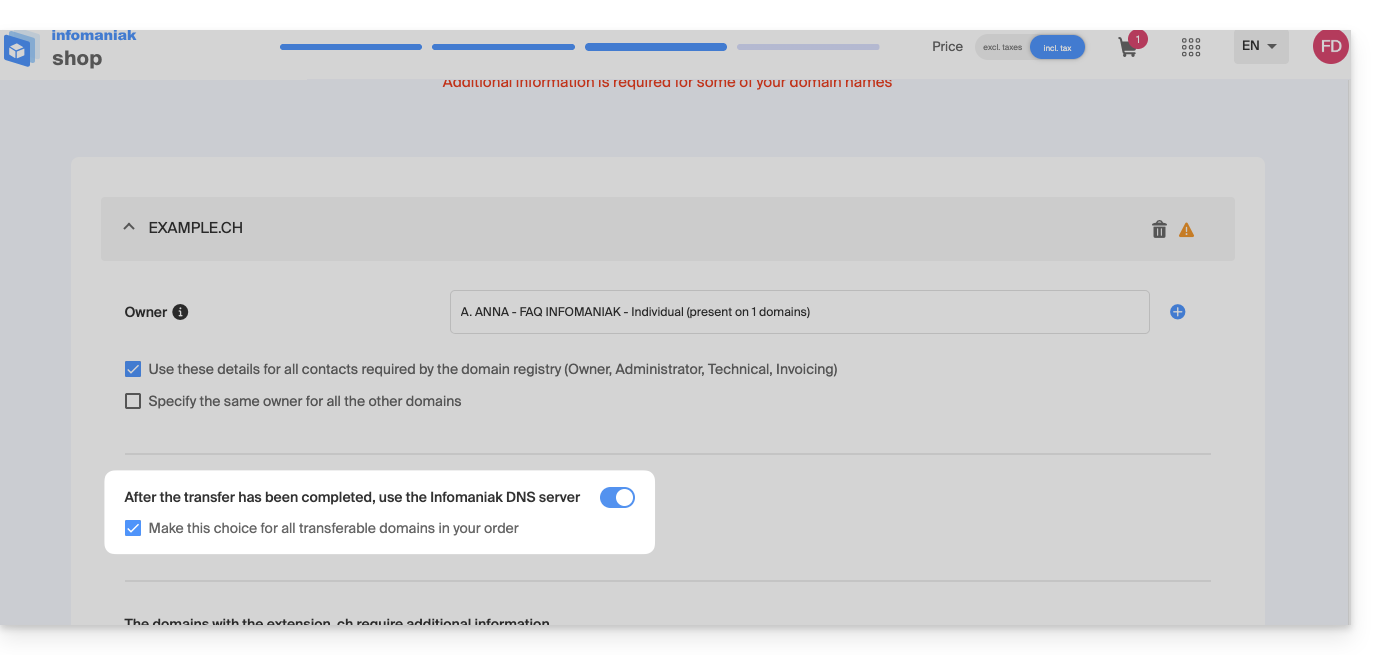
For example:
- Your domain name
domain.xyzhas the DNSns1.monregistrar.comandns2.monregistrar.combefore transfer and you will only work with Infomaniak for everything related to email, web hosting, etc…- …then you don't have to do anything except choose our DNS when prompted during the transfer (same if it already has DNS, for example ns11.infomaniak.com and ns12.infomaniak.com).
- …then you don't have to do anything except choose our DNS when prompted during the transfer (same if it already has DNS, for example ns11.infomaniak.com and ns12.infomaniak.com).
- Your domain name
domain.xyzcurrently has the DNSns1.monregistrar.comandns2.monregistrar.comand you are only moving the domain name while continuing to work with different services other than Infomaniak…- …then carefully note the information contained in your current DNS zone (A records, CNAME, etc.) because Infomaniak cannot guarantee that your current DNS zone will persist where it is currently located (check with your current registrar) and choose not to use Infomaniak DNS.
- …then carefully note the information contained in your current DNS zone (A records, CNAME, etc.) because Infomaniak cannot guarantee that your current DNS zone will persist where it is currently located (check with your current registrar) and choose not to use Infomaniak DNS.
- And if you don't know which DNS your domain name is currently using…
- …query it via https://infomaniak.com/whois or another WHOIS service.
- …query it via https://infomaniak.com/whois or another WHOIS service.
- If your domain name
domain.xyzalready has DNS in the form of, for example,ns11.infomaniak.comandns12.infomaniak.combefore transfer…- …then you don't have to do anything except choose our DNS when prompted during the transfer.
Do you want to transfer services such as your sites or email addresses? Refer to this other guide.
If you are stuck at a specific step, do not hesitate to contact Infomaniak support to get the help you need to continue the process.
Link to this FAQ:
Has this FAQ been helpful?