Knowledge base
1000 FAQs, 500 tutorials and instructional videos. Here, there are only solutions!
Restore contacts in Infomaniak Contacts
This guide explains how to restore accidentally deleted contacts in the address books of the Infomaniak Contacts web app (online service ksuite.infomaniak.com/contacts).
✘ UNAVAILABLE with
kSuite Free
my kSuite (ik.me, etik.com, ikmail.com)
Mail Service Starter
By upgrading one of these free plans, you will be able to restore the backup for up to 30 days.
Contact restoration
Restore points are performed daily. Once a backup of your entire address book has been created, Infomaniak makes it available to you for 30 days. You can also recover contacts deleted within the last 24 hours, 48 hours, or 7 days:
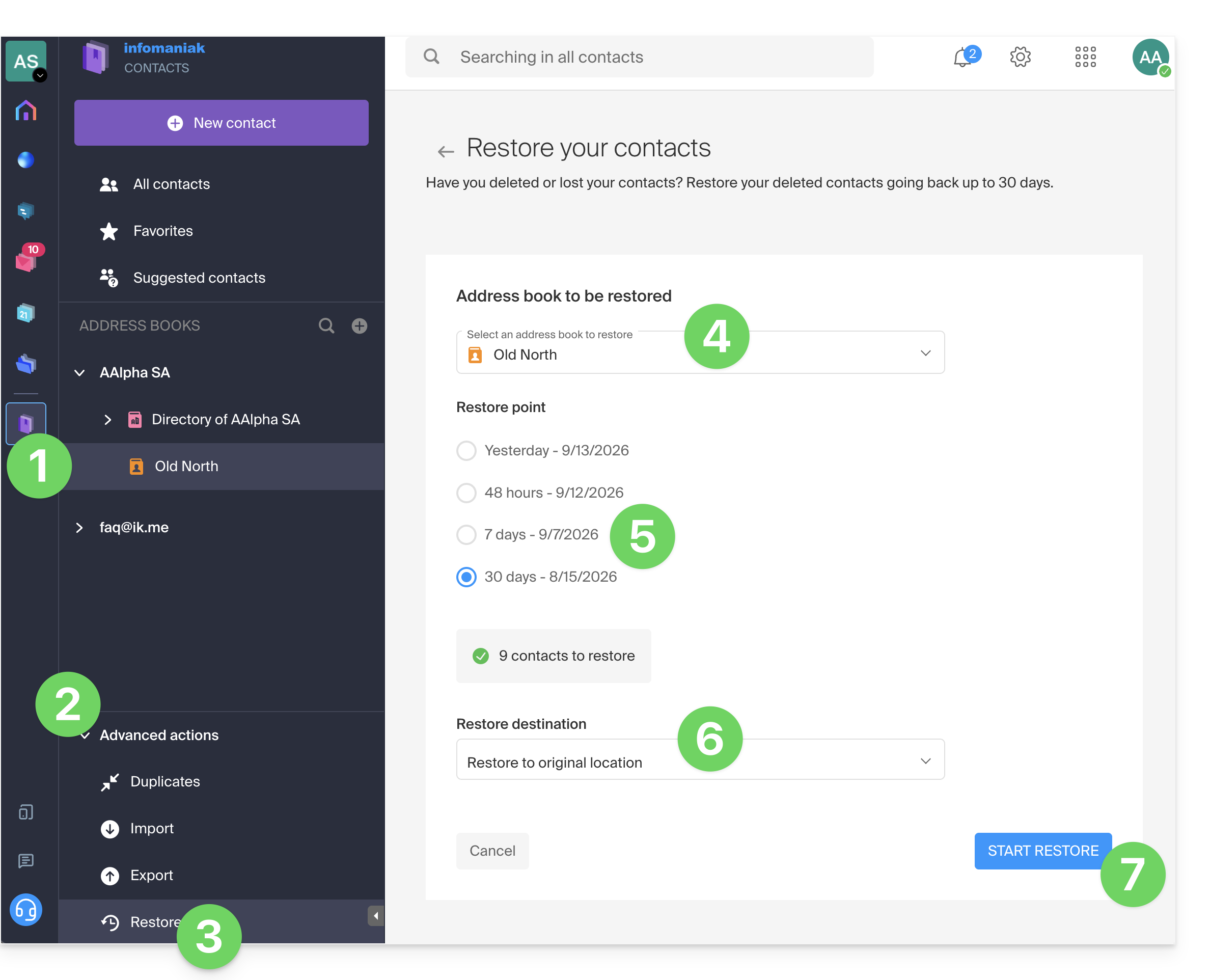
- Click here to access the Infomaniak Contacts web app (online service ksuite.infomaniak.com/contacts).
- Click on the chevron to expand the Advanced actions section.
- Click on Restore.
- Choose the snapshot to restore.
- Choose the version from yesterday, 48 hours ago, or 7 and 30 days ago.
- Choose the destination (in the original location or in another address book if available).
- Start the restoration using the button at the bottom of the page, which is activated if contacts can be restored:
Link to this FAQ: https://faq.infomaniak.com/1741
Has this FAQ been helpful?