Knowledge base
1000 FAQs, 500 tutorials and instructional videos. Here, there are only solutions!
Download an email from Mail Infomaniak
Update 10/12/2026
This guide explains how to download an email from the Infomaniak Mail web app (online service ksuite.infomaniak.com/mail) to obtain a .eml file on your hard drive, which is compatible with all email software/clients.
This operation cannot be performed on the Infomaniak Mail mobile app (application for iOS/Android smartphones or tablets), but please refer to the alternatives provided at the end of this guide.
Download an email
To save an email from the Infomaniak Mail web app (online service ksuite.infomaniak.com/mail):
- Click here to access your emails on your Infomaniak kSuite (❓: help).
- Open the message to download.
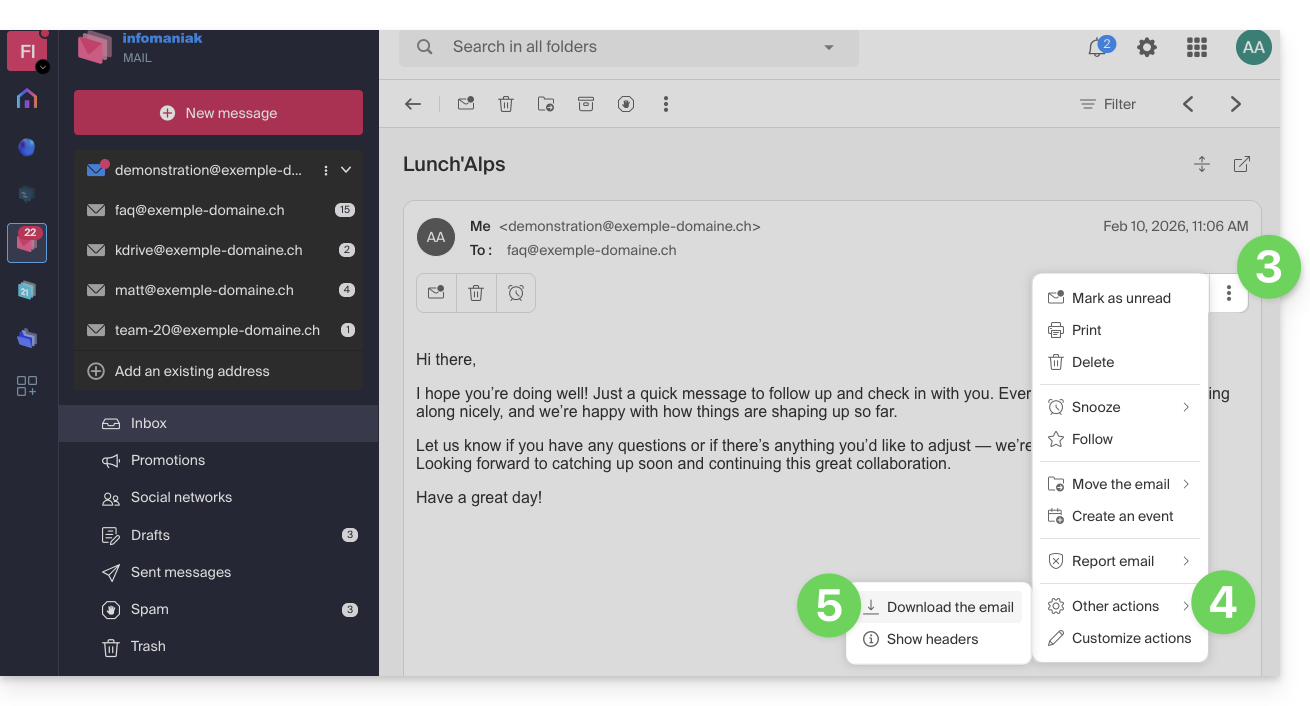
- Click on the action menu ⋮ to the right of the open email.
- Click on More actions.
- Select Download:
4 alternatives
- The Save As... function in an email client such as Thunderbird allows you to achieve the same result:
- Open the Thunderbird software.
- In the inbox, right-click on the message you want to save.
- Choose the location to save the
.emlfile.
- To print the message and choose PDF from the available printers, please refer to this other guide.
- To download the message to kDrive, please refer to this other guide.
- To share it publicly using a simple link, please refer to this other guide.
Link to this FAQ: https://faq.infomaniak.com/1718
Has this FAQ been helpful?