Knowledge base
1000 FAQs, 500 tutorials and instructional videos. Here, there are only solutions!
Troubleshooting a DMARC error with Infomaniak email
This guide helps you identify and resolve issues related to setting up and using a DMARC policy. If you use Google, please refer to this dedicated guide.
Prerequisites
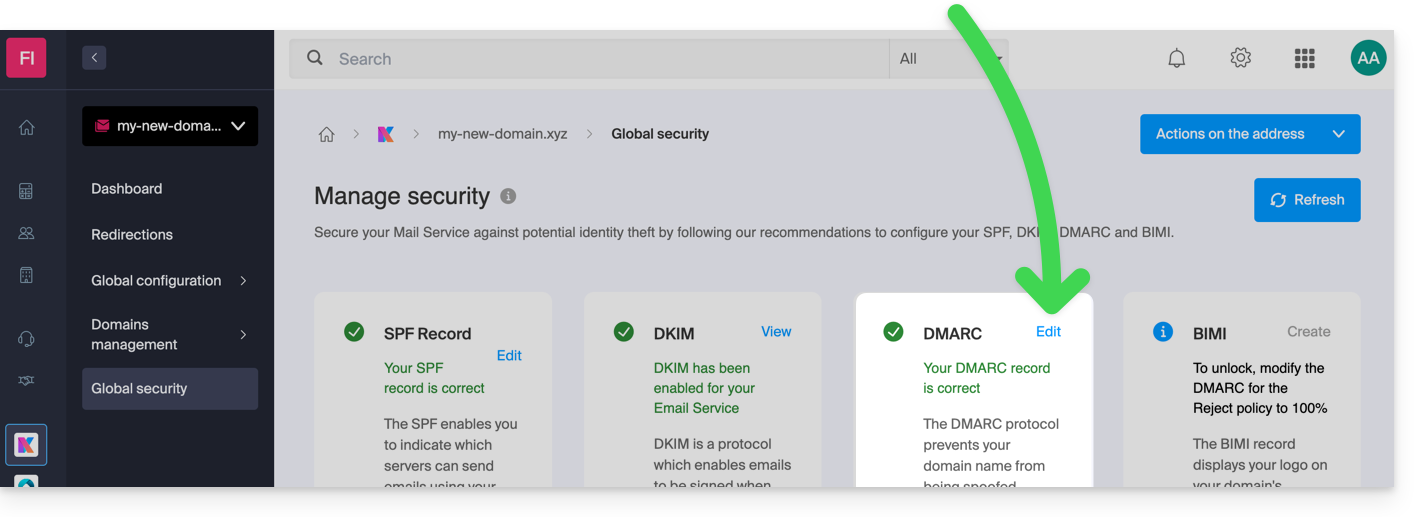
- Check the overall security of your Mail Service (❓: help) to ensure that SPF and DKIM are green, i.e. enabled and correctly aligned for your domain.
- Add the third element in the same location: DMARC:
"Message lacks SPF/DKIM/DMARC Auth Records" rejection
Providers like Microsoft have strengthened their security requirements for incoming messages. If your domain does not have a DMARC record, your emails will be rejected with the error Message rejected: Message lacks SPF/DKIM/DMARC Auth Records (AS9031519)…
Thanks to the Global Security feature available in your Mail service, easily add a DMARC record to your domain's DNS zone (❓: help).
General DMARC errors or rejections
...related to an email that does not use any SPF or DKIM mechanism
DMARC requires that at least one of the two mechanisms (SPF or DKIM) be valid and aligned with the sender's visible domain. If you send an email from your Infomaniak address via the SMTP server of another provider, the check may fail.
To resolve this issue:
- Check the overall security (❓: help) of your Mail service.
- Use Infomaniak's official SMTP servers for sending emails (❓: help).
- If you are using an external service, configure SPF and DKIM correctly for that service.
...related to an incorrect DNS DMARC entry
The DMARC record must be unique and published on the subdomain _dmarc.
- Syntax error: check the semicolons and tags (e.g.
v=DMARC1; p=none;). - Multiple records: a domain should only have one TXT DMARC record.
Test your configuration with a dedicated tool like MXToolbox (❓: help) or DMARC Advisor (❓: help).
...during an email redirection (SPF error)
When an email is redirected without the SRS (Sender Rewriting Scheme) mechanism, the SPF check may fail on the destination server.
At Infomaniak: All redirects automatically include the SRS protocol to rewrite the envelope address and preserve the validity of the transmission. If you are redirecting from another hosting provider to Infomaniak, ensure that the original provider manages SRS.
Special cases and best practices
I'm sending emails from my Infomaniak address, but I'm receiving a "Reject DMARC" error.
- Check the overall security (❓: help) of your Mail service.
- Perform a test send from the Infomaniak Mail app.
- If this method works, the problem lies in the SMTP settings of your email software (Outlook, Thunderbird, mobile): check your server settings (❓: help).
Messages from a new domain are ending up in spam
A new domain lacks reputation history (❓: help). First, send a moderate volume of legitimate messages and ensure that SPF, DKIM, and DMARC are perfectly configured to build your domain's reputation with providers.
I want to receive an email, but the external sender is experiencing a DMARC error.
The blocking is due to the sender's domain configuration. You cannot fix this from your Infomaniak inbox. Ask the sender to forward the complete error message to their own administrator or email hosting provider.
Link to this FAQ: https://faq.infomaniak.com/1704
Has this FAQ been helpful?