Knowledge base
1000 FAQs, 500 tutorials and instructional videos. Here, there are only solutions!
Getting Started Guide: Site Creator
Thank you for choosing Infomaniak to host your website and for creating its content with Site Creator. This guide will help you quickly use the essential functions of this accessible and easy-to-use website creation tool.
Introduction
- Site Creator is available…
- … with every paid web hosting plan
- … or as a standalone product (available in 3 versions) and does not require any other specific offer in this case
- It is recommended to use the latest version of a browser such as Chrome, Firefox, Safari, and Microsoft Edge, preferably on a computer.
Operations Guides
Basic information:
- Manage pages
- Simple page editing
- Manage content blocks
- Manage media (images, videos, documents, etc.)
- Manage the navigation menu(s)
- Manage themes, colors, and fonts
- Manage the site name and details
Advanced information:
- Advanced page editing
- Manage additional modules (gallery, blog, shop, etc.)
- Manage languages and translations
- Create a contact form
- Cookie Management (GDPR)
- Site Creator Limitations
You can also delete your website created with Site Creator and start from scratch by recreating a blank website.
Learn more about Site Creator:
- French | Webinar recorded at Infomaniak headquarters.
- German | Quickstart :: Tutorial
- Italian | Tutorial
Contextual help
To view or review the contextual help for getting started with Site Creator, click here in your Manager: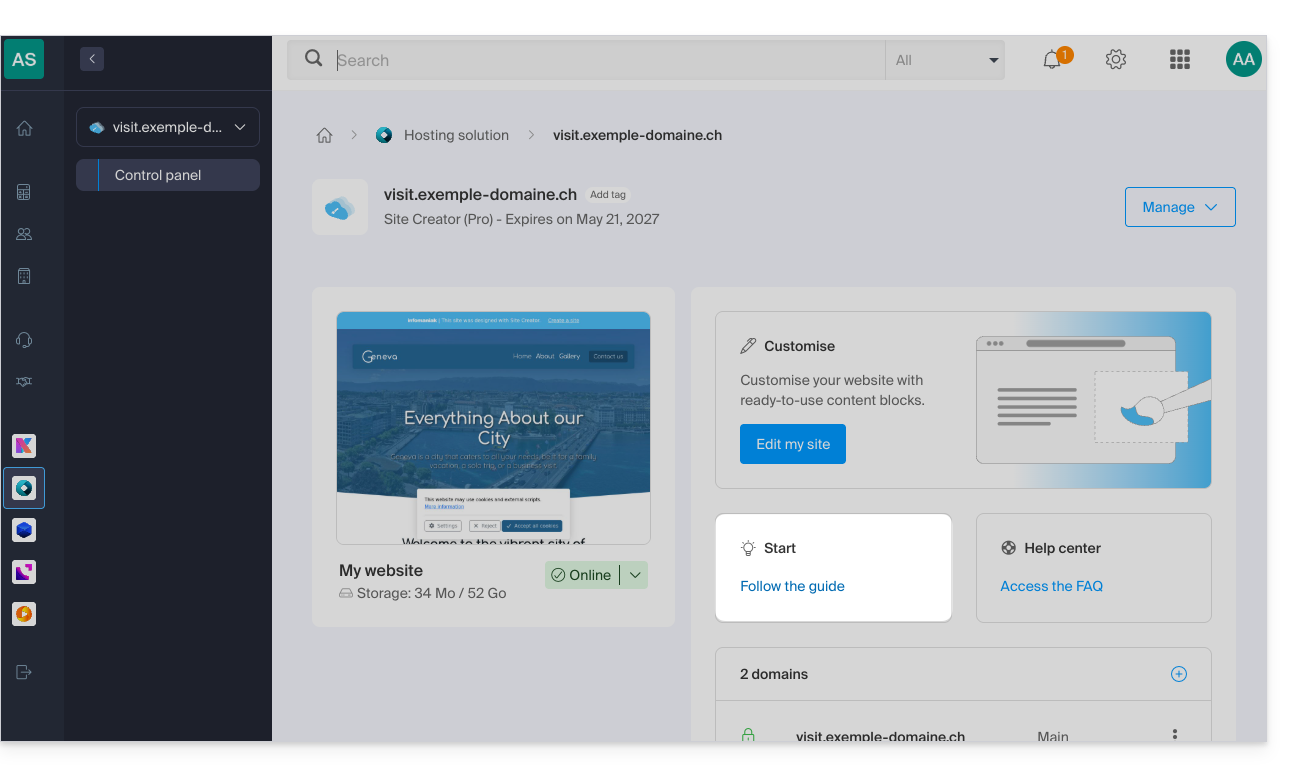
If you encounter any issues, consult the knowledge base before contacting Infomaniak support.
Click here to share feedback or suggestions about an Infomaniak product.
Link to this FAQ: https://faq.infomaniak.com/1698
Has this FAQ been helpful?