Knowledge base
1000 FAQs, 500 tutorials and instructional videos. Here, there are only solutions!
Create an AI project with custom instructions and knowledge base with Euria from Infomaniak
This guide explains how to configure and optimize Projects on Euria, Infomaniak's AI assistant, to create customized and secure workspaces using your own instructions and documents.
What is a Project on Euria, Infomaniak's AI assistant?
A Project on Euria is a dedicated workspace that allows you to group your exchanges around a single topic or activity. By adding custom instructions and your own documents, you create a genuine knowledge base that the AI assistant uses to provide you with much more precise and contextually relevant responses. It is equivalent to the Projects on ChatGPT or Claude, with the advantage of exclusive hosting in Switzerland and total protection of your data.
Why create a Project with custom instructions?
Without a project, an AI assistant responds generally. With an Euria project, you provide context through custom instructions: your preferred tone, information about your company, your reference files… Result: tailored responses, as if your AI assistant already knew your universe. Unlike ChatGPT's custom instructions or Claude's project instructions, your data remains hosted in Switzerland and is never used to train models.
How to create your first AI Project on Euria?
To do this:
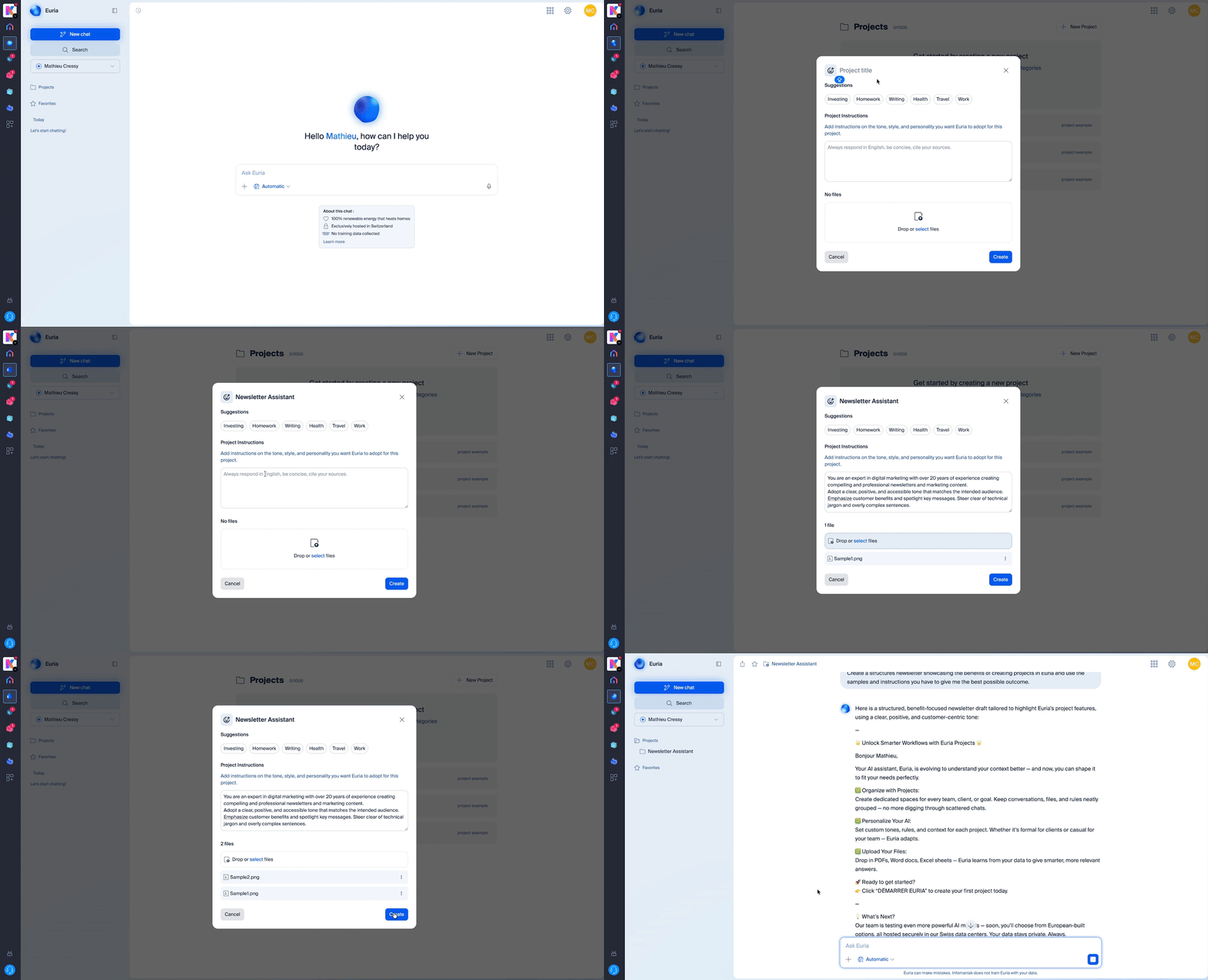
- From the Euria homepage, click on "Projects" in the left menu.
- Click on "New project" and give it a name (for example: "Marketing", "Customer Support", "My Company").
- Your project is created — all you have to do is customize it with your instructions and documents.
What is a custom instruction and how to add it?
A custom instruction (or custom instruction) is a guideline you give to Euria so that it adapts its responses to your specific needs. Once in your project, go to the Instructions section. This is where you can specify to Euria:
- The tone to adopt (formal, friendly, technical…)
- The context of your exchanges (industry, type of customers, objectives…)
- The role that the AI should play (writer, advisor, analyst…)
- Specific guidelines (languages to use, desired response formats, information to always mention…)
The more detailed your custom instructions, the more relevant and consistent the responses from your AI assistant will be.
How to build a knowledge base with your documents?
Open a project from euria.infomaniak.com, then drag/drop the documents of your choice into the right-hand bar.
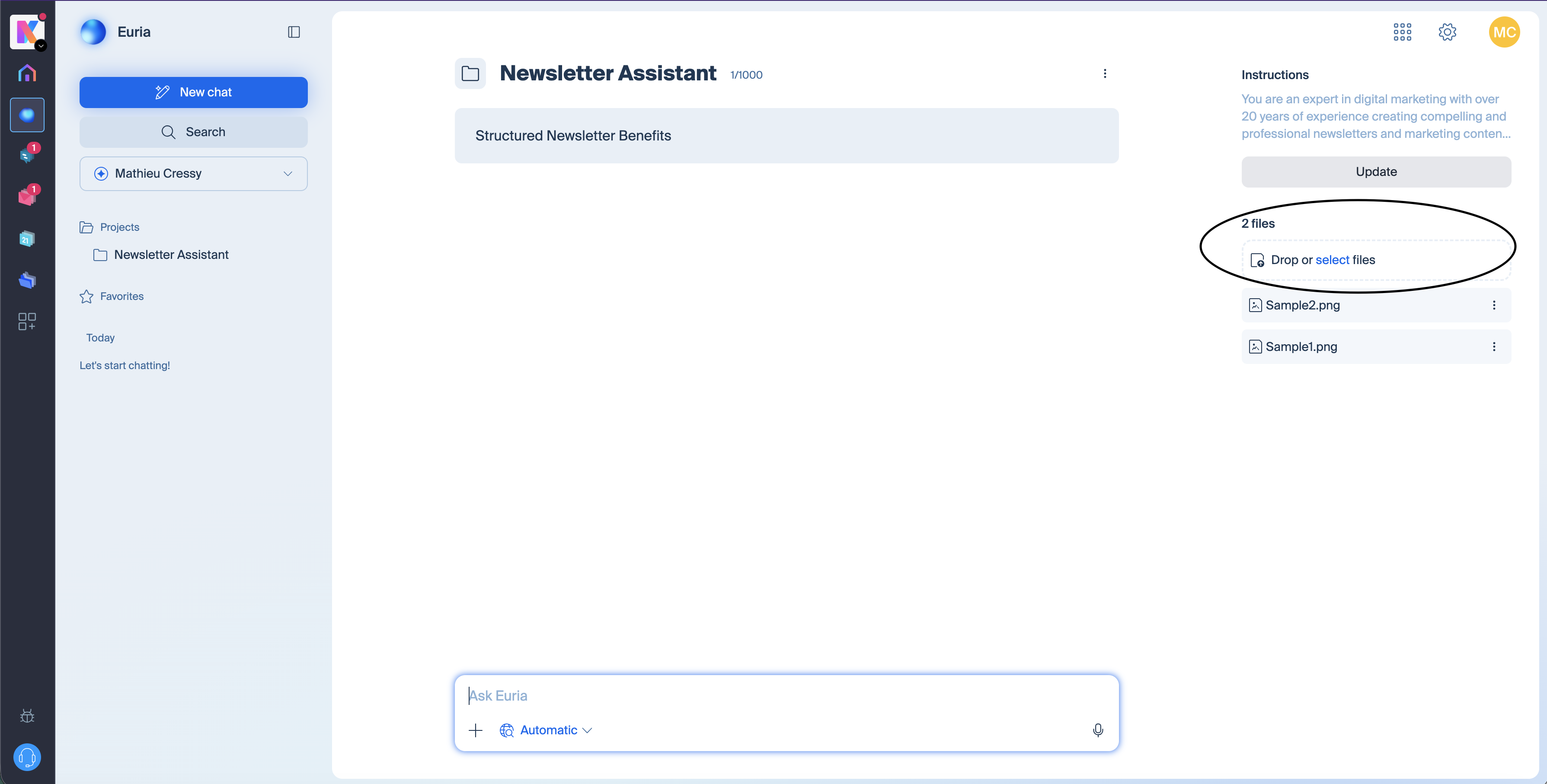
You can import your files (PDF, text, spreadsheets, etc.). Euria will use these documents to answer your questions with precise and up-to-date information. This is ideal for depositing, for example, an editorial charter, a product catalog, internal FAQs, procedures, or any other reference document. The richer your knowledge base, the more effective your personalized AI assistant will be.
What types of files can I add to my knowledge base?
Euria supports several common formats to feed your knowledge base: PDF, text documents, markdown, Word, Excel, etc. If a format is not supported, Euria will notify you at the time of import.
How does Euria differ from ChatGPT and Claude for managing AI projects?
Like ChatGPT and Claude, Euria allows you to create workspaces with custom instructions and a knowledge base. The major differences lie in data protection and technological transparency.
Euria is exclusively hosted in Switzerland, in Infomaniak's data centers. Your documents and conversations remain private, no data is used to train AI models, and you have full control over your information. Additionally, Euria relies exclusively on open-source models, which are auditable and deployed locally—unlike the proprietary and closed technologies of ChatGPT or Claude. An open-source model does not call its country of origin. Once deployed locally, it functions like any software installed on a server. For businesses and professionals concerned about the sovereignty of their data, Euria offers a sovereign solution to ChatGPT and Claude compliant with the strictest confidentiality requirements. Sovereignty here refers to the infrastructure, jurisdiction, data flows, and Infomaniak's business model, which depends exclusively on its clients.
Are my data protected on Euria?
Euria relies exclusively on open-source models hosted and executed in Switzerland.
Concretely: the models are not retrained with user data, and conversations are not used to train other models.
The major difference with OpenAI, Google, or Anthropic:
there is no dependence on an external API
no data flow to a hyperscaler
no proprietary opaque technology
100% of Infomaniak's staff and data centers are in Switzerland
and Infomaniak is a 100% independent and Swiss company, compliant with GDPR
Can I create multiple Projects on Euria?
Absolutely. You can create as many projects as needed—one per client, per department, per topic… Each project operates independently with its own custom instructions and its own knowledge base, for an AI assistant truly tailored to each use.
How to get started with Euria Projects?
Go to Euria, Infomaniak's AI assistant, log in, and create your first project in a few clicks. Add your custom instructions and documents to immediately get a personalized AI assistant, hosted in Switzerland.
Link to this FAQ: https://faq.infomaniak.com/2907
Has this FAQ been helpful?