Knowledge base
1000 FAQs, 500 tutorials and instructional videos. Here, there are only solutions!
Ticketing: on-site sales pack usage notice
This guide explains how to set up and use your sales pack with the Zebra printer for show and cinema ticket formats (as part of the Infomaniak ticketing system).
Installation and setup of your sales pack
Connecting the machines
- Connect the power supply of the Samsung TabS tablet.
- Connect the power supply of the Zebra printer.
- Connect the WiFi or 4G terminal and ensure the connection with the other machines.
Make sure the tablet is connected to the Infomaniak network.
Video Guide
Setting up the printer
- Open the printer using the opening buttons located on the sides:


- Insert the tickets into the slot at the back of the printer. For the ticket orientation, please consider the Infomaniak logos: the first one comes out on the left, and the second one on the right. The ticket should be right-side up when the tickets come out from right to left.
 .
. 
- Close and turn on the printer:

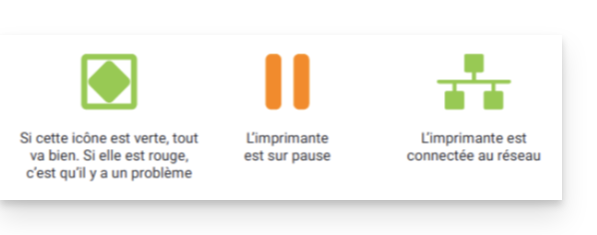
- Press the "Pause" button. There will be two green lights on:
Printing tickets with the printer
Format verification
The printers are already configured for the ordered ticket format. If necessary, it is possible to verify the configuration by opening the menu in the top left corner and under Options. The Cinema ticket format option should only be activated if the tickets will use this format (see below for calibration when changing the format).
Printing a ticket
To start printing, you need to log in to the ticketing account from the tablet using the Infomaniak account ID and password. The tablet will automatically connect to the ticket booth interface.
- Perform a "test" command or use a command in the "Order" menu.
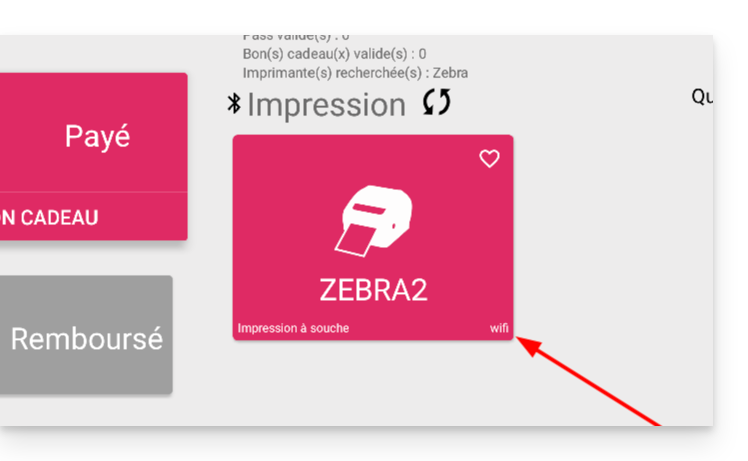
- The printer should appear (ZEBRAXX) on the right side of the tablet.
- Press the printer icon to start printing:
Set the correct ticket on the printer
This section is only for people who have a stock of tickets ordered before July 2024…
Since July 2024, Infomaniak has provided tickets with new separators in the form of a notch. If you still have old types of tickets, please watch the video below to correctly set up your tickets:
Find out more
Link to this FAQ:
Has this FAQ been helpful?