Knowledge base
1000 FAQs, 500 tutorials and instructional videos. Here, there are only solutions!
Export Infomaniak Web Contacts app contacts
This guide explains how to save and export your contacts from the Infomaniak Web app Contacts address books (online service ksuite.infomaniak.com/contacts).
Preamble
- It is not possible to export an Organization Directory.
- Exporting generates a file of type vCard with the .vcf extension.
Export contacts
To select the contacts or address book to export:
- Click here to access the Infomaniak Web app Contacts (online service ksuite.infomaniak.com/contacts).
- Click on the chevron to expand the Advanced Actions section.
- Click on the Export menu.
- Click on the address book to export.
- Click on the Export button:
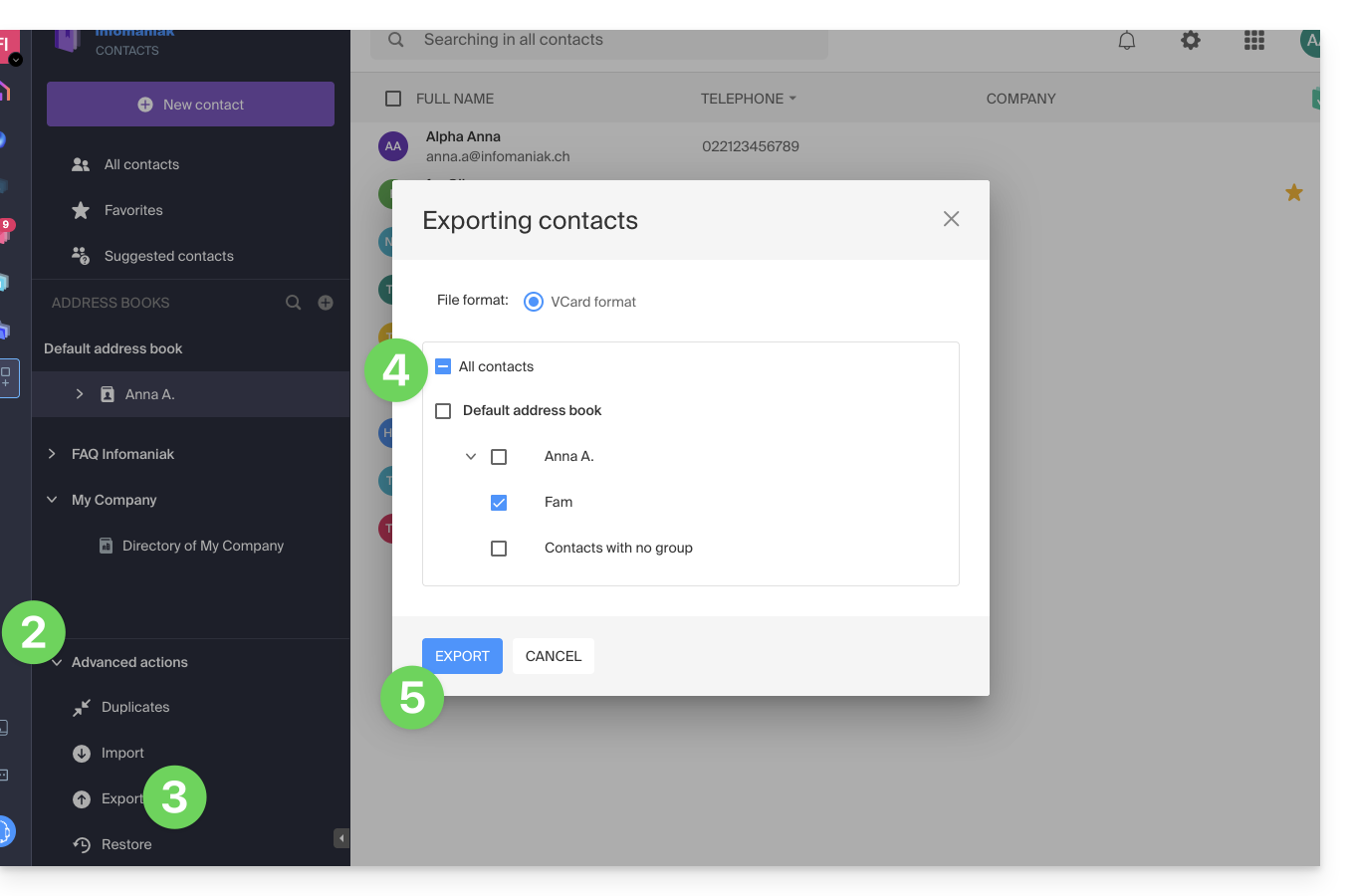
- Choose the location on your device where to save the vCard file with your contacts.
You can then open it in macOS Contacts or any compatible application.
Link to this FAQ:
Has this FAQ been helpful?