Knowledge base
1000 FAQs, 500 tutorials and instructional videos. Here, there are only solutions!
Edit an existing my kSuite offer
This guide explains how to upgrade your my kSuite offer and switch to a paid offer my kSuite+ to, for example, increase your maximum storage size. You will keep the email address created when you subscribed to the free offer.
Preamble
- To help you identify the most suitable my kSuite / kSuite offer for your needs, refer to this other guide.
- Refer to this other guide regarding the limitations specific to the my kSuite offer and the advantages of the my kSuite+ offer.
- You are not required to switch to my kSuite+ to add services: refer to this other guide regarding Organizations.
Switch to my kSuite+
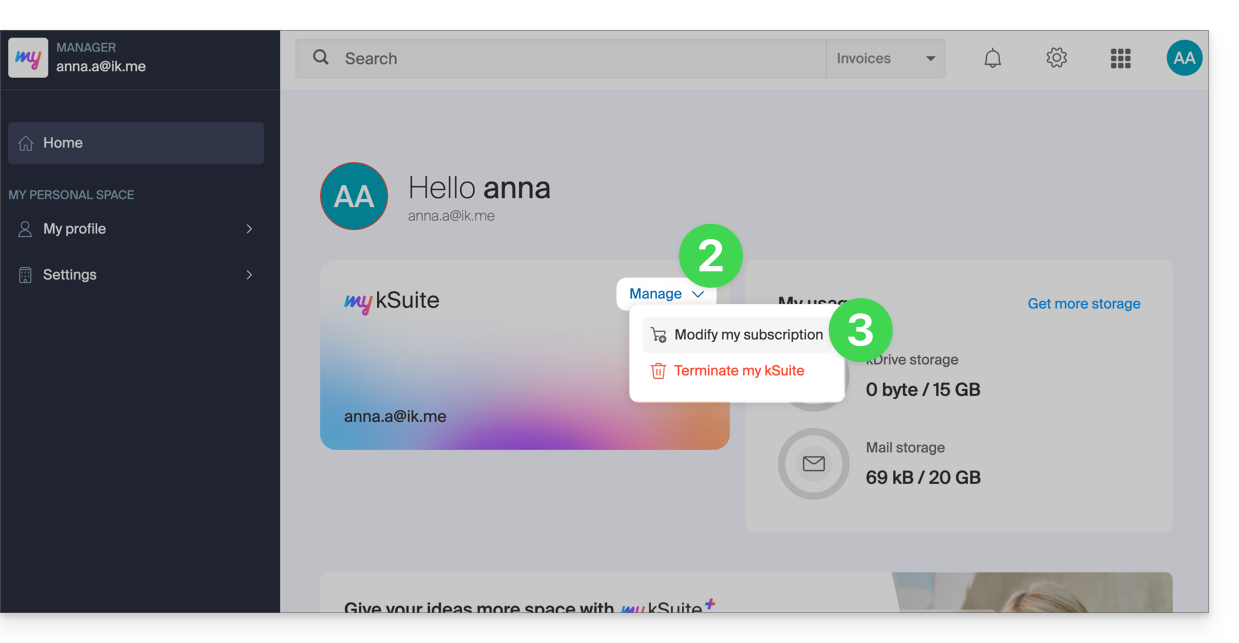
To access your current my kSuite offer and switch to a higher offer:
- Click here to access the Manager of your my kSuite offer.
- Click on the chevron to the right of Manage.
- Choose Modify my offer to convert the free offer to a paid and more comprehensive offer:
Order a new kDrive
There is no limit to the number of kDrive (paid) you can add to your Infomaniak account. Order a new kDrive if necessary.
Link to this FAQ: https://faq.infomaniak.com/2496
Has this FAQ been helpful?