Knowledge base
1000 FAQs, 500 tutorials and instructional videos. Here, there are only solutions!
Use Euria on kChat (summarize a discussion)
This guide allows you to quickly discover the essential functions of Euria, the artificial intelligence at your disposal within kSuite, particularly powerful for summarizing discussions on the app kChat.
Preamble
- Euria can help you perform all kinds of calculations, translations, provide information on various subjects, and answer your questions.
- Refer to this other guide regarding the model used and the responsibilities of each party.
- As soon as a new user is added, they receive a welcome message from Euria.
- Refer to this other guide regarding the possibilities of discussion with the AI in kChat.
Automatically summarize a kChat message
To get the summary of a kChat message:
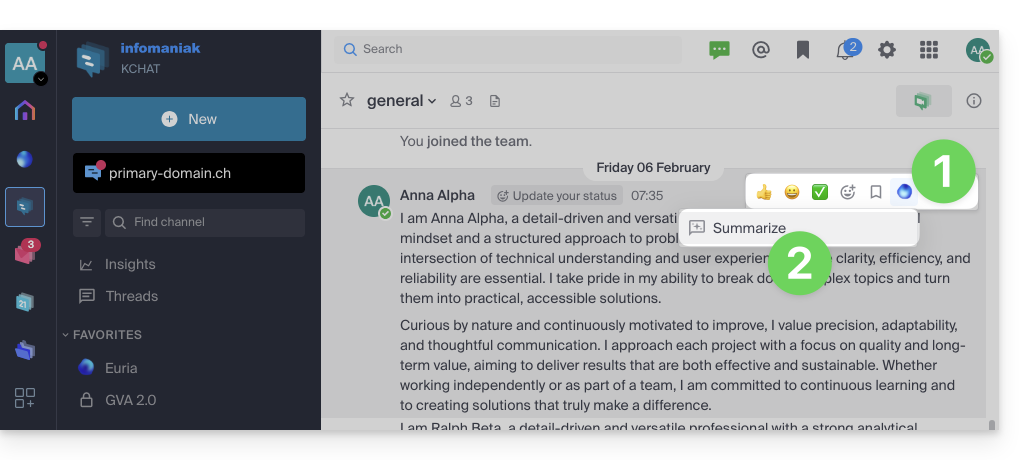
- Hover over the message and select the Euria actions icon in the top right.
- Click on Summarize the discussion thread:
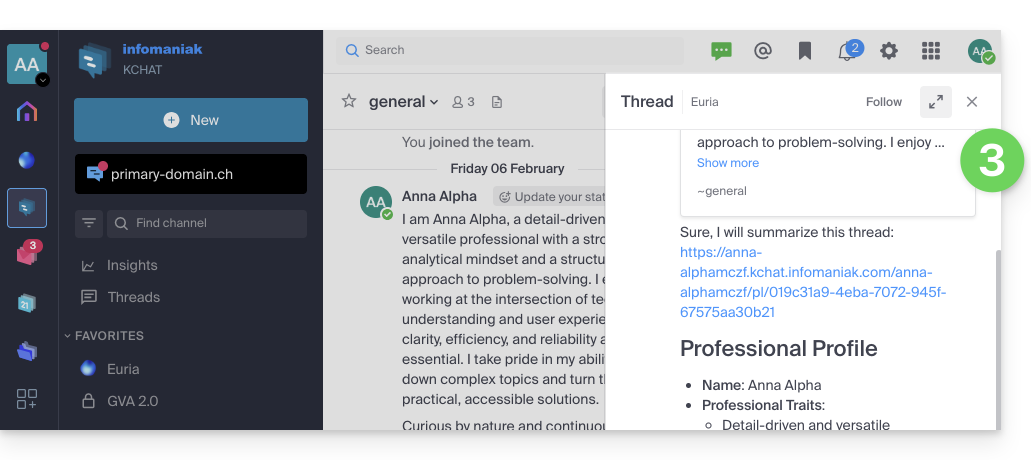
- Get the summary, generated by Euria in the right sidebar:
Link to this FAQ: https://faq.infomaniak.com/2480
Has this FAQ been helpful?