Knowledge base
1000 FAQs, 500 tutorials and instructional videos. Here, there are only solutions!
Manage cookies & JavaScript in web browsers
Update 06/18/2026
This guide explains how to enable cookies and JavaScript in the main web browsers.
Introduction
- Enabling cookies allows websites to identify you and remember your preferences, such as your preferred language or the items you have added to your shopping cart.
- Enabling JavaScript allows websites to be more interactive and dynamic, and offers features such as video playback or game creation.
- Some websites (including mobile applications) may not function correctly if cookies or JavaScript in the device's native browser are disabled.
- You can also choose to enable cookies and/or JavaScript only for certain websites.
Managing Cookies and JavaScript
The exact location of the options for enabling cookies and JavaScript may vary slightly from one browser version to another.
Click to view the corresponding guides:
| Browser | Enable or disable cookies | Enable or disable JavaScript |
|---|---|---|
Chrome | ||
Firefox | ||
Edge | ||
Safari |
Troubleshooting a Login Issue with an Infomaniak App
If you encounter a login window like the one below, for example with the mobile app Infomaniak Mail (application for iOS smartphones or tablets) on iPhone: 
- Open the Advanced settings in Safari on your mobile device.
- Temporarily disable the toggle switch that blocks all cookies:
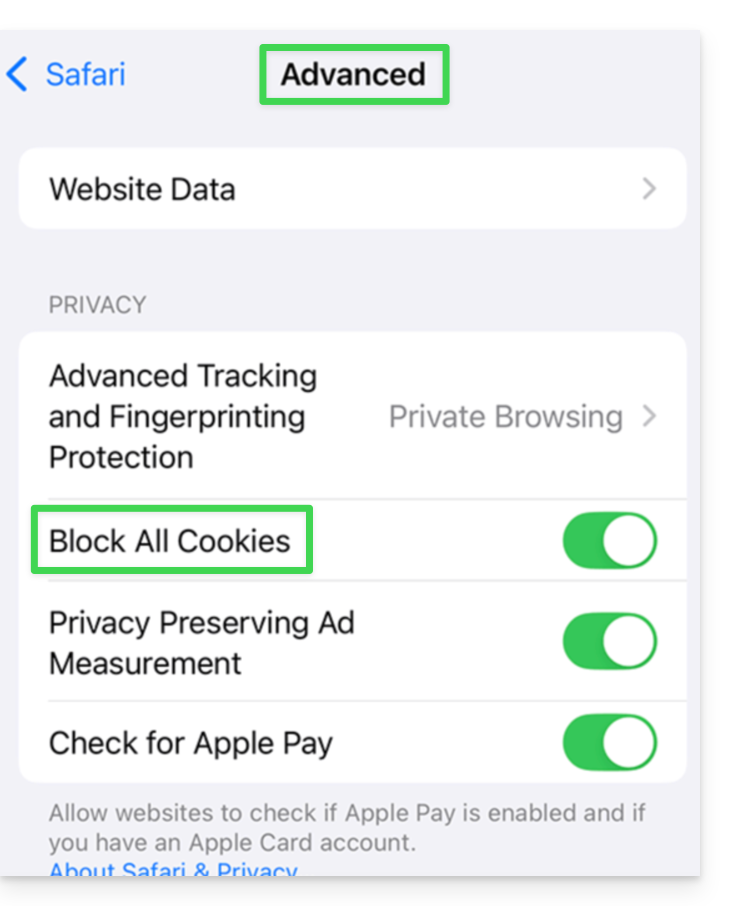
- This will allow you to display the entire login window and log in; you can always re-enable cookie blocking after logging in if you wish.
Link to this FAQ: https://faq.infomaniak.com/2457
Has this FAQ been helpful?