Knowledge base
1000 FAQs, 500 tutorials and instructional videos. Here, there are only solutions!
Connect to kDrive via WebDAV
This guide provides instructions for connecting to kDrive using the WebDAV connection protocol.
Use the WebDAV protocol on kDrive for specific and occasional cases: if you want to work on your files and share them, kDrive is the ideal tool. However, to secure your data against loss or corruption and ensure the continuity of your activity, Swiss Backup is the essential and suitable solution.
✘ UNAVAILABLE with
kSuite free / kSuite Standard
my kSuite / my kSuite+ (ik.me, etik.com, ikmail.com)
Obtain the identifier (kDrive ID)
To find out your kDrive identifier:
- Click here to access the Infomaniak kDrive Web app (online service ksuite.infomaniak.com/kdrive).
- The kDrive directory structure is displayed in the left sidebar menu.
- The URL
https://ksuite.infomaniak.com/34567/kdrive/app/drive/123456/files/56789orhttps://ksuite.infomaniak.com/all/kdrive/app/drive/123456/displayed at the top of your browser contains a number: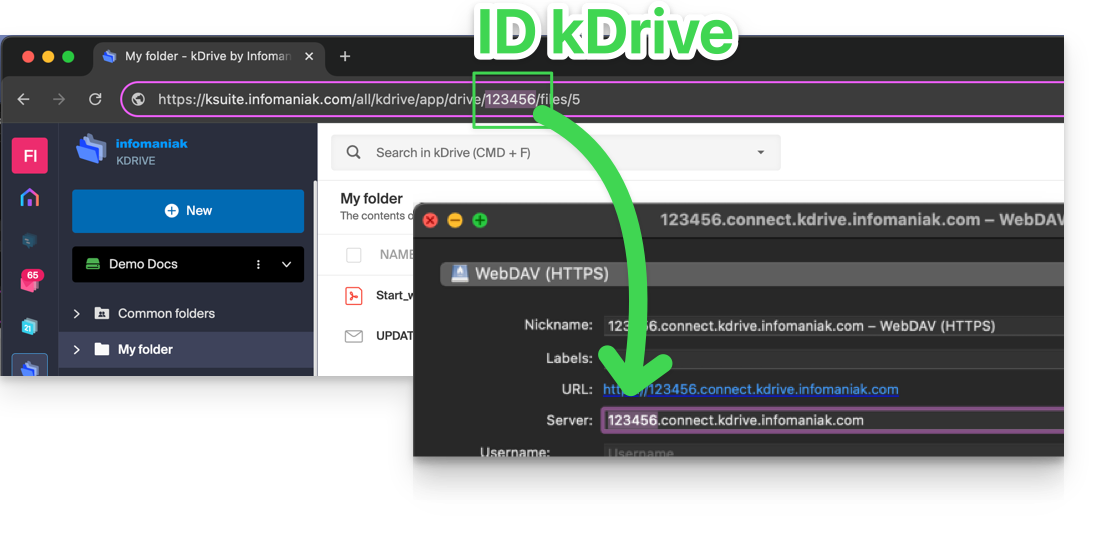
- In some cases, especially when the Organization ID is mentioned in the URL, there may be several series of numbers, but the principle remains the same, you need to take the number displayed after the term “/drive/”:
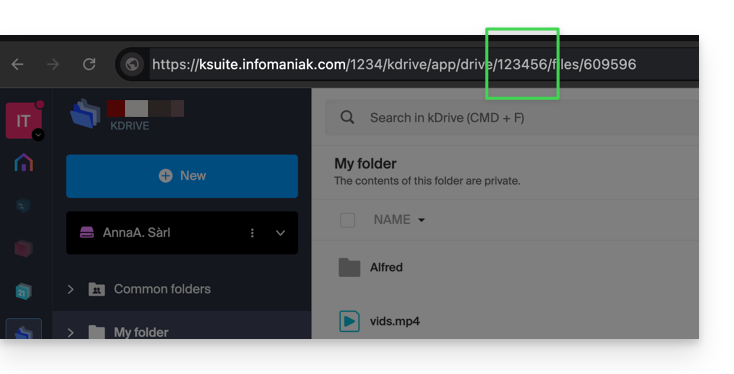
This number (in the example 123456) is your kDrive identifier (IDkDrive).
You will therefore need to write https://IDkDrive.connect.kdrive.infomaniak.com whenever necessary (https://123456.connect.kdrive.infomaniak.com for example as a WebDAV address).
Direct WebDAV connection URL to a specific folder
To facilitate direct connection via WebDAV to a specific folder, you can use the following URL (replacing 123456 as above):
https://12345.connect.kdrive.infomaniak.com/Common documents/folder-nameThis simple method allows you to quickly access the desired folder without manually navigating the directory structure. You just need to replace « folder-name » with the exact name of the targeted folder to establish a direct and secure connection via WebDAV.
Specific WebDAV guides
Examples of WebDAV synchronization:
Link to this FAQ:
Has this FAQ been helpful?