Knowledge base
1000 FAQs, 500 tutorials and instructional videos. Here, there are only solutions!
Discover DynDNS with an Infomaniak domain
This guide explains how to set up a dynamic DNS record (Dynamic DNS, DDNS) for a domain name whose DNS zone is managed at Infomaniak. This free alternative to Dyn and DynHost is very useful if you want to access devices connected to the Internet from the outside whose IP address is dynamic (e.g., a NAS, a surveillance camera, an Internet router/box/home automation, etc.).
Prerequisites
- The DNS zone of the domain name must be managed at Infomaniak.
- If necessary, transfer your domains to Infomaniak.
- Your device or application must support dynamic DNS records.
Specific guides
The following guides allow you to link a domain name with:
- … a Synology NAS
- … a Qnap NAS
- … Zyxel / Sunrise Internet Box / TP-Link solutions
- … a UniFI device
- … Swisscom Internet Box
- … Fritzbox
- … Jeedom
- … Linux via ddclient
- … potentially anything thanks to the API…
The various services offered by Infomaniak are all compatible with the corresponding standard protocols (CalDAV/CardDAV for contacts & calendars for example), therefore if you encounter a problem with third-party software, contact its publisher or a Partner and consult the support policy as well as article 11.9 of the Infomaniak Terms of Service.
Guides for any other use
To create a dynamic DNS on your domain:
- Click here to access the management of your domain on the Infomaniak Manager (need help?).
- Click directly on the name assigned to the domain concerned.
- Click on Dynamic DNS in the left sidebar menu.
- Click on the blue button Add a Dynamic DNS.
- Enter the necessary information:
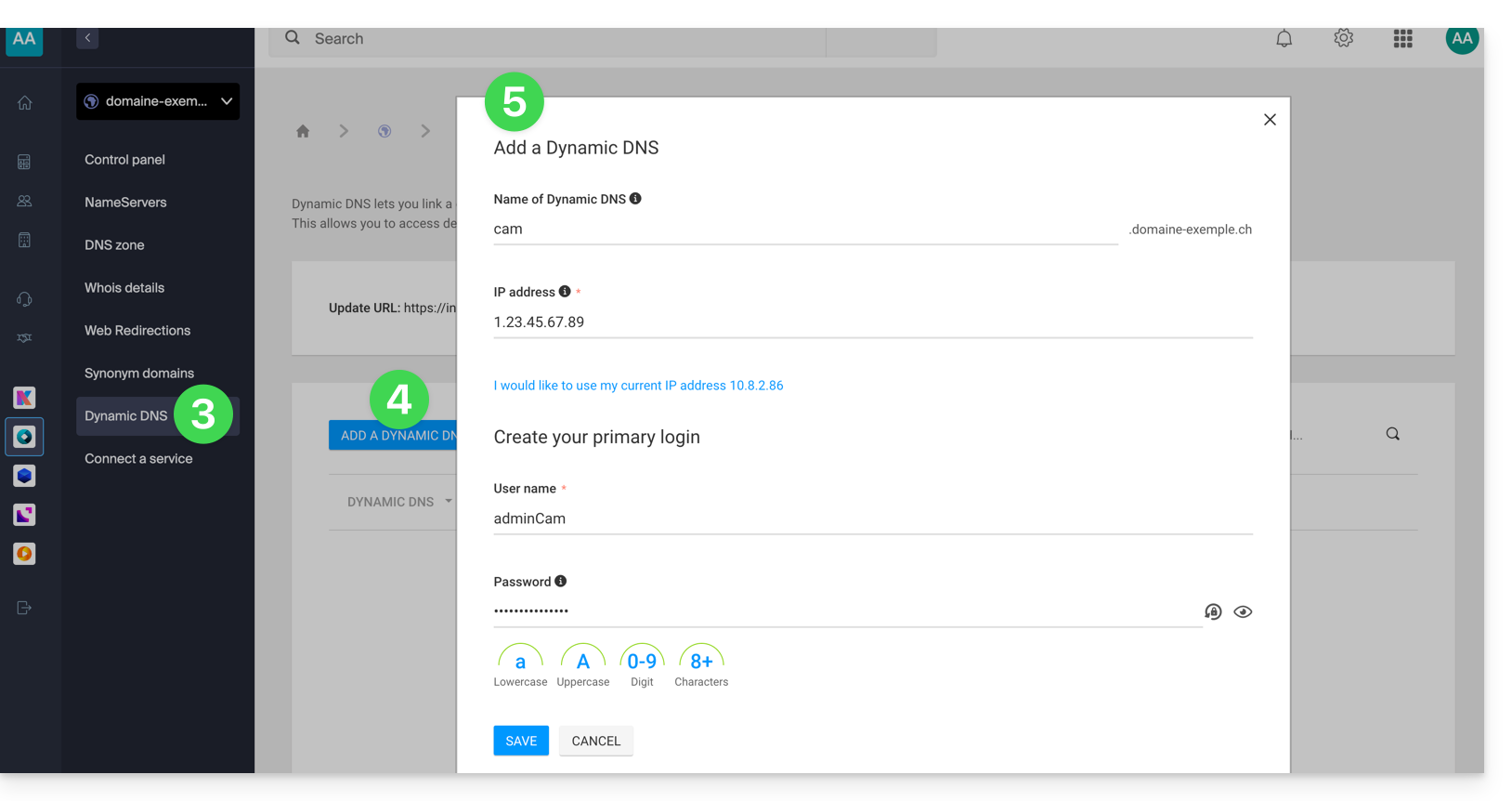
- Choose the desired subdomain or leave the Dynamic DNS Name field empty to use the main domain.
- Provide an IP address; this will then be dynamically updated by your device/app.
- Set up a username / password pair (uppercase, lowercase + numbers, no special characters); the latter will need to be entered in the configuration of your device/app.
Link to this FAQ:
Has this FAQ been helpful?