Knowledge base
1000 FAQs, 500 tutorials and instructional videos. Here, there are only solutions!
Discover the Manager, the Infomaniak administration interface
This guide explains how the Infomaniak service administration interface named Manager https://manager.infomaniak.com works.
Preamble
- The Manager is the Infomaniak interface that allows you to manage your various Infomaniak products, such as domain names, hosting, as well as the administrative, billing part, etc.
Ordering a product = creating an account
If you do not yet have any products with Infomaniak, during the ordering process, you will be invited to create an account (with a login identifier) and an Organization is automatically created on this occasion.
For an individual, the name of the Organization will generally be composed of their first and last name, while for a company, it is generally the name or the company's legal name.
Once the Organization is created by this first user, it is possible…
1. Other users can have…
- … all rights and therefore be administrator of the Organization
- … limited rights (access to specific products)
- … with or without billing rights
2. Other Organizations can…
- … contain other products unrelated to other Organizations
- … have their own users who will not have access to other Organizations
The concept of Organization is particularly interesting for people who need to manage multiple products for different clients. Imagine, for example, that a webmaster is required to administer the products of 3 different companies, each having its own Organization containing their respective products. By adding the webmaster or the partner as an administrator of their Organization, the latter can easily switch from one account (Organization) to another to manage the different products of the 3 companies without having to log in and out each time. Indeed, they will use a unique login identifier.
Navigate and access your products
There are several ways to access your products, for example, the list of your hostings (where your sites are located), once you are logged in.
Can't find your products?
If you are on an interface where your hosting products are not displayed, you are probably on my kSuite; click on the icon at the top right of the interface to switch between the my kSuite apps (Mail for example) and the Manager:
If you still can't find them, check the currently displayed Organization...
Navigate within the Infomaniak Manager
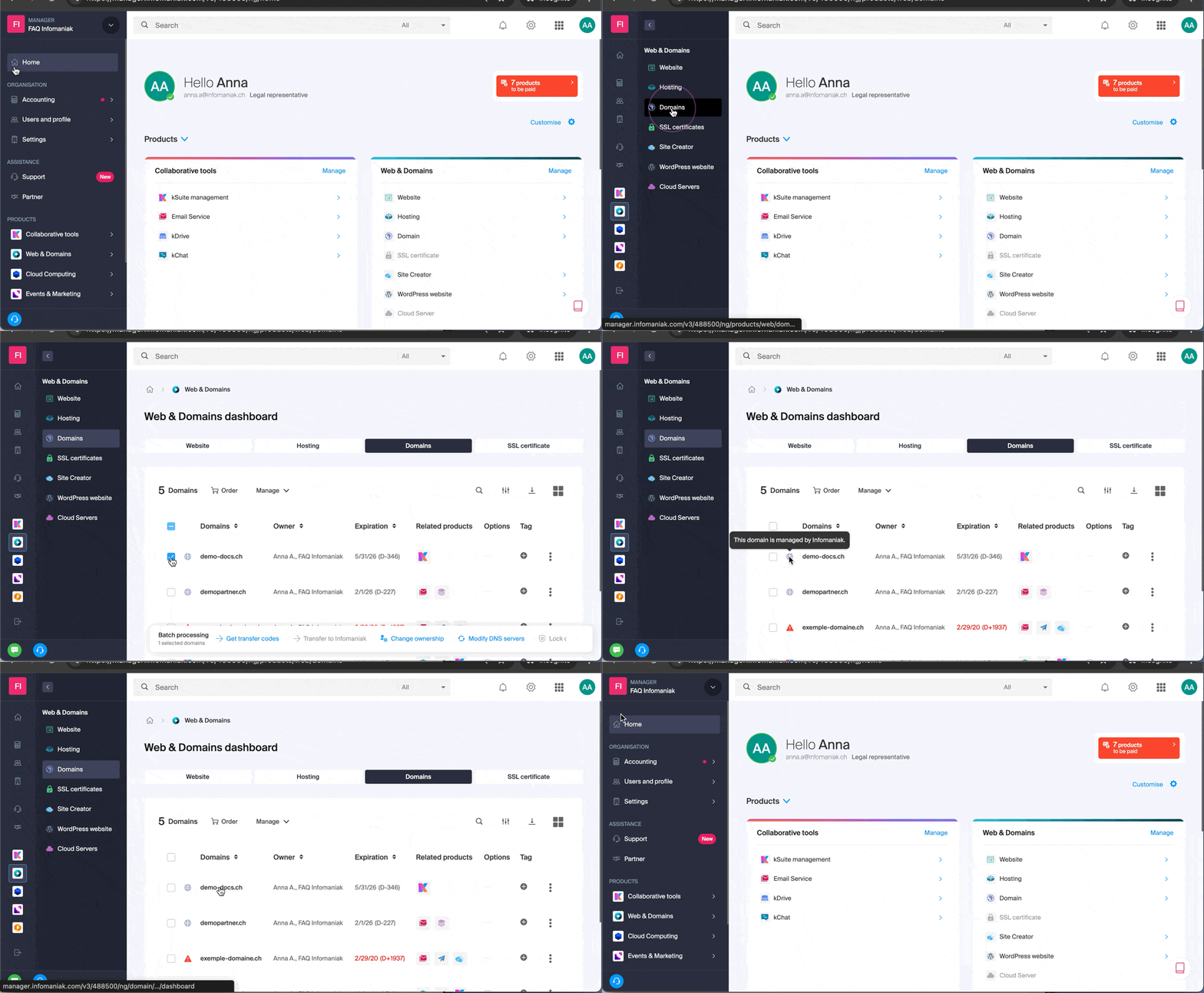
You can navigate using the left sidebar by clicking on Web and Domain then on Hosting:

You can also click in the center of the homepage on Hosting (under Web and Domain):

Another way is available in the FAQs: simply click on the link (example) indicated in the guide to go directly to the type of product concerned.
All you have to do is click on the name assigned to your product (for example domain.xyz when you arrive on the page for managing your domain names).
View the online tutorial
Click on the icon at the bottom right to get the visual guide again, presenting you with the main sections of the Manager:
Resolve a problem on the Manager
Unable to log in?
Refer to this other guide.
Is the product you are looking for grayed out or invisible?
You are probably not in the correct Organization or user account if your usual products are not visible. Check and change the Organization (if your user allows it) or log in again to a completely different user account.
A mouse click does not load the desired page?
Do not click in the product selection boxes otherwise nothing will happen (except for the selection for a possible batch operation) but directly on the name assigned to the product concerned:
Is the desired operation not possible or grayed out?
Your user may no longer have sufficient rights within the Organization. Try to find out more with this other guide (or this one if it concerns actions at the email level).
Link to this FAQ: https://faq.infomaniak.com/1990
Has this FAQ been helpful?