Knowledge base
1000 FAQs, 500 tutorials and instructional videos. Here, there are only solutions!
Display another Organization in the Manager
Update 03/23/2026
This guide explains how to switch from one Organization to another from your Infomaniak Manager when you belong to multiple Organizations.
Preamble
- Since you opened your account with Infomaniak, you are part of at least one Organization.
- If you were alone and it was not an invitation, an Organization was created in your name and you automatically become the legal manager.
- Otherwise, you belong to the Organization that invited you (to join its kSuite, to manage a product, etc.).
- You can leave Organizations.
- It is quite possible to access multiple Organizations from the same login credentials and to switch quickly from one to the other.
Switch to one of the other Organizations
To switch to another Organization among those you belong to:
- Click here to access the management of your products (Infomaniak Manager).
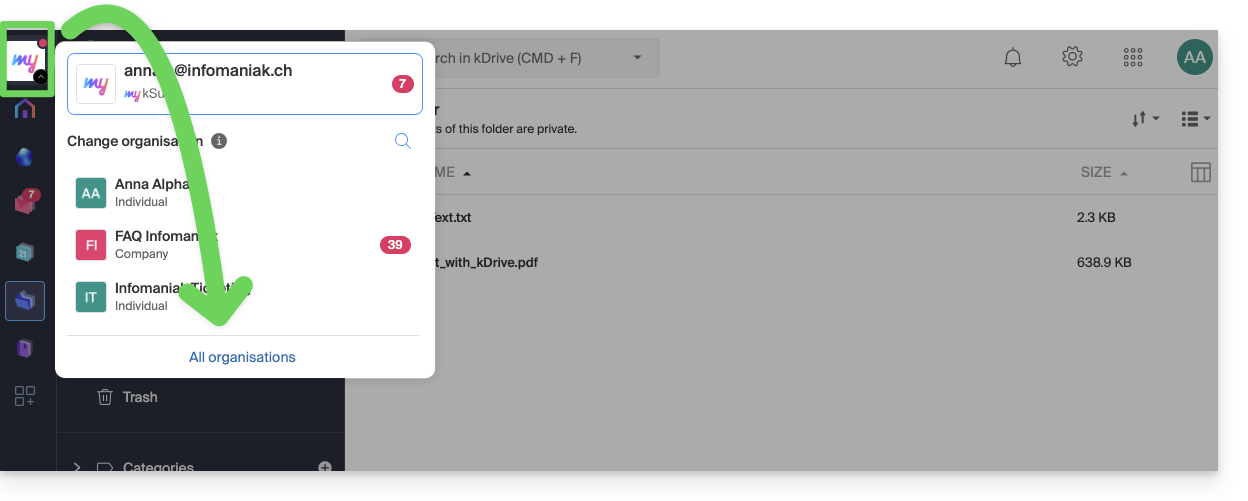
- Click on the chevron at the top left of the Manager interface.
- Click on the Organization you want to access (or display them all to access all the kDrive / email addresses you are attached to).
- The Organization change is immediate, you are automatically switched:
Link to this FAQ:
Has this FAQ been helpful?