Knowledge base
1000 FAQs, 500 tutorials and instructional videos. Here, there are only solutions!
Add a DNS zone (for external domain)
This guide explains how to order a DNS zone from Infomaniak.
Preamble
- Having the DNS zone with Infomaniak is useful if your domain name is registered elsewhere (third-party provider/registrar) and you want to easily link this domain with Infomaniak products.
- Indeed, it is not enough to own a site
domain.xyzwith Infomaniak and to indicate the 2 Infomaniak DNS addresses with the domain name registrar (if it is not Infomaniak) for the site to display when you typedomain.xyzin a browser. - You must add a DNS zone in the same place as the hosting to make the site work easily.
- This will also be particularly useful if the service provider managing your domain name does not offer DNS zone management.
Order a DNS zone
To do this:
- Click here to access the Infomaniak domain Shop.
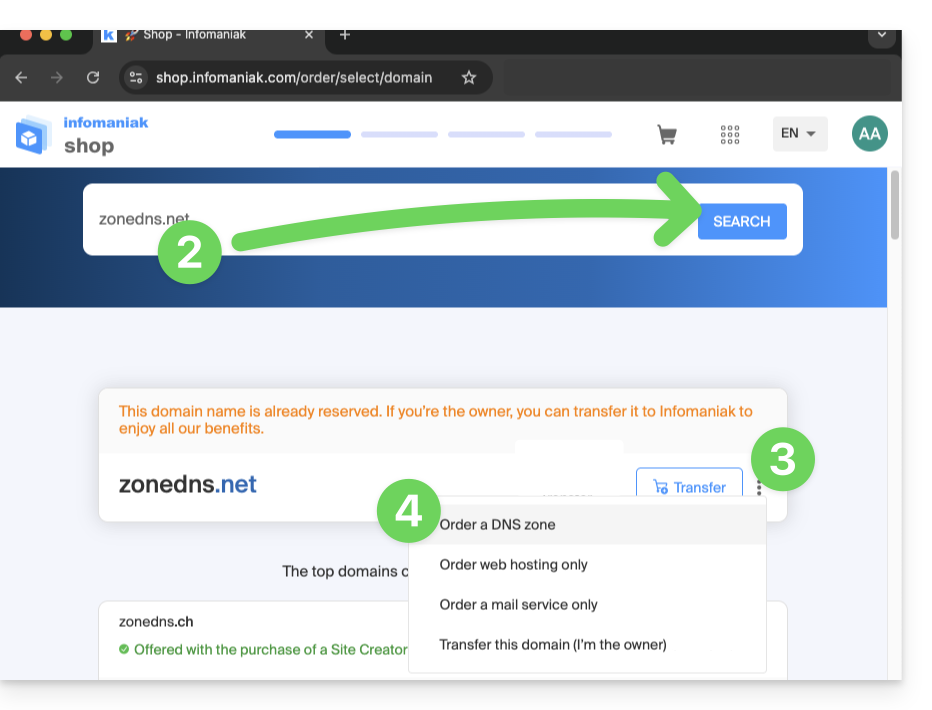
- Start a search with the name of the domain registered elsewhere.
- Click on the action menu ⋮ located to the right of the result obtained.
- Select Order a DNS zone:
- Complete the purchase.
- Once added to your Manager, the zone can be edited.
Link to this FAQ: https://faq.infomaniak.com/1914
Has this FAQ been helpful?