Knowledge base
1000 FAQs, 500 tutorials and instructional videos. Here, there are only solutions!
Restore contacts in Infomaniak Contacts
Update 06/23/2026
This guide explains how to restore accidentally deleted contacts in the Infomaniak Contacts web app address books (online service ksuite.infomaniak.com/contacts).
Backup Retention Period
Once a backup of your address book's complete state has been created, Infomaniak makes it available to you for a certain number of days, depending on your plan.
⚠ Retention period in days:
| kSuite | Free | 0 |
| Standard | 30 | |
| Business | 30 | |
| Enterprise | 30 | |
| my kSuite | 0 | |
| my kSuite+ | 30 | |
| Mail Service | Starter 1 address max. | 0 |
| Premium 5 addresses min. | 30 |
By upgrading a free plan, it will be possible to recover the backup for up to 30 days.
Restoring Contacts
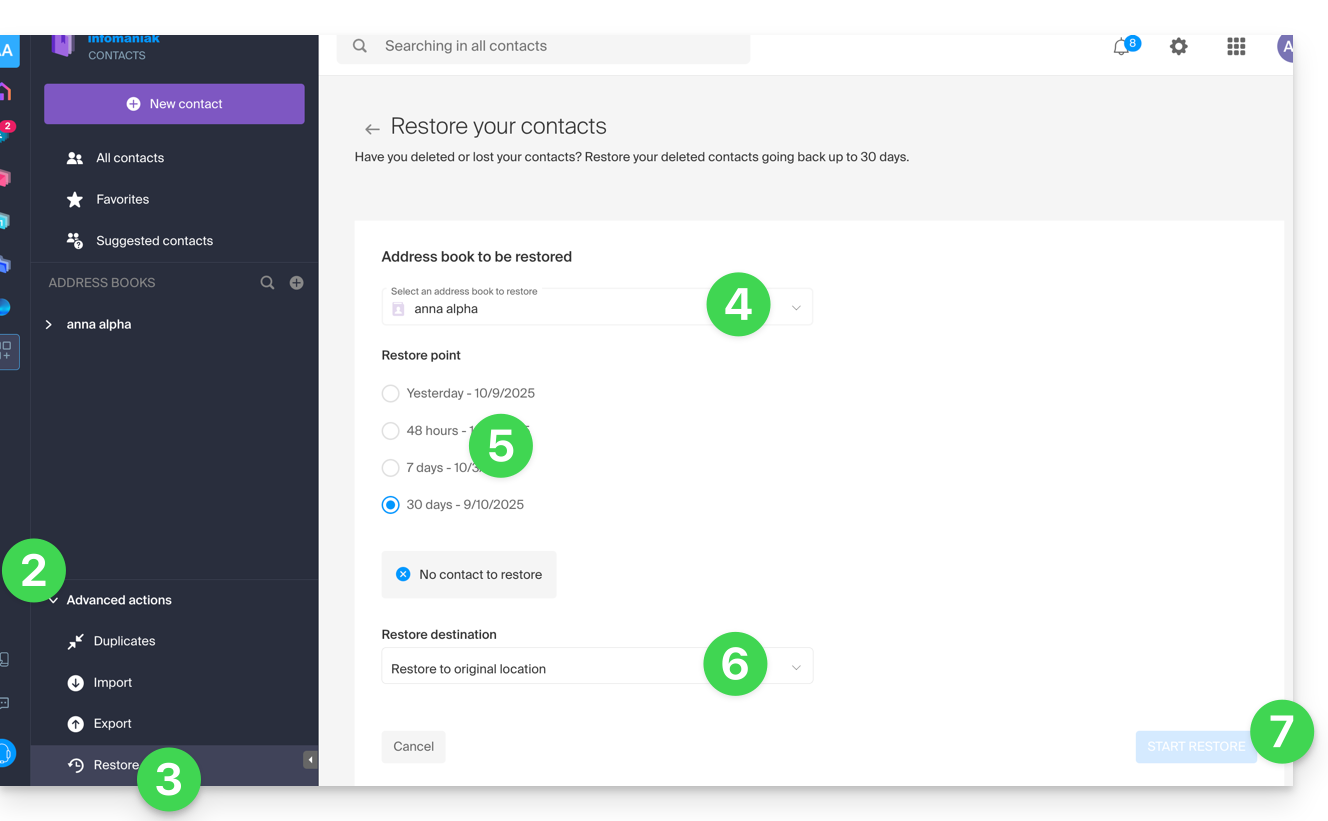
It is possible to recover deleted contacts from the last 24 hours, 48 hours, 7 days, or 30 days:
- Click here to access the Infomaniak Contacts web app (online service ksuite.infomaniak.com/contacts).
- Click on the chevron to expand the Advanced Actions section.
- Click on Restore.
- Choose the address book to restore.
- Choose the version from yesterday, 48 hours ago, or 7 and 30 days ago.
- Choose the destination (in the original location or in another address book if available).
- Start the restoration using the button at the bottom of the page, which becomes active if contacts can be restored:
Link to this FAQ: https://faq.infomaniak.com/1741
Has this FAQ been helpful?