Knowledge base
1000 FAQs, 500 tutorials and instructional videos. Here, there are only solutions!
Restore contacts from the Contacts Web app
Update 06/04/2026
This guide explains how to restore contacts accidentally deleted from address books in the Infomaniak Web app Contacts (online service ksuite.infomaniak.com/contacts).
Backup retention period
Once a full backup of your address book has been made, Infomaniak makes it available to you for a certain number of days depending on your offer.
⚠ Retention period in days:
| kSuite | Free | 0 |
| Standard | 30 | |
| Business | 30 | |
| Enterprise | 30 | |
| my kSuite | 0 | |
| my kSuite+ | 30 | |
| Mail Service | Starter 1 max. address | 0 |
| Premium 5 min. addresses | 30 |
By upgrading a free offer, it will be possible to recover the backup up to 30 days.
Restoring contacts
It is possible to recover contacts deleted in the last 24 hours, 48 hours, 7 days or 30 days:
- Click here to access the Infomaniak Web app Contacts (online service ksuite.infomaniak.com/contacts).
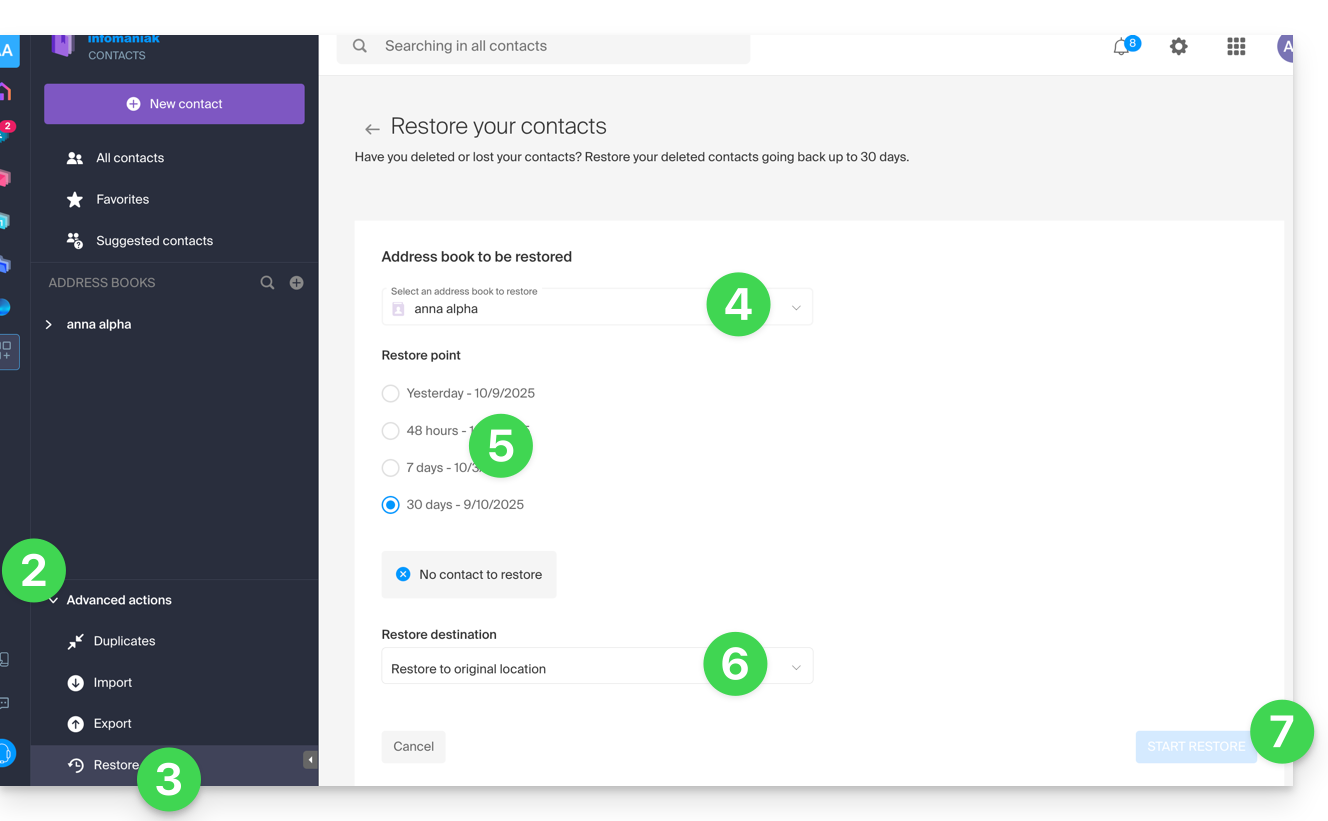
- Click on the chevron to expand the Advanced Actions section.
- Click on Restore.
- Select the address book to restore.
- Select the version from yesterday, 48 hours or 7 and 30 days ago.
- Select the destination (in the original location or in another address book if available).
- Start the restoration using the button at the bottom of the page that activates if contacts can be restored:
Link to this FAQ: https://faq.infomaniak.com/1741
Has this FAQ been helpful?