Knowledge base
1000 FAQs, 500 tutorials and instructional videos. Here, there are only solutions!
Download an email from the Infomaniak Web Mail app
This guide explains how to download an e-mail from the Infomaniak Web app Mail (online service ksuite.infomaniak.com/mail) to obtain a file in .eml format on your hard drive, compatible with all email software/clients.
It is not possible to reproduce this operation on the Infomaniak Mail mobile app (application for iOS/Android smartphone or tablet) but take note of the alternatives proposed at the end of this guide.
Download an e-mail
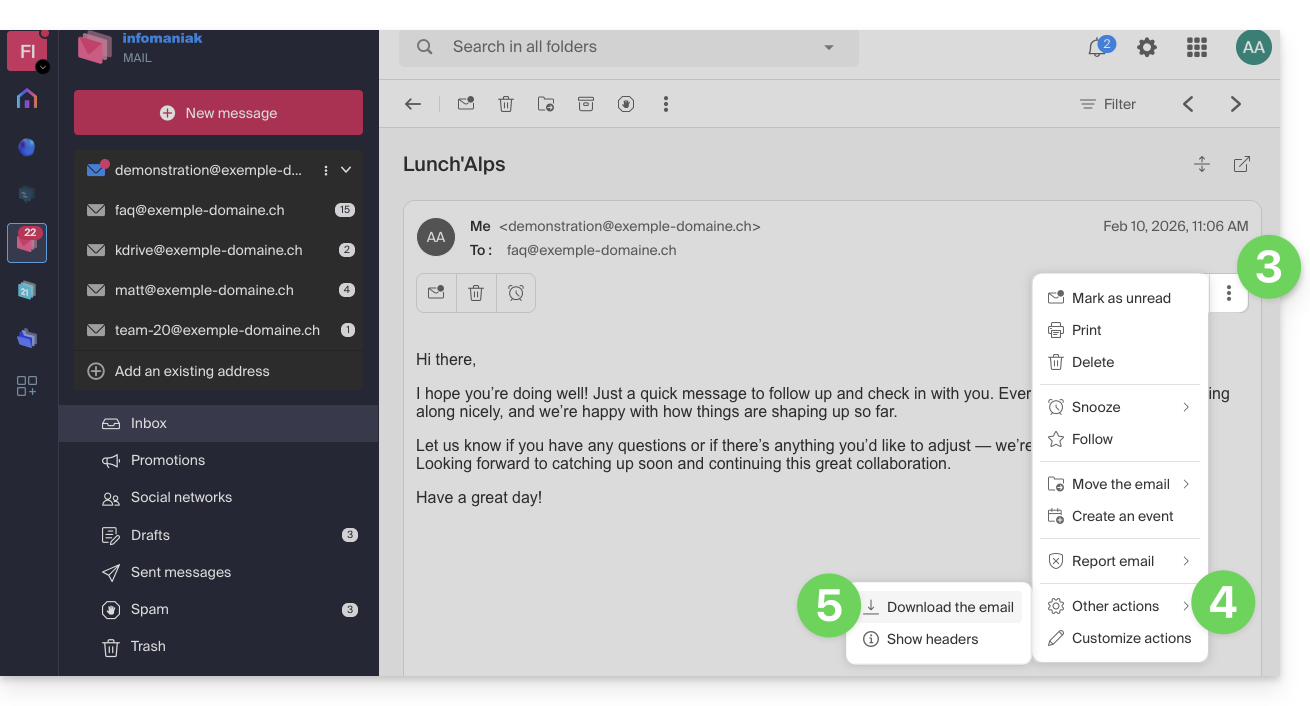
To save an e-mail from the Infomaniak Web app Mail (online service ksuite.infomaniak.com/mail):
- Click here to access the Infomaniak Web app Mail (online service ksuite.infomaniak.com/mail).
- Open the message to download.
- Click on the action menu ⋮ to the right of the open e-mail.
- Click on Other actions.
- Select Download:
4 alternatives
- The Save as... function of an email software/client such as Thunderbird allows you to achieve the same result:
- Open the Thunderbird software.
- In the inbox, right-click on the message to save.
- Choose the location to save the
.emlfile.
- To print the message and choose PDF from the available printers, refer to this other guide.
- To download the message to kDrive, refer to this other guide.
- To share it publicly using a simple shortcut to it, refer to this other guide.
Link to this FAQ: https://faq.infomaniak.com/1718
Has this FAQ been helpful?