Knowledge base
1000 FAQs, 500 tutorials and instructional videos. Here, there are only solutions!
Restore deleted events in the Infomaniak Web Calendar app
This guide explains how to retrieve events, tasks, unavailability, and time slots accidentally deleted in one of your calendars/agendas in the Infomaniak Web app Calendar (online service ksuite.infomaniak.com/calendar for managing your events and appointments).
✘ UNAVAILABLE with
kSuite free
my kSuite (ik.me, etik.com, ikmail.com)
Mail Service Starter
By upgrading one of these free offers, it will be possible to recover the backup up to 30 days.
Calendar/agenda restoration
Backup retention period
Restore points are performed every day. Once a backup of the complete state of your calendar has been made, Infomaniak makes it available to you for 30 days.
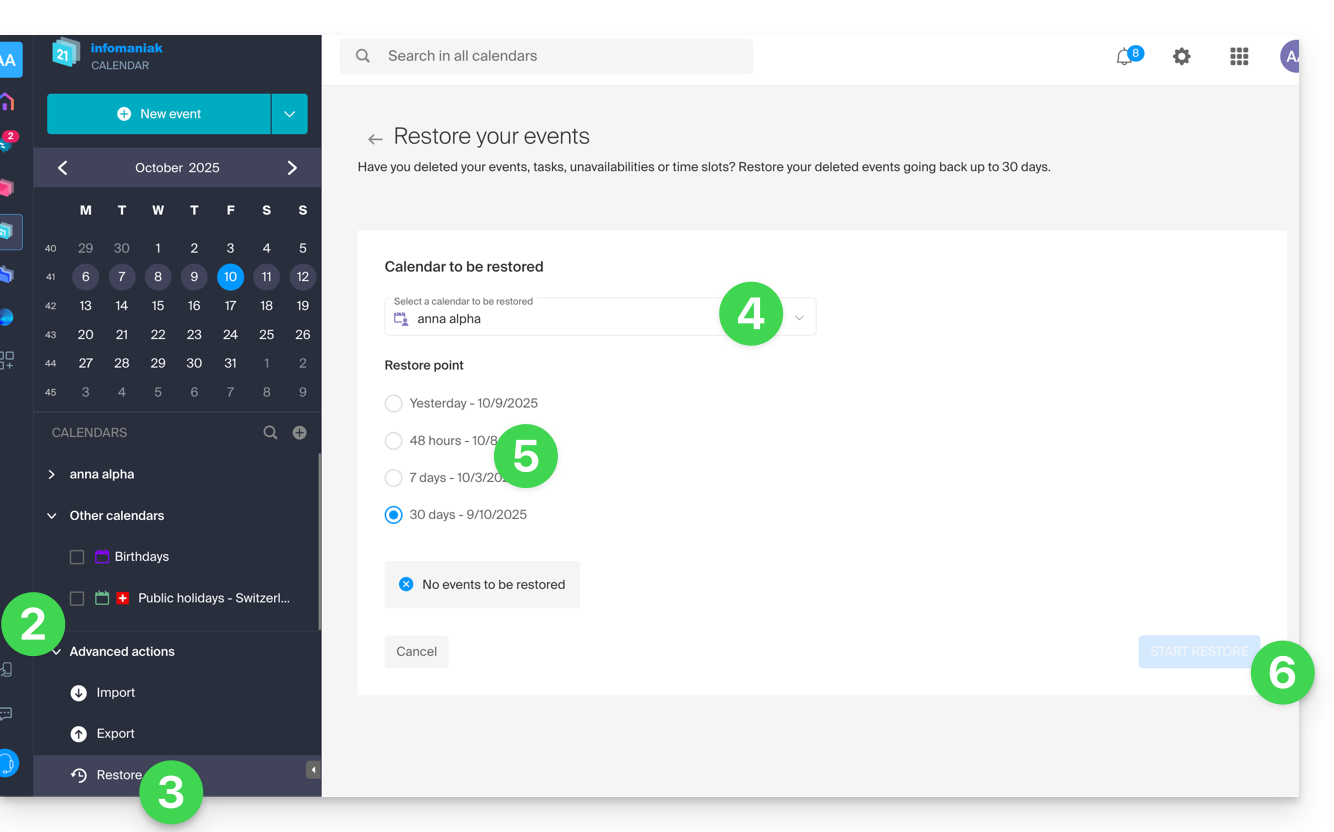
If events can be restored, then you can go back to the point 24 hours, 48 hours, 7 days, and 30 days ago:
- Click here to access the Infomaniak Web app Calendar (online service ksuite.infomaniak.com/calendar).
- Click on Advanced actions from the left sidebar.
- Select Restore.
- Choose the calendar to restore.
- Choose the desired version (1/2/7/30 days).
- Start the restoration using the button at the bottom of the page that activates if events can be restored:
Link to this FAQ:
Has this FAQ been helpful?