Knowledge base
1000 FAQs, 500 tutorials and instructional videos. Here, there are only solutions!
Understanding the roles and rights of users in an Organization
This guide details the different roles, rights, permissions, and privileges that users can obtain within an Infomaniak Organization.
Roles and administrative contact preferences
You can define the permissions (access rights to products, for example) as well as the administrative contact preferenceswhen adding a user, or later.
Define the roles of a new user
When you add a new user to an Organization, you must define their role and set their preferences at the administrative level: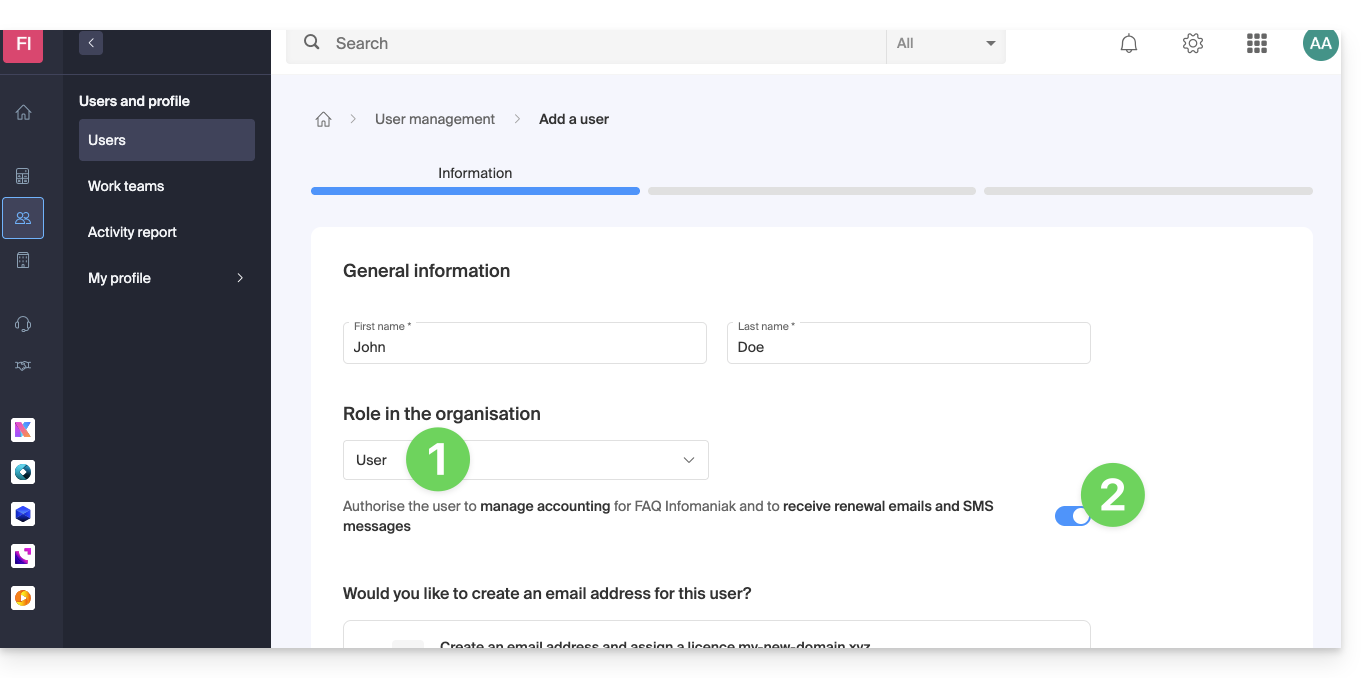
1. Possible roles within the Organization
- Legal Representative (all rights + legal responsibility (if you are considering replacing your role as legal representative))
- Legal responsibility for the organization
- Can manage all products and users
- Can manage accounting and new product orders
- Can manage all clients
- Administrator (all rights)
- Can manage all products and users
- Can manage accounting and new product orders
- Can manage all clients
- User (limited rights, collaborator)
- Can manage the products you authorize
- Can manage accounting if you authorize it
- Can manage the clients you authorize
2. Administrative permissions
Decide if you want to “allow receiving (email / SMS) billing reminders” so all communications, such as:
- New invoice
- Payment made to the account
- Payment received
- Order cancelled
- Automatic renewal scheduled
- Renewal completed
- PayPal transfer in your favor
- etc.
and if the “User” role should also be able to manage accounting.
Link to this FAQ: https://faq.infomaniak.com/1440
Has this FAQ been helpful?