Knowledge base
1000 FAQs, 500 tutorials and instructional videos. Here, there are only solutions!
Create a catch-all email address
This guide explains how to create a "catchall" type email address on a Service Mail.
✘ UNAVAILABLE with
kSuite free
my kSuite / my kSuite+
Service Mail Starter
Preamble
- A "catchall" type email address retrieves all emails sent to non-existent email addresses on the domain.
- This is ideal if you want to receive all messages for which there is no specific address on your domain.
- This type of address cannot be used to send emails.
- If you configure the "Automatic Reply" (out-of-office message) function on a catchall@ address, no automatic reply will be sent to senders who contacted a non-existent address on your domain.
- This restriction notably avoids reply loops and the sending of unwanted messages.
- Also, take note of the important recommendations at the end of this guide.
Create a catchall address
Prerequisites
- Have a Service Mail on your Infomaniak Manager.
- Have a quota of available free addresses or adjust it in advance if necessary.
Then, the administrator of a Service Mail creates a new generic email address:
- Click here to access the management of your product on the Infomaniak Manager (need help?).
- Click directly on the name assigned to the product concerned.
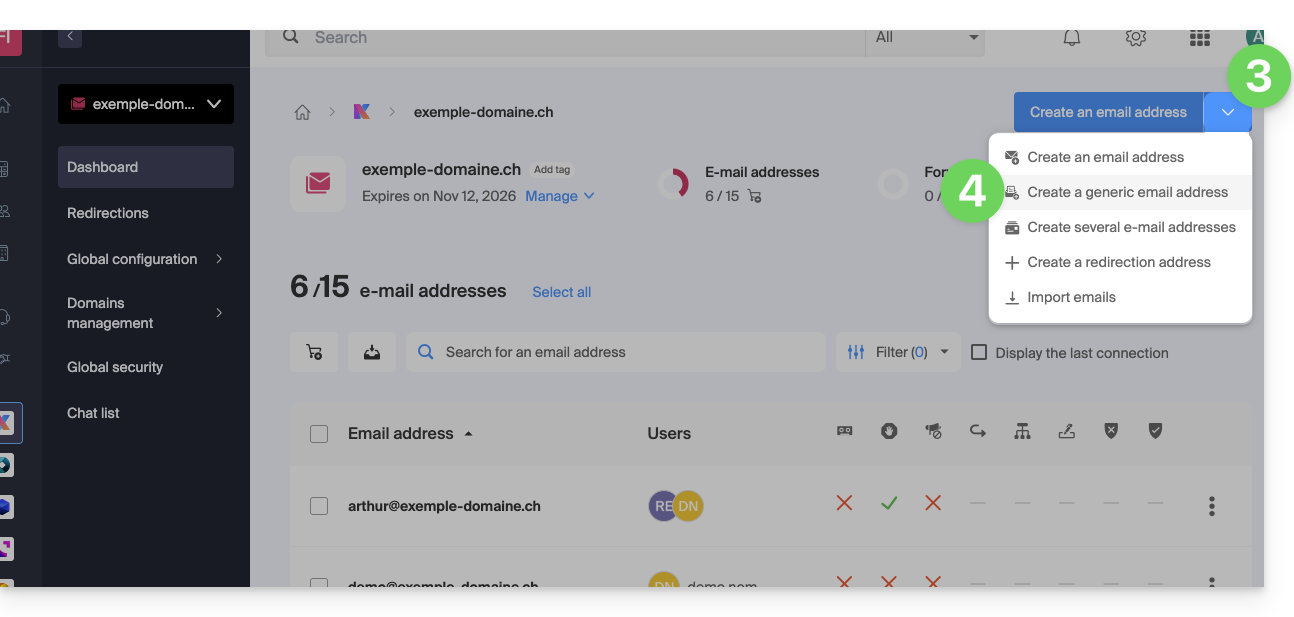
- Click on the chevron to the right of the blue button Create an email address.
- Click on Create a generic email address:
- Choose Catchall.
- Click on Continue:
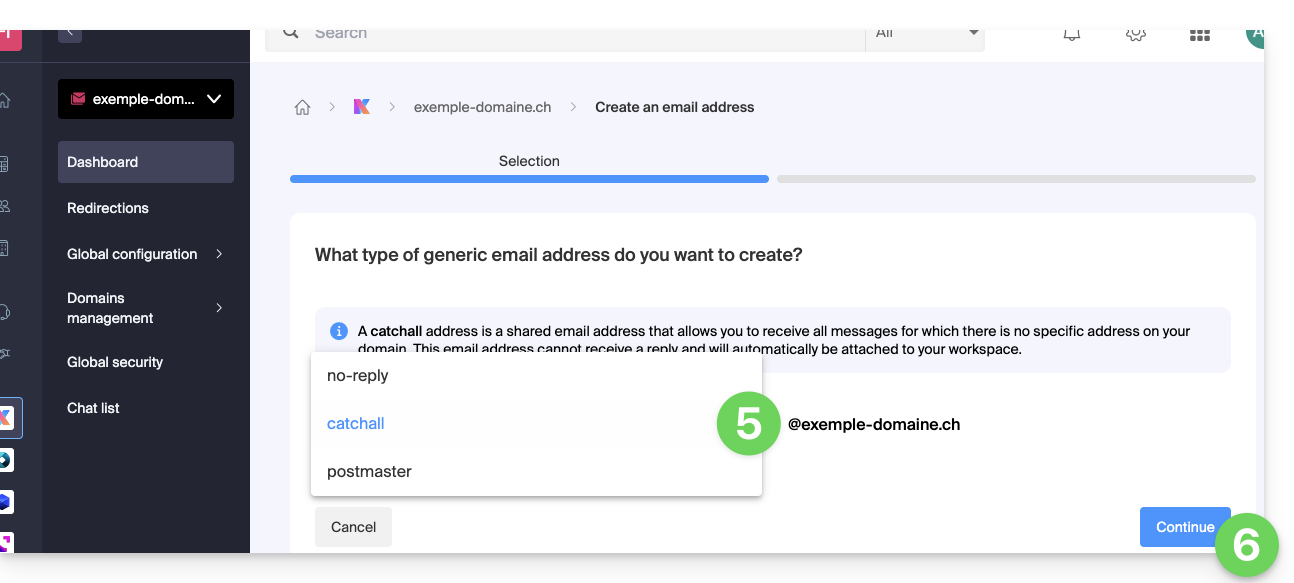
Once the catchall address is created, it is automatically visible on your Infomaniak Mail web app.
To use it elsewhere, you just need to add a password for your devices/users.
Example of use
Once the address catchall created:
- You are using the email address
jonnie.smith@domain.xyzwhich works and exists on the Mail Servicedomain.xyz.- You have also created an address
catchall@domain.xyzon the Mail Servicedomain.xyz.
- You have also created an address
- An email is sent to
smith.johnny@domain.xyzbecause the sender misspelled the recipient's address. - The email will still arrive in the
catchall@domain.xyzbox which is enough to consult in the Mail interface of your choice. - Same if you delete the address
jonnie.smith@domain.xyzone day; if you keep thecatchalladdress, then it is the latter that will receive everything that is still addressed to the non-existent address...
Important recommendations
Creating this type of account is not recommended:
- Catchall addresses receive all emails sent to any domain address; this means they are often flooded with spam, which can be difficult to manage and filter.
- Due to the high volume of spam, legitimate messages can be drowned out and lost in the mass, which can result in the loss of important communications.
- Catchall addresses can potentially be used by attackers to target your domain with brute force attacks or other methods, as they provide an easy target for testing different address combinations.
In short, managing a catchall address can become tedious and complicated, especially for large organizations with many employees and departments.
Link to this FAQ: https://faq.infomaniak.com/126
Has this FAQ been helpful?