Base de conhecimento
1000 perguntas frequentes, 500 tutoriais e vídeos explicativos. Aqui, você encontra apenas soluções!
Este guia permite resolver eventuais problemas na ativação da sua licença Windows Server.
Introdução
- Informe-se sobre eventuais problemas em curso em https://infomaniakstatus.com/.
- Especificamente para Public Cloud, a lista de manutenções programadas e problemas em curso pode ser encontrada em https://status.infomaniak.cloud/.
Modificar a chave registada
Abra o utilitário Executar (tecla logotipo do Windows + R).
Remover a chave registada
Execute o seguinte comando:
cscript.exe c:\windows\system32\slmgr.vbs -upk
Adicionar uma nova chave
Reinicie o utilitário Executar e execute o seguinte comando:
cscript.exe c:\windows\system32\slmgr.vbs -ipk {CHAVE/KEY}substituindo {CLE/KEY} pela chave da sua configuração abaixo:
| Sistema operacional | Chave KMS |
|---|---|
| Windows Server 2019 Datacenter | WMDGN-G9PQG-XVVXX-R3X43-63DFG |
| Windows Server 2019 Standard | N69G4-B89J2-4G8F4-WWYCC-J464C |
| Windows Server 2022 Datacenter | WX4NM-KYWYW-QJJR4-XV3QB-6VM33 |
| Windows Server 2022 Standard | VDYBN-27WPP-V4HQT-9VMD4-VMK7H |
| Windows Server 2025 Standard | TVRH6-WHNXV-R9WG3-9XRFY-MY832 |
| Windows Server 2025 Datacenter | D764K-2NDRG-47T6Q-P8T8W-YP6DF |
Ativar o Windows
Reinicie o utilitário Executar e, em seguida, execute o seguinte comando para associar a chave ao robô de ativação Infomaniak:
cscript.exe c:\windows\system32\slmgr.vbs -skms kms.infomaniak.cloudReinicie o utilitário Executar e, em seguida, execute o seguinte comando para ativar o seu sistema Windows:
cscript.exe c:\windows\system32\slmgr.vbs -atoLink para esta FAQ: https://faq.infomaniak.com/267
Esta seção de perguntas frequentes foi útil?
Este guia explica os procedimentos para remover e devolver os recursos quando um produto de Cloud Público é cancelado.
Remoção e devolução de recursos no Cloud Público
Recomenda-se exportar e eliminar manualmente todos os recursos antes de cancelar o produto.
Quando é efetuado um cancelamento voluntário, os recursos associados à Cloud Pública são progressivamente desativados e, em seguida, eliminados.
Os recursos DNS do tipo DNSaaS (Designate) são removidos imediatamente após a rescisão.
Os demais recursos são desativados em todas as regiões da nuvem pública:
- desativação de utilizadores e projetos;
- impossibilidade de aceder aos recursos restantes;
- desativação dos recursos ainda expostos:
- Buckets S3 e contêineres Swift (Armazenamento de Objetos);
- instâncias de computação desligadas;
- saída automática do modo de pausa antes do desligamento das instâncias;
- saída automática do modo de recuperação antes do desligamento das instâncias;
- desativação dos balanceadores de carga (LBaaS);
- desativação das orquestrações e alarmes (Heat).
Os recursos não expostos não são modificados imediatamente, nomeadamente:
- volumes;
- imagens;
- cópias de segurança;
- imagens instantâneas;
- chaves públicas;
- redes privadas;
- segredos.
Prazo de retenção dos ativos
Com exceção dos recursos DNS, os ativos são mantidos por um período de 7 dias após o cancelamento.
No 7º dia, às 3h da manhã, todos os recursos restantes são definitivamente excluídos, sem possibilidade de restauração.
Restituição de ativos após o cancelamento
Após o cancelamento do produto, um pedido de restituição pode ser efetuado dentro de um prazo máximo de 3 dias corridos.
Este pedido requer:
- uma subscrição ativa a um produto de Cloud Público;
- uma situação de faturação em dia;
- o cumprimento das condições contratuais aplicáveis.
Desde que os dados ainda estejam disponíveis nas infraestruturas de armazenamento, os serviços suspensos poderão ser reativados num prazo máximo de 4 dias após a validação do pedido.
As instâncias paradas não são reiniciadas automaticamente. No entanto, podem ser reiniciadas manualmente, se necessário.
A exportação dos seus dados é da sua responsabilidade.
Link para esta FAQ: https://faq.infomaniak.com/1052
Esta seção de perguntas frequentes foi útil?
Este guia explica como transferir uma instância para outra máquina física dentro da Public Cloud Infomaniak.
Introdução
- Esta operação pode ser realizada a qualquer momento e apresenta várias vantagens:
- antecipar ou evitar uma manutenção programada;
- distribuir a carga entre vários servidores;
- melhorar a estabilidade ou o desempenho de uma instância.
Migrar a instância para outra máquina física…
… desde o Horizon
- Clique aqui para acessar o gerenciamento do seu produto no Manager Infomaniak (precisa de ajuda?).
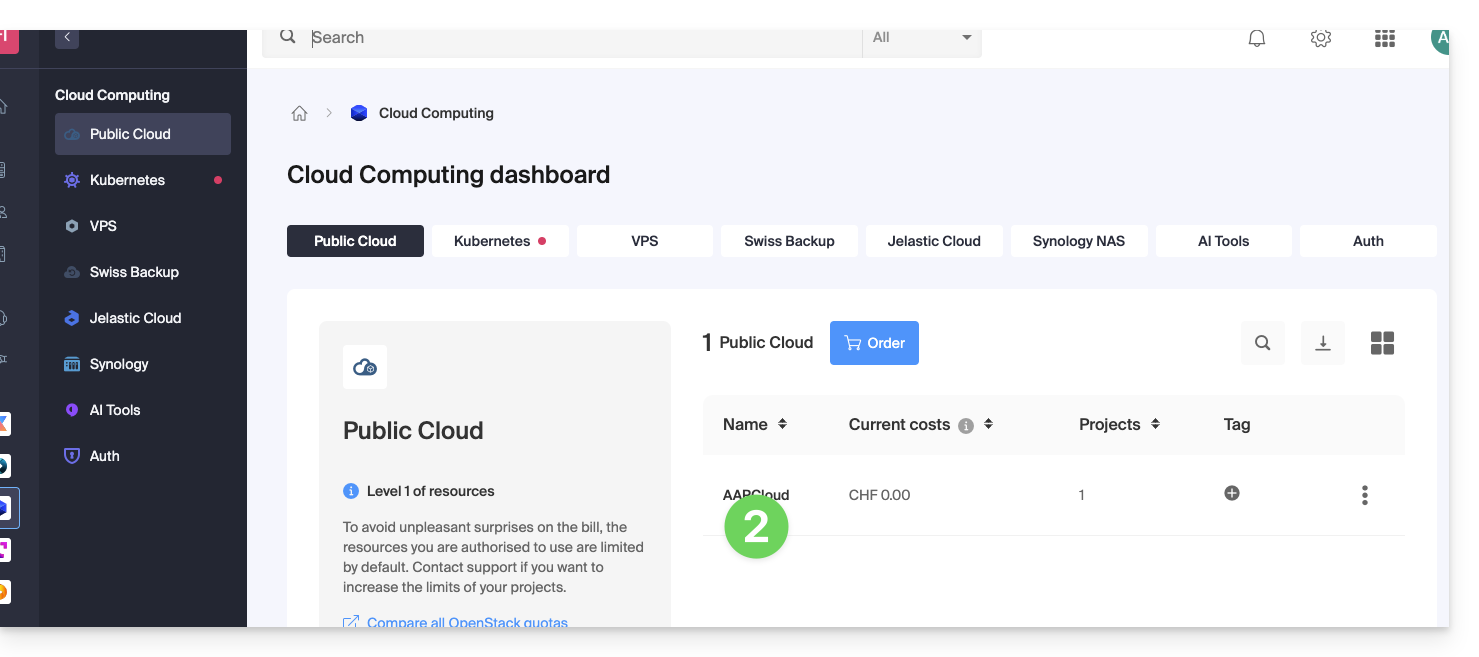
- Clique diretamente no nome atribuído ao produto em questão:
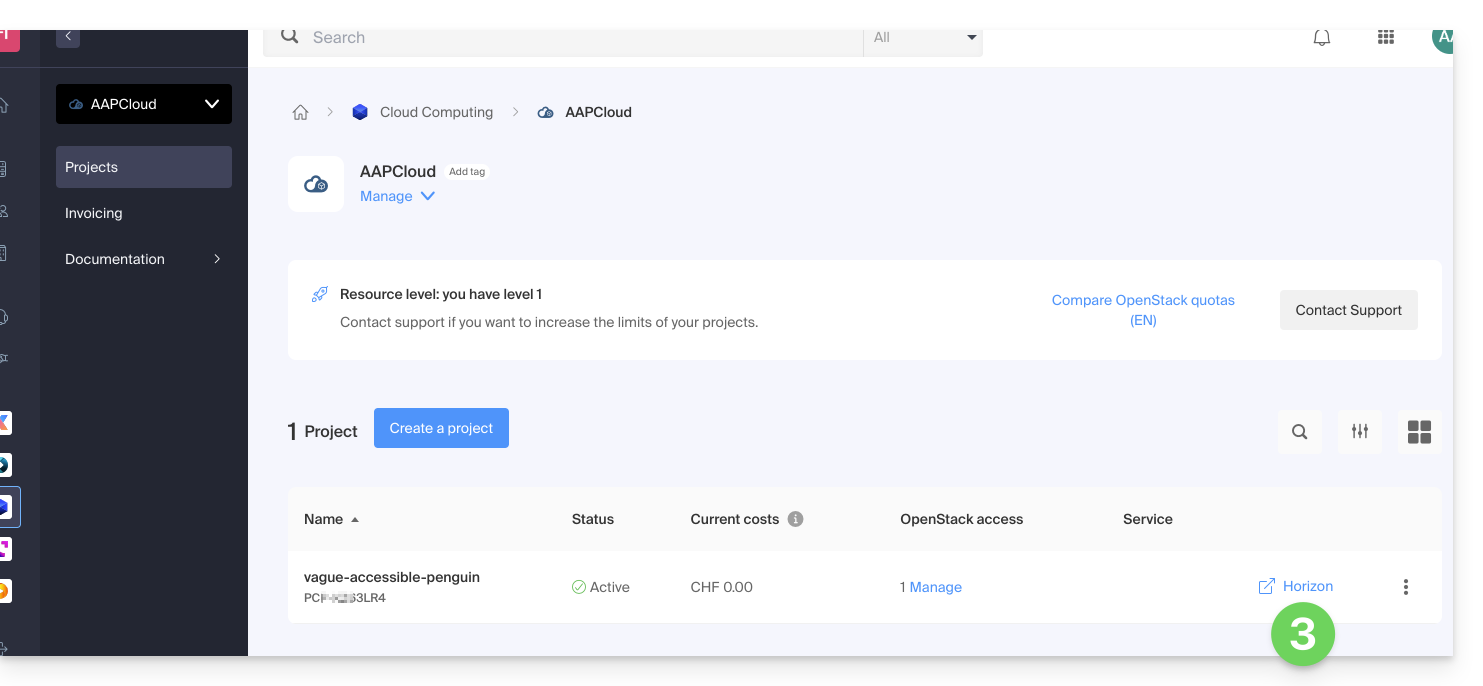
- Clique no atalho Horizon para se conectar:
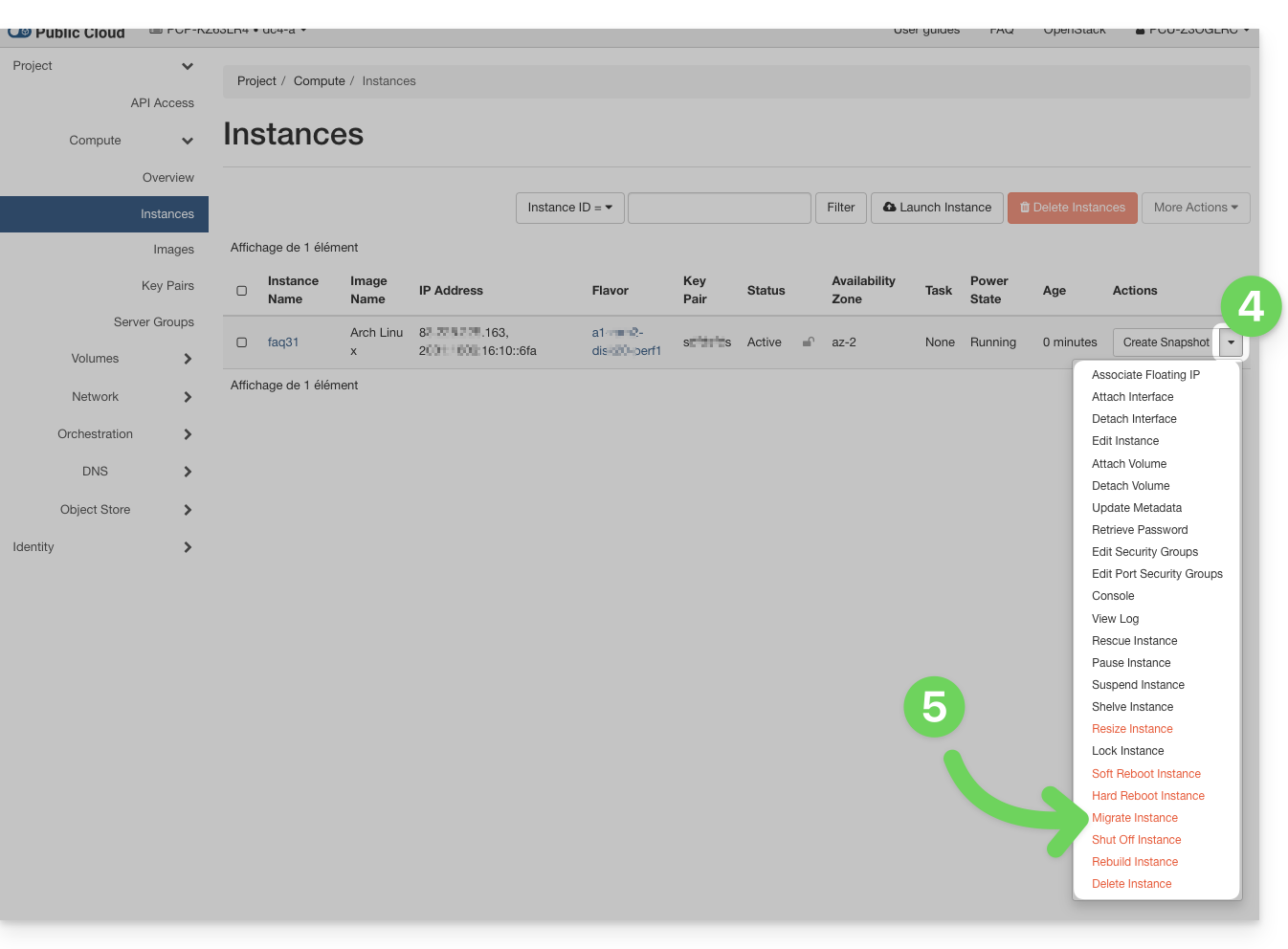
- No menu Instâncias, clique no menu de ação ⋮, à direita da instância que pretende transferir.
- Clique em Transferir uma instância (Migrate):
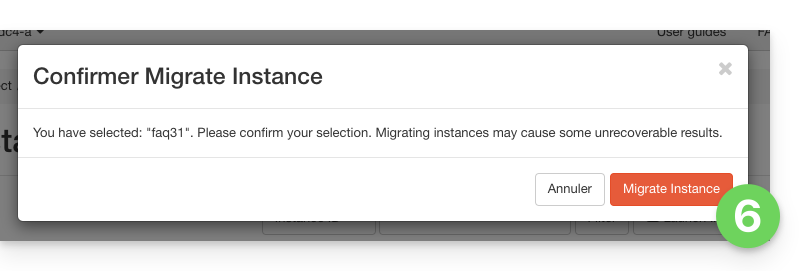
- Confirme a transferência:
- Verifique o status atual e aguarde alguns minutos:
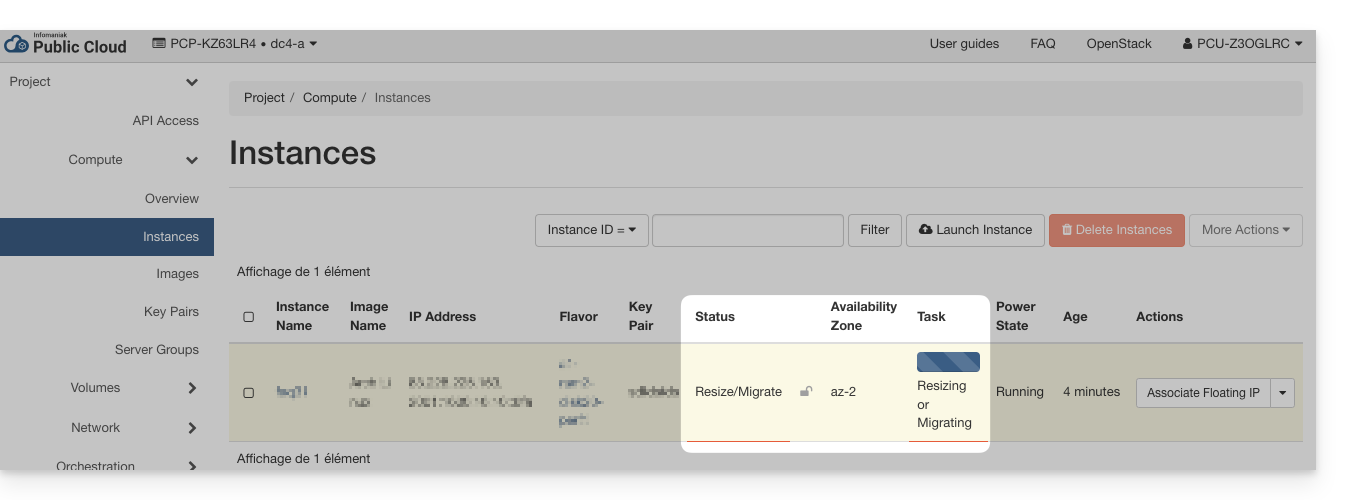
- Confirme a migração:
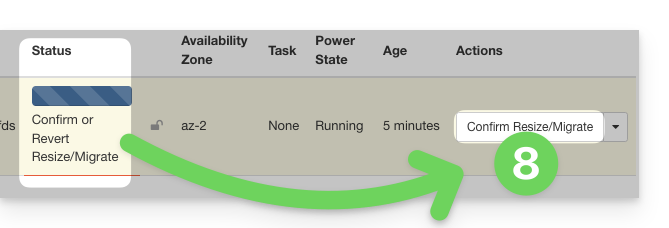
- Aguarde a conclusão da operação antes de reiniciar ou modificar a instância.
… na linha de comando (CLI)
- Liste as suas instâncias disponíveis:
openstack server list - Identifique o ID da instância a ser transferida (coluna
ID). - Inicie a migração para outro host físico:
openstack server migrate <ID_da_instância>
Este comando inicia a transferência da instância para um novo host dentro do cluster. - Verifique o estado da migração:
openstack server show <ID_da_instância>
A instância passa então para o estadoRESIZEDquando a migração é concluída, mas ainda não foi confirmada. - Após a conclusão e validação da migração, confirme a transferência:
openstack server resize --confirm <ID_da_instância>
ou, dependendo das versões do cliente OpenStack:openstack server migration confirm <ID_da_instância>- Se o comando
server migration confirmexibir um aviso indicando que está obsoleto, o processo ainda será executado em segundo plano e a confirmação será devidamente considerada. - Se você receber um erro do tipo:
Cannot 'confirmResize' instance ... while it is in vm_state active (HTTP 409)
isso significa que a migração já foi confirmada (manualmente ou automaticamente).
- Se o comando
- Você também pode cancelar a migração se um problema for detectado antes da confirmação:
openstack server resize --revert <ID_da_instância>
ou:openstack server migration revert <ID_da_instância> - Se nenhuma ação manual for realizada, a migração será confirmada automaticamente após 24 horas. O estado da instância retorna então para
ATIVO.
A transferência é transparente para o sistema operacional e para os dados da instância. Uma breve interrupção pode ocorrer durante a migração.
Link para esta FAQ: https://faq.infomaniak.com/1327
Esta seção de perguntas frequentes foi útil?
A Infomaniak não oferece diretamente um serviço de VPN, túnel ou rede segura construída entre dois pontos (VPN = Rede Privada Virtual). No entanto, pode considerar uma solução alternativa utilizando os serviços da Infomaniak, como o Public Cloud. Este guia explica como utilizar este produto de alojamento da Infomaniak para criar uma VPN.
Criar uma VPN com o Public Cloud da Infomaniak
A Infomaniak não fornece o módulo OpenStack VPNaaS (Virtual Private Network-as-a-Service), que, infelizmente, é bastante limitado em termos de funcionalidades e segurança, para criar uma VPN.
A Infomaniak propõe o uso de uma das seguintes alternativas para permitir que você crie uma VM VPN manualmente:
Link para esta FAQ: https://faq.infomaniak.com/1350
Esta seção de perguntas frequentes foi útil?
Este guia lista as diferentes distribuições Linux e versões do Windows que você pode implementar com um único clique ao iniciar uma nova instância da sua Cloud Pública.
Sistemas operacionais disponíveis
As imagens dos diferentes sistemas operativos, disponibilizadas pela Infomaniak na secção Imagens e utilizadas na secção Origem ao lançar uma nova instância da sua Cloud Pública, são atualmente as seguintes:
- Alpine Linux 3.17
- Amazon Linux 2
- Arch Linux
- CentOS 7
- CentOS 8 Stream
- CentOS 9 Stream
- CirrOS 0.6.1
- Debian 10.13 buster
- Debian 11.6 bullseye
- Fedora Cloud OS 37
- Fedora Core OS 37
- FreeBSD 13.1
- Imagem de recuperação Infomaniak
- OPNsense 22.1.2_2-amd64
- Oracle Linux 9
- RancherOS 1.5.8
- RedHat Enterprise Linux 9
- Rocky Linux 9
- Ubuntu 18.04 LTS Bionic Beaver
- Ubuntu 20.04 LTS Focal Fossa
- Ubuntu 22.04 LTS Jammy Jellyfish
- openSUSE Leap 15.4 JeOS
- Microsoft Windows Server 2019 Standard
- Microsoft Windows Server 2019 Datacenter
- Microsoft Windows Server 2022 Standard
- Microsoft Windows Server 2022 Datacenter
- Microsoft Windows Server 2025 Standard
- Microsoft Windows Server 2025 Datacenter
Certifique-se de utilizar sempre o ID da imagem em vez do seu nome durante a implementação.
Link para esta FAQ: https://faq.infomaniak.com/1748
Esta seção de perguntas frequentes foi útil?
Este guia aborda um problema que pode ocorrer ao iniciar uma instância na Public Cloud Infomaniak.
Introdução
- Informe-se sobre eventuais problemas em curso em https://infomaniakstatus.com/.
- Especificamente para a Cloud Pública, a lista de manutenções programadas e problemas em curso pode ser encontrada em https://status.infomaniak.cloud/.
Utilizar o ID das imagens
As imagens dos diferentes sistemas operativos, disponibilizadas pela Infomaniak na secção Imagens e reproduzidas na secção Origem quando inicia uma nova instância da sua Cloud Pública, são atualizadas regularmente, mas sem que o seu nome seja alterado: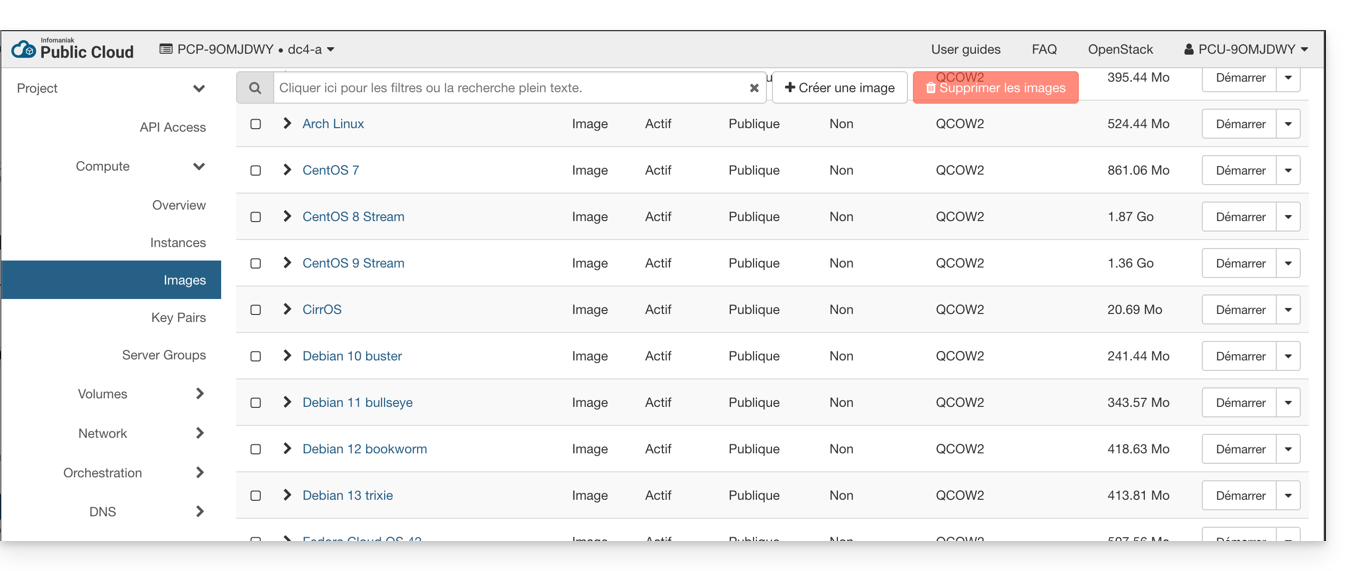
Ter um nome estável pode causar problemas com ferramentas de automação como heat ou terraform, com o risco de que elas recriem as VMs sem que isso seja desejado.
Este problema pode ser evitado usando o ID da imagem ou uma imagem personalizada: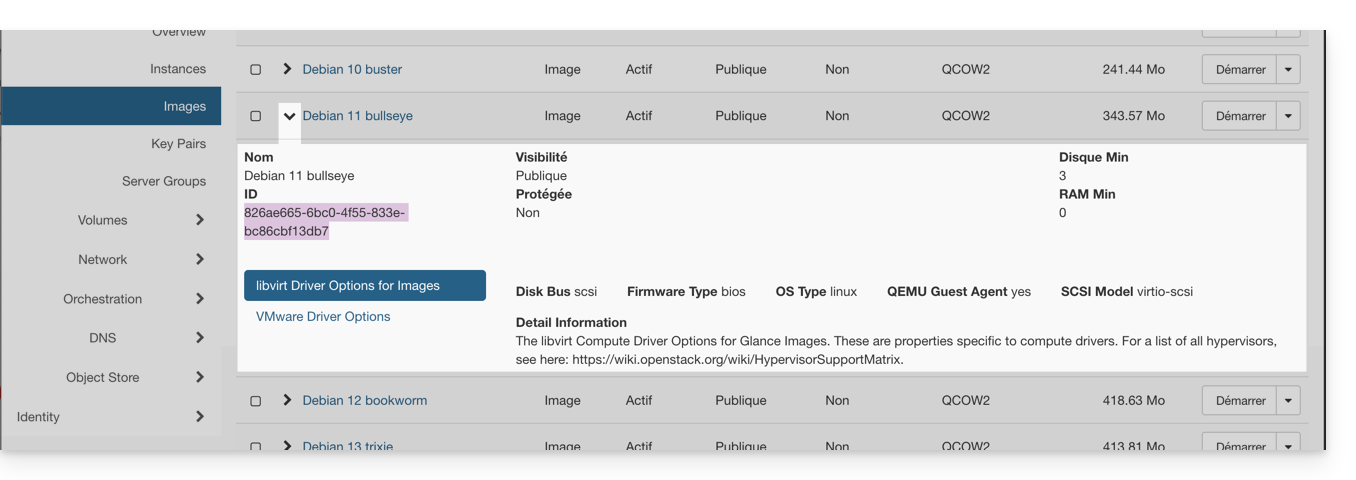
Link para esta FAQ: https://faq.infomaniak.com/1781
Esta seção de perguntas frequentes foi útil?
Este guia explica quais são as diferenças entre as ofertas de hospedagem web da Infomaniak para ajudá-lo a escolher a melhor solução de acordo com suas necessidades de TI.
Se você deseja hospedar seu serviço de e-mail, consulte este outro guia.
1. Criador de Sites
Ofertas independentes, que não dependem de um serviço de hospedagem como o apresentado no ponto 3.
Site Creator é uma solução completa que permite criar facilmente um site institucional, um blog ou uma loja virtual sem a necessidade de conhecimentos técnicos específicos. Oferecido como uma solução independente (standalone, sem a necessidade de hospedagem web tradicional), está disponível em diversas opções, de acordo com as suas necessidades:
- Site Creator Free: uma versão gratuita para testar e personalizar uma página web com as funcionalidades básicas
- Site Creator Lite: ideal para publicar um site institucional ou um blog (até 6 páginas web, 15 GB de espaço em disco e nome de domínio oferecido por 1 ano)
- Site Creator Pro: a solução completa para lojas online (páginas ilimitadas, 50 GB de espaço em disco, funcionalidades de comércio eletrônico com gestão de pagamentos e de estoque, nome de domínio oferecido por 1 ano)
Saiba mais sobre as ofertas Site Creator e compare os recursos.
2. Hospedagem Web Starter
A hospedagem web simples e gratuita
A hospedagem web Starter é oferecida gratuitamente com cada nome de domínio registrado na Infomaniak. Ela oferece 10 MB de espaço em disco para criar um site (páginas básicas em linguagem HTML apenas – sem PHP, sem banco de dados), mesmo sem conhecimento específico, graças à ferramenta Página de Boas-vindas.
- Registar ou transferir um nome de domínio para a Infomaniak
- Saber mais sobre as vantagens incluídas com um nome de domínio
3. Hospedagem web compartilhada
A oferta ideal para criar seus sites
Estas soluções de hospedagem web são ofertas compartilhadas (os sites serão hospedados em servidores cujos recursos são compartilhados com outros clientes). Para garantir a confiabilidade destes serviços compartilhados, os servidores Infomaniak utilizam, em média, apenas 40% da capacidade dos processadores e são equipados com discos SSD profissionais de última geração.
A hospedagem web oferece um mínimo de 250 GB de espaço em disco e permite gerenciar vários sites com vários nomes de domínio. Esta oferta inclui todas as tecnologias normalmente utilizadas para criar sites profissionais: PHP, MySQL, acesso FTP e SSH, certificados SSL e instalação fácil de WordPress ou CMS populares, etc. Também é possível adicionar um site Node.js e/ou Site Creator.
Note que, sem qualquer tipo de hospedagem, também é possível obter e utilizar o Site Creator de forma “autónoma”. Consulte este outro guia.
3. Servidor Cloud
A hospedagem web profissional
Com um Servidor Cloud,os recursos que lhe são alocados não são partilhados com outros clientese pode personalizar a configuração de hardware e software do seu servidor de acordo com as suas necessidades. Um Servidor Cloud também permite utilizar componentes que não estão disponíveis em alojamentos Web partilhados (Node.js, mongoDB, Sol, FFMPEG, etc.).
- Um Servidor Cloud permite administrar facilmente o seu servidor através da mesma interface de administração dos serviços de hospedagem web – você gerencia os sites da mesma forma.
- Um VPS permite gerenciar o seu servidor de forma 100% autônoma, com a versão do Windows ou a distribuição Linux de sua escolha (
Debian,Ubuntu,openSUSE, ...) – são necessárias sólidas competências técnicas para utilizar um VPS, incluindo o VPS Lite.
4. Public Cloud (et Kubernetes Service)
Solução IaaS aberta, comprovada e segura
Para a Infomaniak, é a infraestrutura que impulsiona o kDrive, o Swiss Backup e o Webmail, serviços utilizados por vários milhões de utilizadores. Mas a Cloud Pública está acessível a todos e disponibiliza os recursos de que precisa para o desenvolvimento dos seus projetos.
Com as ofertas personalizadas e sob medida, você não terá dificuldades em gerenciar seu orçamento de desenvolvimento. Sem custos de ativação. Sem valor mínimo. Cancelável a qualquer momento. Você paga apenas pelos recursos efetivamente utilizados com o Public Cloud no final de cada mês, o mesmo para o Kubernetes Service.
5. Jelastic Cloud
Hospedagem web personalizada com as tecnologias de sua preferência
Jelastic Cloud permite criar ambientes de desenvolvimento personalizados com as tecnologias de sua preferência (PHP, Java, Docker, Ruby, etc.). É uma oferta de nuvem flexível:
- Redimensionamento horizontal e vertical dos recursos.
- Pagamento com base no consumo real dos recursos.
- Personalização fácil da sua infraestrutura (redundância, IP, SSL, balanceamento de carga, etc.).
Link para esta FAQ: https://faq.infomaniak.com/2019
Esta seção de perguntas frequentes foi útil?
Este guia destina-se aos utilizadores que utilizam a sua própria imagem Windows Server versão de avaliação em Windows Server Standard ou Datacenter com licença na Cloud Pública.
Introdução
- Como parceira da Microsoft, a Infomaniak fornece e fatura automaticamente as licenças do Windows Server aos clientes que as utilizam em instâncias com estes sistemas operativos, nas versões standard ou datacenter.
- A Infomaniak oferece imagens prontas para uso para a Cloud Pública, pré-ativadas com licença; em caso de falha na ativação, consulte este outro guia.
Utilizar a sua própria imagem do Windows Server
Se decidir carregar a sua própria imagem do Windows Server, standard ou datacenter, deverá seguir o procedimento de ativação.
Versão de avaliação de 180 dias
No caso de se tratar de uma versão de avaliação válida por 180 dias, é necessário executar alguns comandos adicionais antes do procedimento acima:
Abra uma janela de linha de comando (cmd.exe) através do menu Iniciar e execute o seguinte comando como administrador para mudar para…
- … Windows Server 2019 Standard:
dism /online /set-edition:serverstandard /productkey:N69G4-B89J2-4G8F4-WWYCC-J464C /accepteula - … Windows Server 2019 datacenter:
dism /online /set-edition:serverdatacenter /productkey:WMDGN-G9PQG-XVVXX-R3X43-63DFG /accepteula - … Windows Server 2022 standard:
dism /online /set-edition:serverStandard /productkey:VDYBN-27WPP-V4HQT-9VMD4-VMK7H /accepteula - … Windows Server 2022 datacenter:
dism /online /set-edition:ServerDatacenter /productkey:WX4NM-KYWYW-QJJR4-XV3QB-6VM33 /accepteula - … Windows Server 2025 standard:
dism /online /set-edition:serverstandard /productkey:TVRH6-WHNXV-R9WG3-9XRFY-MY832 /accepteula - … Servidor Windows 2025 para datacenter:
dism /online /set-edition:serverdatacenter /productkey:D764K-2NDRG-47T6Q-P8T8W-YP6DF /accepteula
Após a conclusão do comando, reinicie a instância e siga o procedimento de ativação normal, conforme descrito na FAQ correspondente.
Link para esta FAQ: https://faq.infomaniak.com/2236
Esta seção de perguntas frequentes foi útil?
Este guia explica como gerir utilizadores para o seu projeto Public Cloud.
Introdução
- Para aceder aos recursos de um projeto, é necessário criar utilizadores do tipo OpenStack (consulte abaixo).
- Estes utilizadores OpenStack não têm qualquer relação com os utilizadores do Manager Infomaniak.
- O nome de utilizador é gerado automaticamente e comunicado após a sua criação.
- Estes utilizadores OpenStack estão associados a um projeto e, portanto, não podem aceder a vários projetos.
- Todas as operações relacionadas aos utilizadores (adição, modificação, eliminação, etc.) são assíncronas e podem, por vezes, demorar vários minutos a serem concluídas.
Criar um utilizador para o seu Public Cloud
Para criar um utilizador OpenStack após encomendar o seu Cloud Público:
- Clique aqui para aceder à gestão do seu produto no Manager Infomaniak (precisa de ajuda?).
- Clique diretamente no nome atribuído ao produto em questão:
- Crie um novo Projeto:
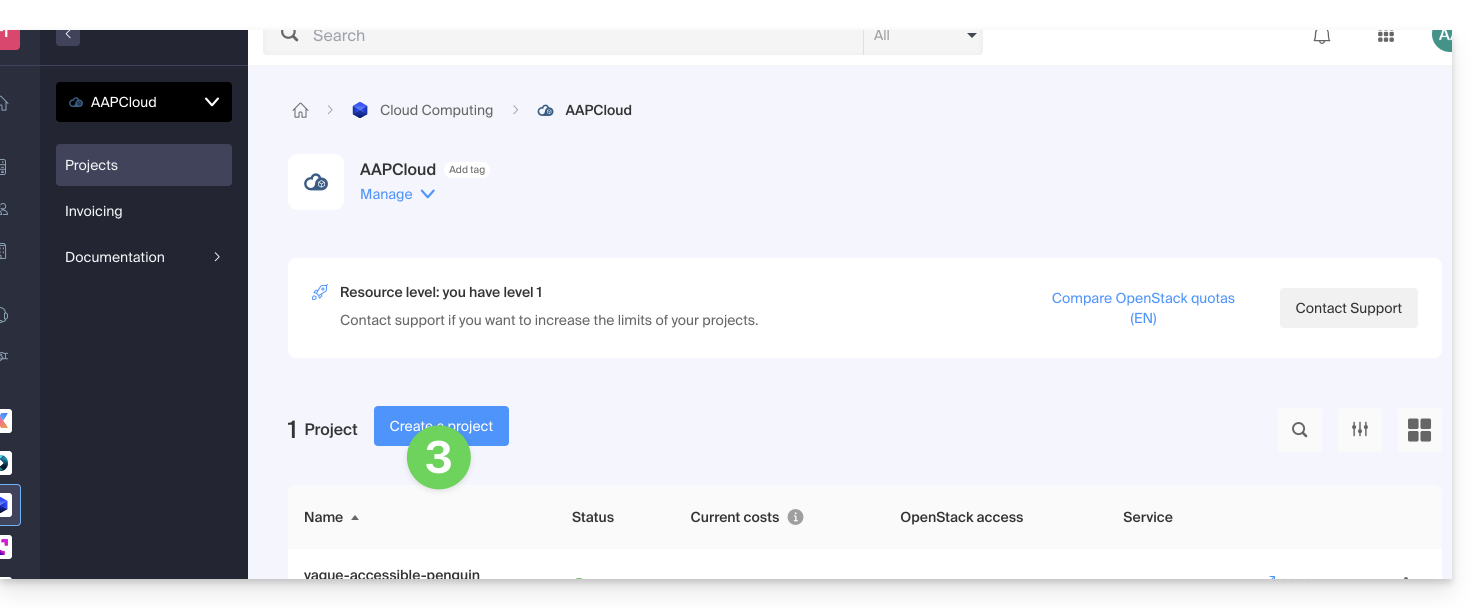
- O utilizador definido na criação do seu projeto terá o formato
PCU-XXXXe poderá atribuir-lhe uma descrição para facilitar a utilização.
Gestão das palavras-passe dos utilizadores
A senha do usuário OpenStack pode ser definida imediatamente durante a criação ou gerada posteriormente por meio de um link enviado por e-mail para o endereço de sua escolha.
Para modificá-la posteriormente:
- Clique aqui para acessar o gerenciamento do seu produto no Manager Infomaniak (precisa de ajuda?).
- Clique diretamente no nome atribuído ao produto em questão.
- Clique em Gerenciar na coluna Usuários do projeto em questão:
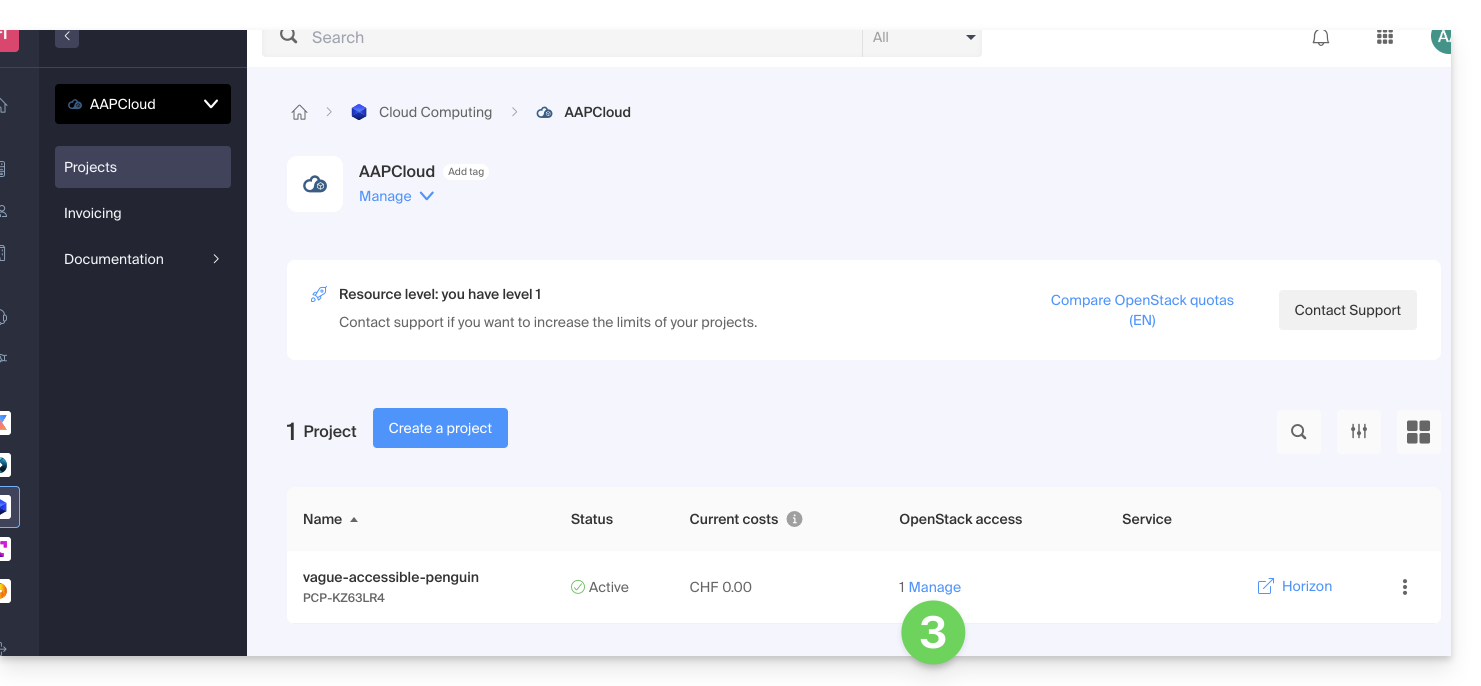
- Clique no menu à direita do usuário em questão para acessar a alteração de senha.
Adicionar um novo utilizador a um projeto
Para adicionar outros utilizadores ao seu projeto:
- Clique aqui para acessar o gerenciamento do seu produto no Manager Infomaniak (precisa de ajuda?).
- Clique diretamente no nome atribuído ao produto em questão.
- Clique em Gerenciar na coluna Usuários do projeto em questão.
- Clique em Adicionar acesso OpenStack:
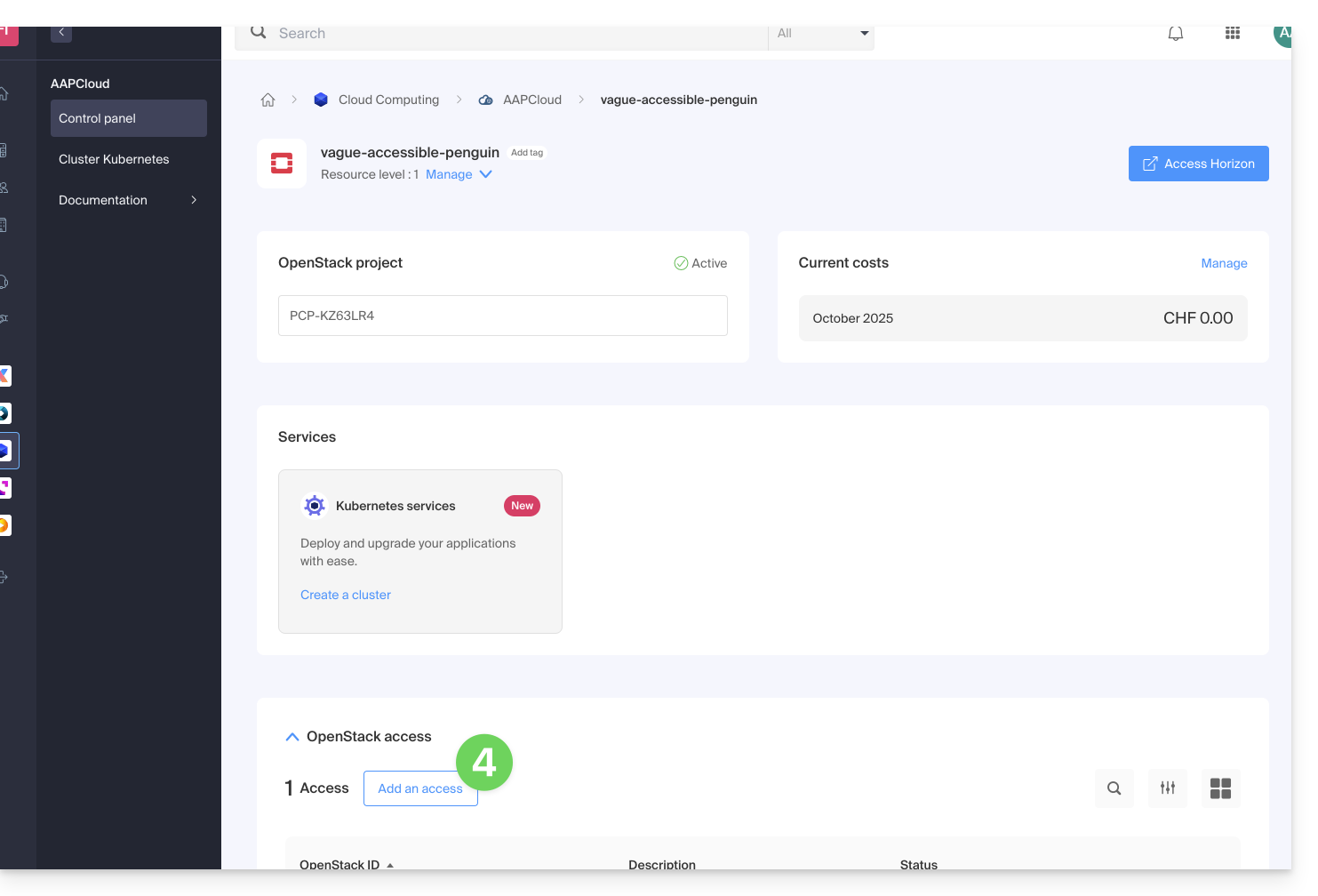
Excluir um utilizador
Para excluir um utilizador existente:
- Clique aqui para acessar o gerenciamento do seu produto no painel de controle Infomaniak (precisa de ajuda?).
- Clique diretamente no nome atribuído ao produto em questão.
- Clique em Gerenciar na coluna Usuários do projeto em questão.
- Clique no menu à direita do usuário em questão para removê-lo:
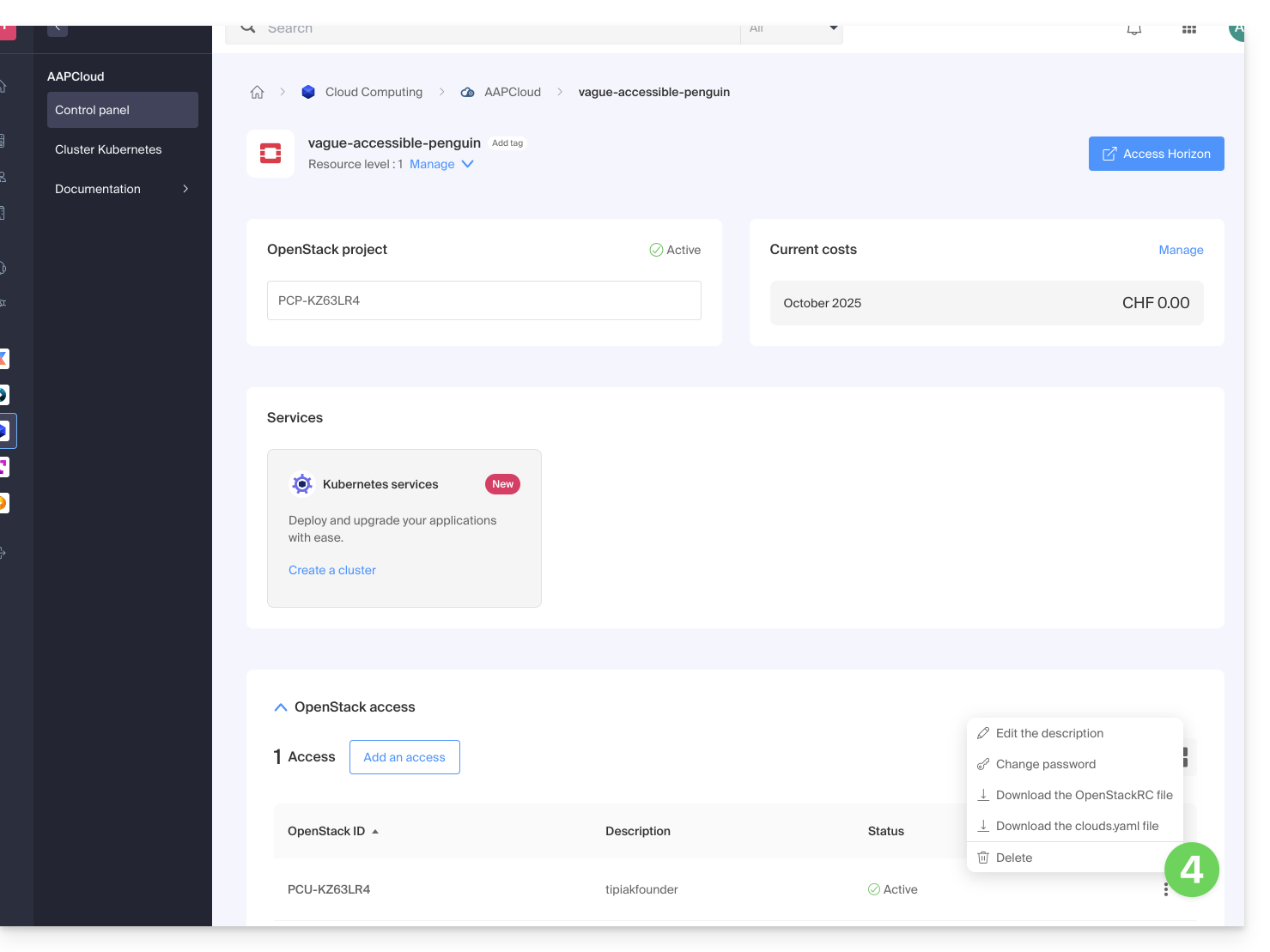
A exclusão do utilizador OpenStack é imediata e definitiva.
Saiba mais
- Guia de início: Cloud Pública
- Cloud Pública: Ação em um projeto existente
- Documentação completa do produto: https://docs.infomaniak.cloud
Link para esta FAQ: https://faq.infomaniak.com/2492
Esta seção de perguntas frequentes foi útil?
Este guia apresenta a oferta Infomaniak Public Cloud, uma solução Infrastructure as a Service (IaaS) baseada em OpenStack que disponibiliza os recursos de que precisa para o desenvolvimento dos seus projetos.
Introdução
- A nuvem pública da Infomaniak, uma plataforma baseada na tecnologia de código aberto OpenStack, oferece instâncias virtuais com diversos perfis de desempenho:
- Instâncias otimizadas para IOPS
- Instâncias otimizadas para RAM
- Instâncias com GPUs de última geração
- Conjunto de ferramentas disponíveis:
- Armazenamento de objetos (compatível com S3)
- Serviço Kubernetes gerenciado
- Bancos de dados gerenciados
- Balanceadores de carga
- Gerenciamento de DNS
- Serviços de redes privadas
- Numerosas integrações, incluindo:
- Uma API unificada
- Um conector Terraform/OpenTofu
- Uma coleção Ansible
- A infraestrutura está disponível em várias regiões na Suíça, com múltiplas zonas de disponibilidade.
Para começar
- O guia de utilização da Public Cloud Infomaniak apresenta diversos tutoriais, guias passo a passo e boas práticas a seguir.
- Acesse também todas as FAQs da Nuvem Pública em https://www.infomaniak.com/fr/support/faq/admin2/public-cloud, incluindo:
- A lista das manutenções programadas e dos problemas em andamento está disponível em https://status.infomaniak.cloud/.
- Descubra a apresentação do Public Cloud (gravação do webinar da Infomaniak 2022):
Preços
Espaço da comunidade e feedback
- Clique aqui para partilhar uma opinião ou sugestão sobre um produto Infomaniak.
- Acesse a página do Reddit criada para facilitar a troca de informações técnicas com a comunidade de usuários.
Link para esta FAQ: https://faq.infomaniak.com/2601
Esta seção de perguntas frequentes foi útil?
Este guia explica como navegar na interface da Public Cloud a partir do Manager Infomaniak e apresenta as diferentes limitações deste serviço.
Descobrindo a Public Cloud
A lista das manutenções programadas e dos problemas em curso pode ser encontrada em https://status.infomaniak.cloud/.
Para aceder à página inicial da sua Cloud Pública:
- Clique aqui para acessar o gerenciamento do seu produto no Manager Infomaniak (precisa de ajuda?).
- Você será direcionado para uma página onde todos os Public Clouds que você contratou estão listados:
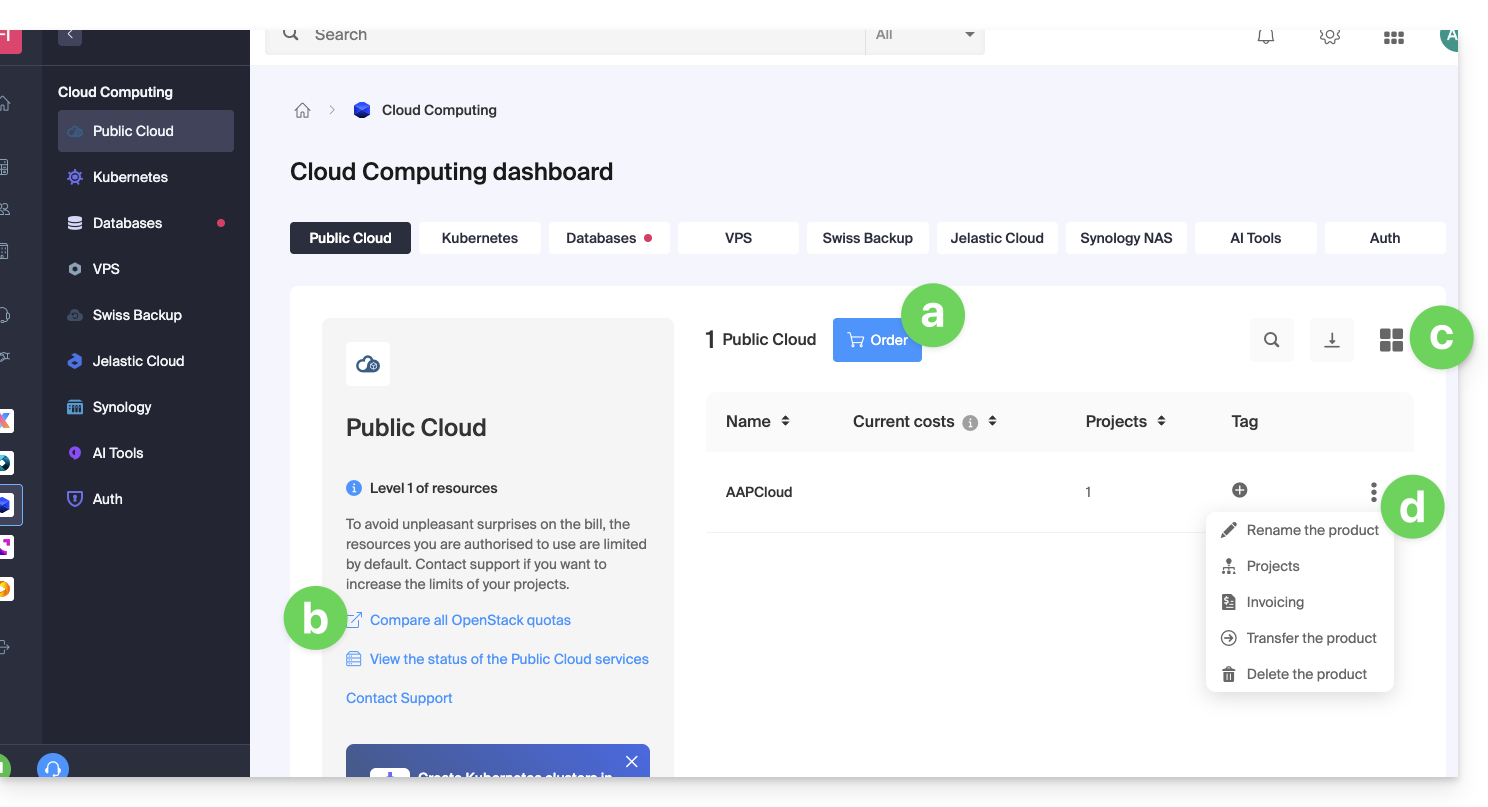
- Este botão permite contratar um novo Public Cloud.
- Este link permite acessar a página de comparação das diferentes opções de assinatura do Public Cloud.
- Este botão permite alternar entre a visualização em modo de lista ou em miniatura.
- Clique no menu de ação ⋮ à direita do item correspondente para acessar as opções:
- o ícone de lápis ✎ permite renomear seu Public Cloud
- o ícone de árvore permite acessar a página de projetos relacionados ao Public Cloud selecionado
- A partir desta página de projetos relacionados com a Cloud Pública, terá acesso a todos os seus projetos:
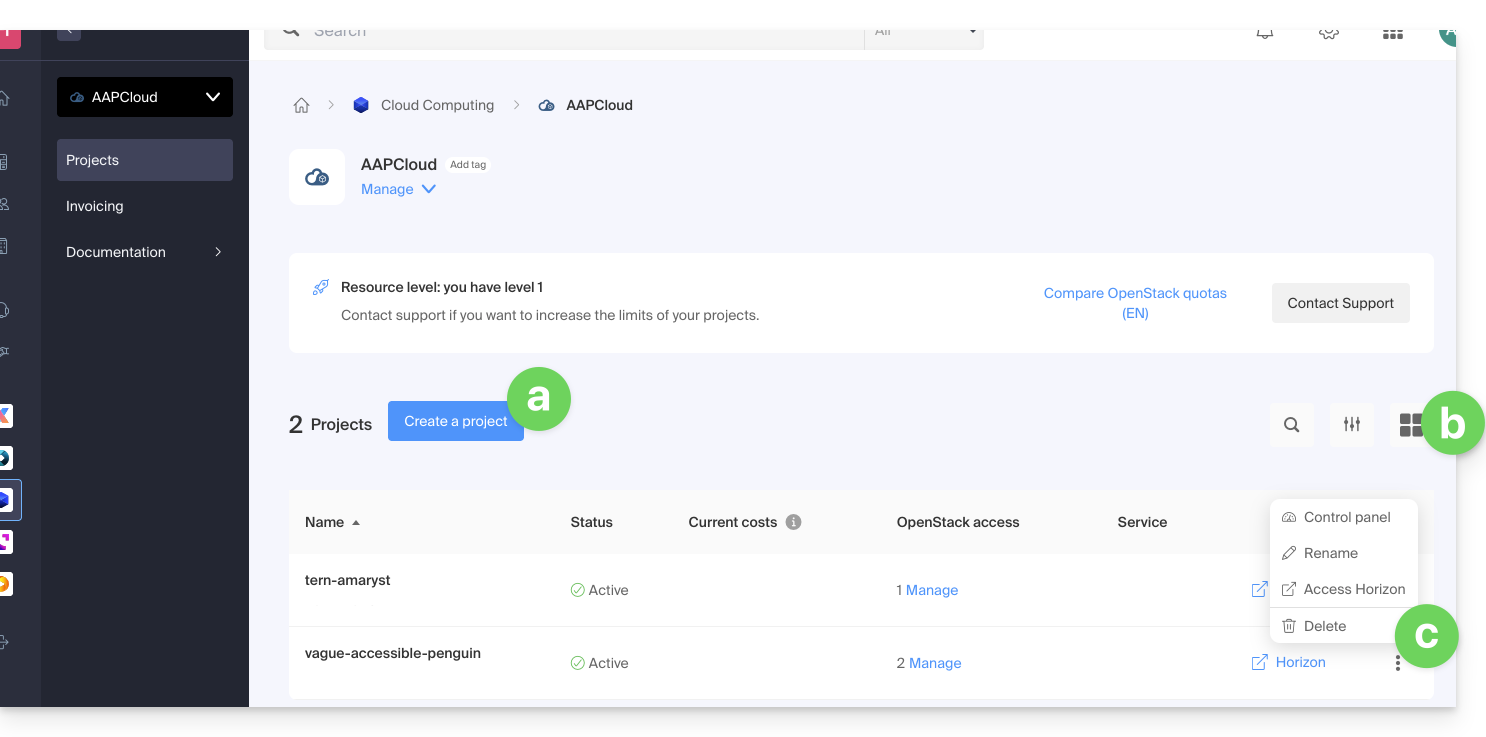
- Este botão permite criar um novo projeto que será associado à Cloud Pública.
- Este botão permite alternar entre uma visualização em modo de lista ou em miniatura.
- Clique no menu de ação ⋮ à direita do objeto em questão para aceder às opções:
- o primeiro elemento permite aceder ao painel de controlo do projeto
- o ícone de lápis ✎ permite renomear o seu projeto
- o ícone de seta para a direita permite aceder diretamente ao painel de controlo OpenStack Horizon.
Opções adicionais estão acessíveis a partir do painel lateral esquerdo e em Gerir: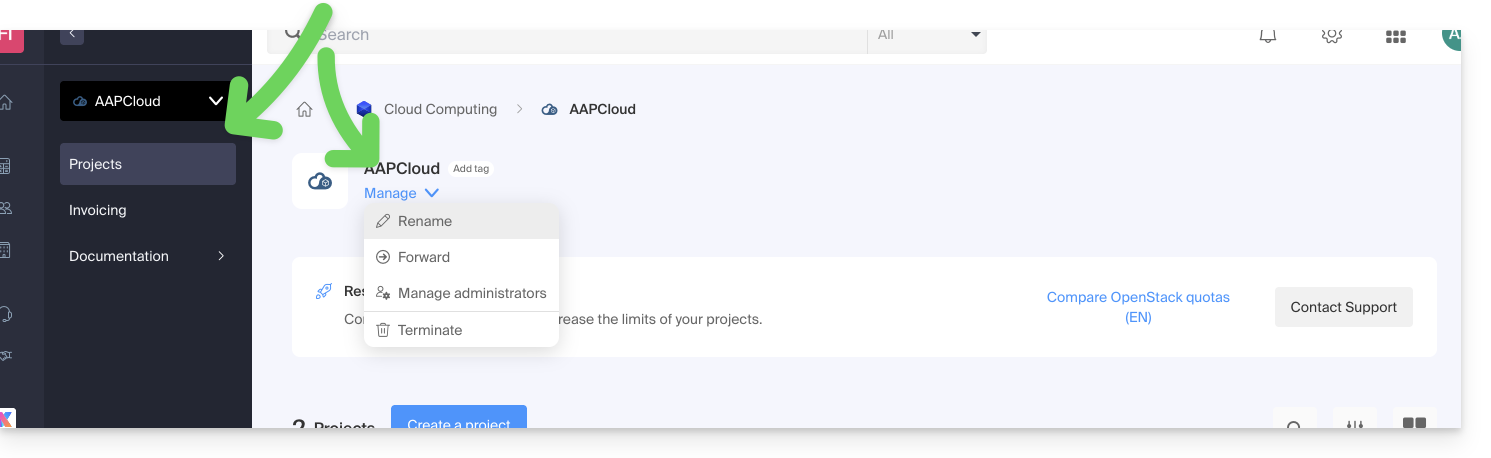
Para convidar novos utilizadores para o seu projeto, é imprescindível fazê-lo diretamente através da interface de administração OpenStack.
Limitações do Cloud Público
Por padrão, os recursos que podem ser utilizados em um projeto são limitados (por razões de segurança, para evitar, por exemplo, uma fatura excessivamente alta no final do mês).
Consulte os 3 níveis de limite detalhados neste outro guia.
O Gerenciador indica qual é o nível de limite atribuído à Organização: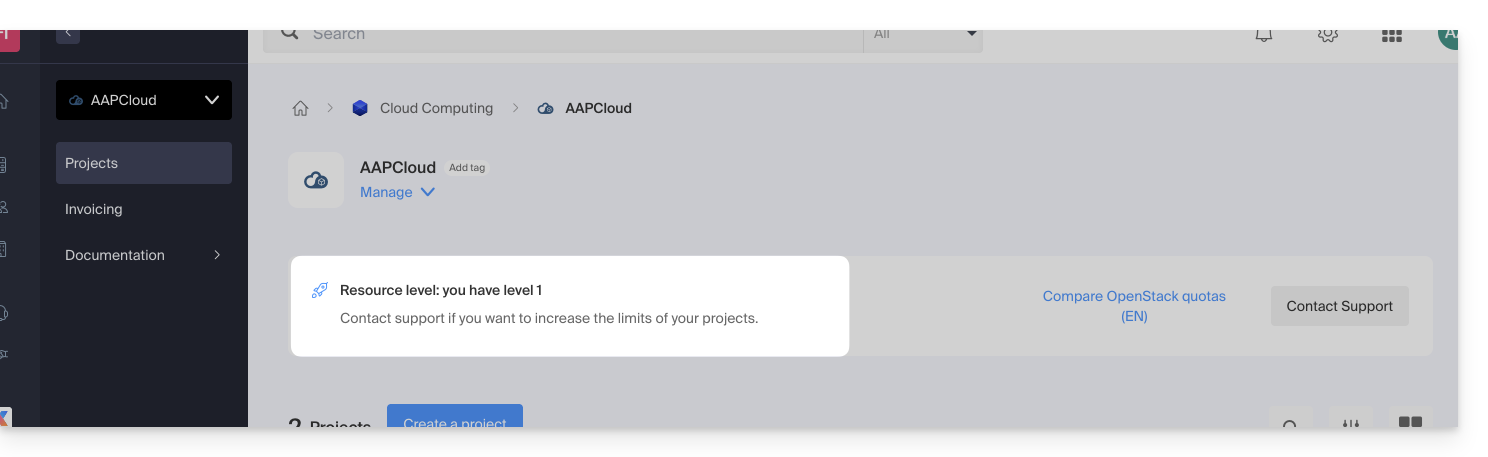
Para aumentar o limite dos projetos, entre em contato com o suporte da Infomaniak.
Os limites se aplicam a todos os projetos da Organização. Em uma Organização com 5 projetos, dos quais 1 precisa do nível 3, os 4 outros projetos herdarão um limite de nível 3.
Link para esta FAQ: https://faq.infomaniak.com/2602
Esta seção de perguntas frequentes foi útil?
Este guia explica como criar um novo projeto com o Public Cloud da Infomaniak.
Pré-requisitos
- Ter lido e compreendido o Guia de início.
- Possuir Public Cloud no seu painel de controlo Infomaniak.
É perfeitamente possível criar vários projetos na mesma nuvem pública.
Criar um novo projeto
Para aceder à Cloud Pública:
- Clique aqui para aceder à gestão do seu produto no Manager Infomaniak (precisa de ajuda?).
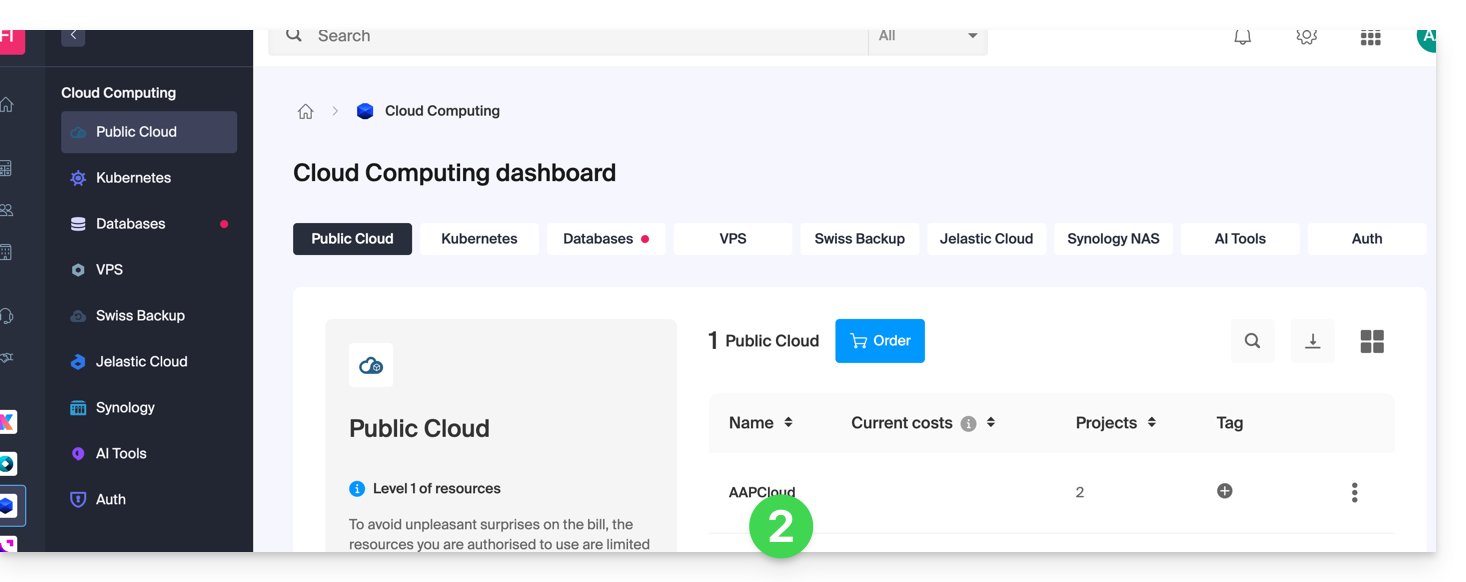
- Clique diretamente no nome atribuído ao produto em questão, o que criará um novo projeto.
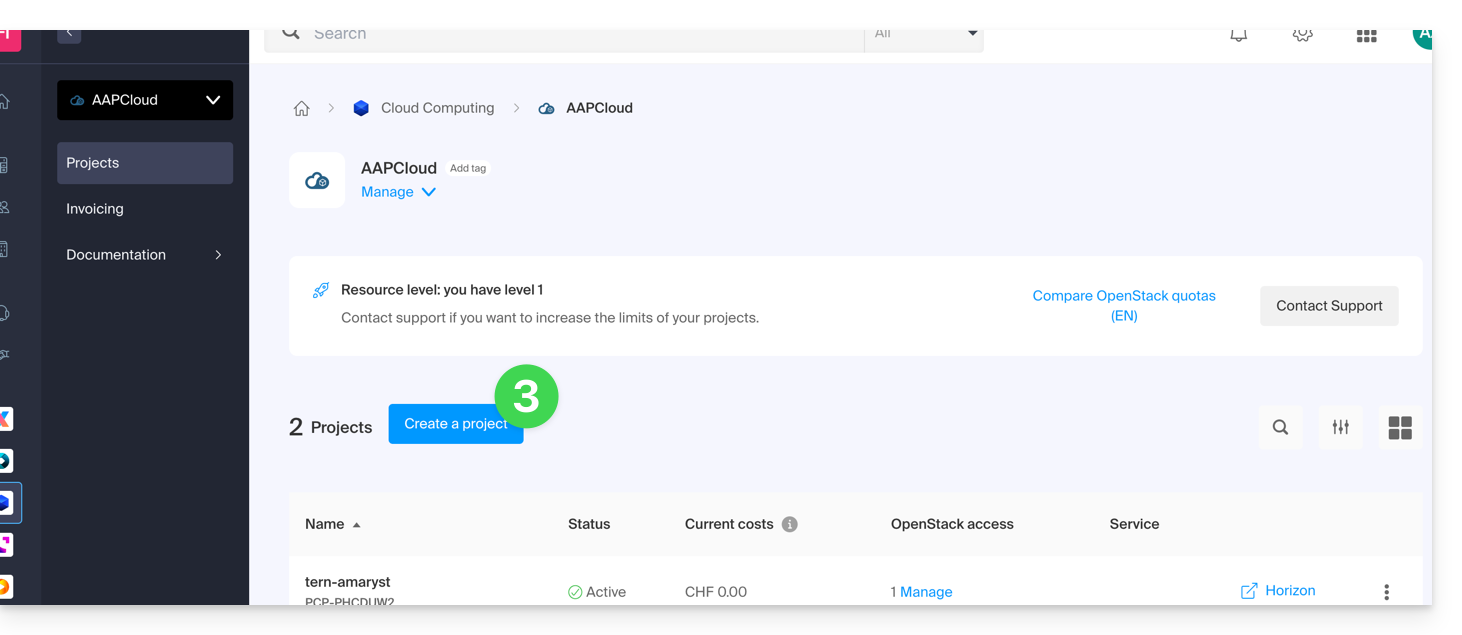
- Clique no botão Criar um projeto:
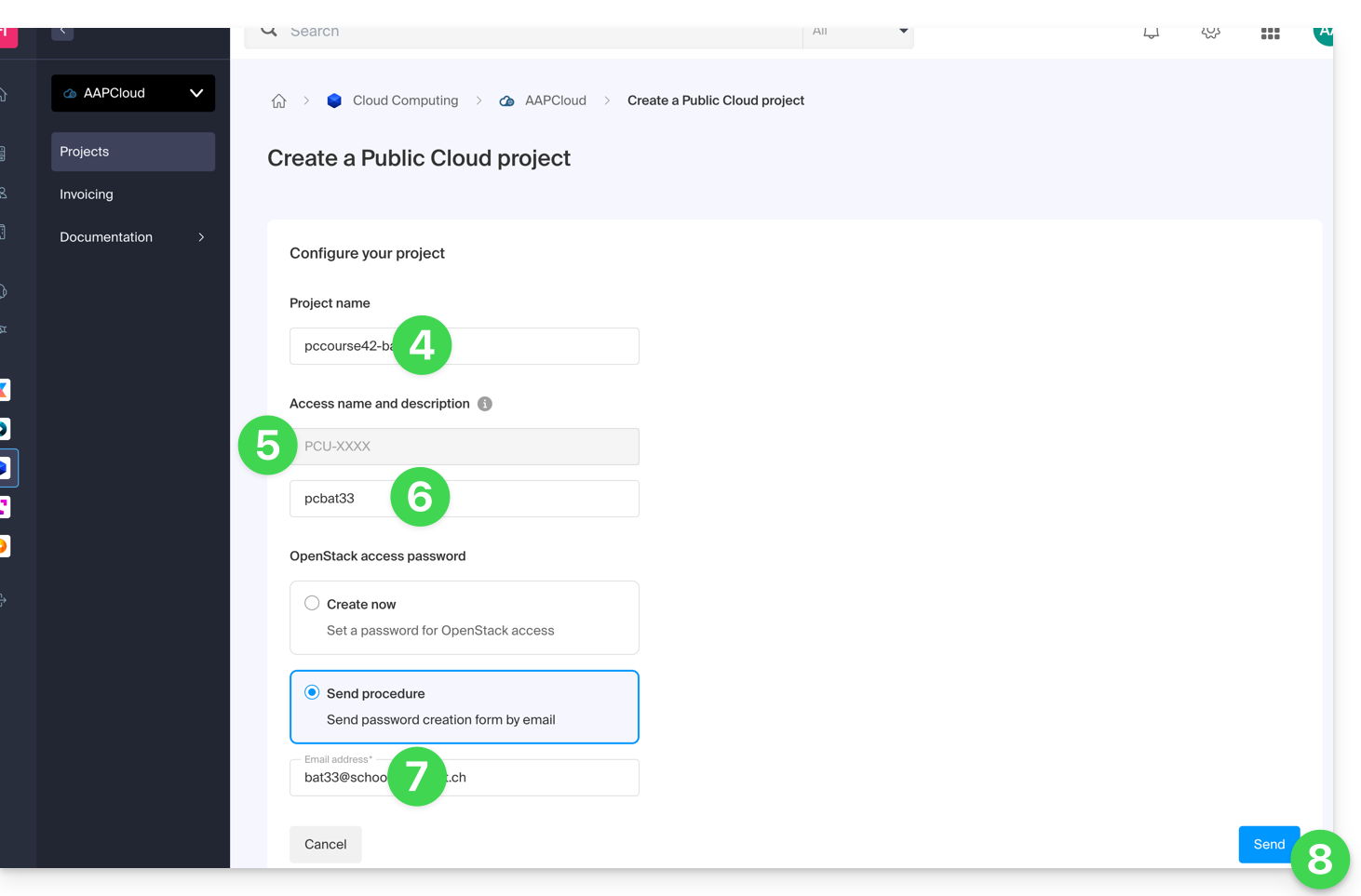
- Dê um nome ao seu projeto.
- Um identificador OpenStack é criado automaticamente (no formato
PCU-XXXX). - É possível adicionar uma descrição (para especificar a quem se destina a conta, por exemplo).
- Defina uma senha (ou envie as instruções por e-mail).
- Clique em Criar para finalizar a criação do projeto:
Nível de recursos
O nível de recursos mais elevado ao qual sua organização tem acesso é atribuído automaticamente ao projeto. Você pode modificá-lo a qualquer momento após a criação do projeto.
Consulte também este outro guia se precisar de informações sobre ações em um projeto existente.
Link para esta FAQ: https://faq.infomaniak.com/2603
Esta seção de perguntas frequentes foi útil?
Este guia explica as diferentes ações que podem ser realizadas a partir do painel de controlo com o Public Cloud.
Aceder às opções adicionais num projeto
Para aceder à Cloud Pública:
- Clique aqui para aceder à gestão do seu produto no Manager Infomaniak (precisa de ajuda?).
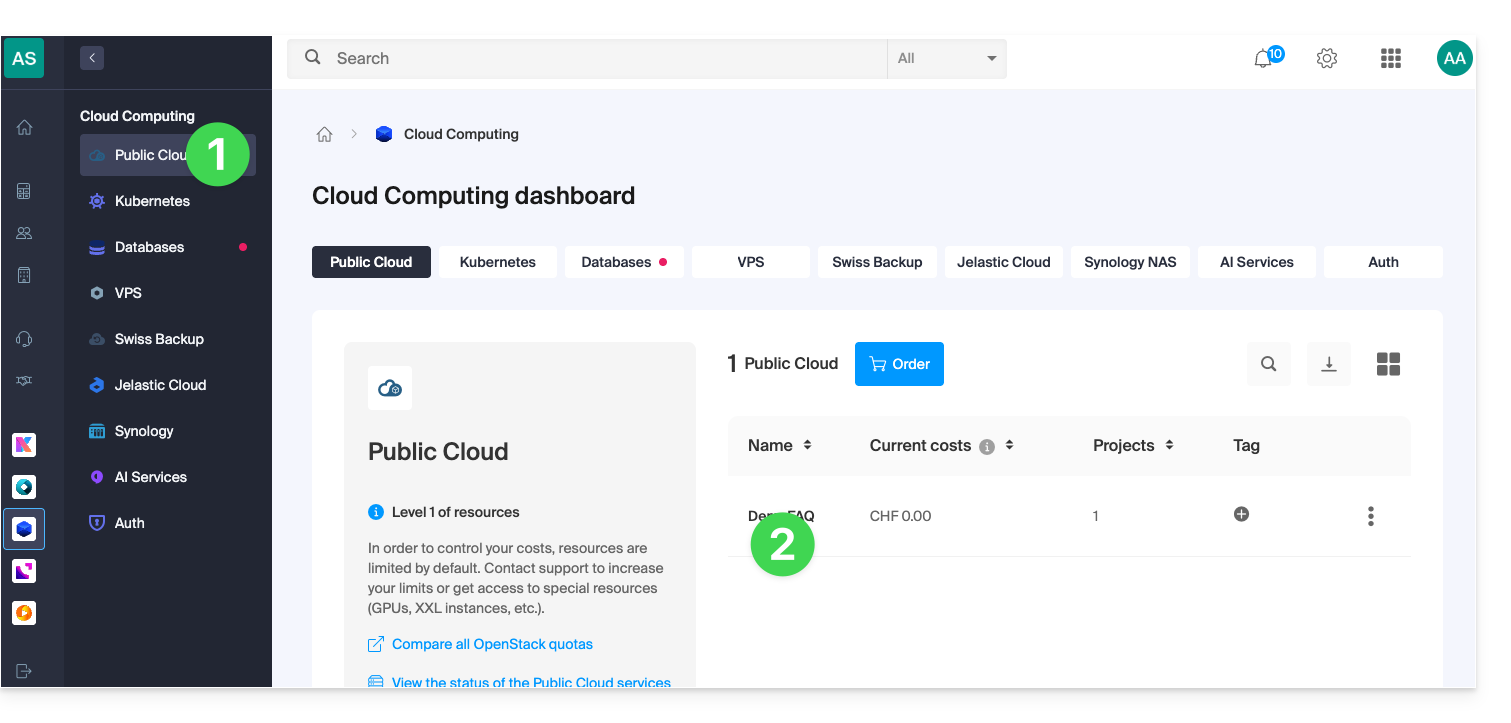
- Clique diretamente no nome atribuído ao produto em questão:
- Clique diretamente no nome do projeto em questão para aceder a ações adicionais:
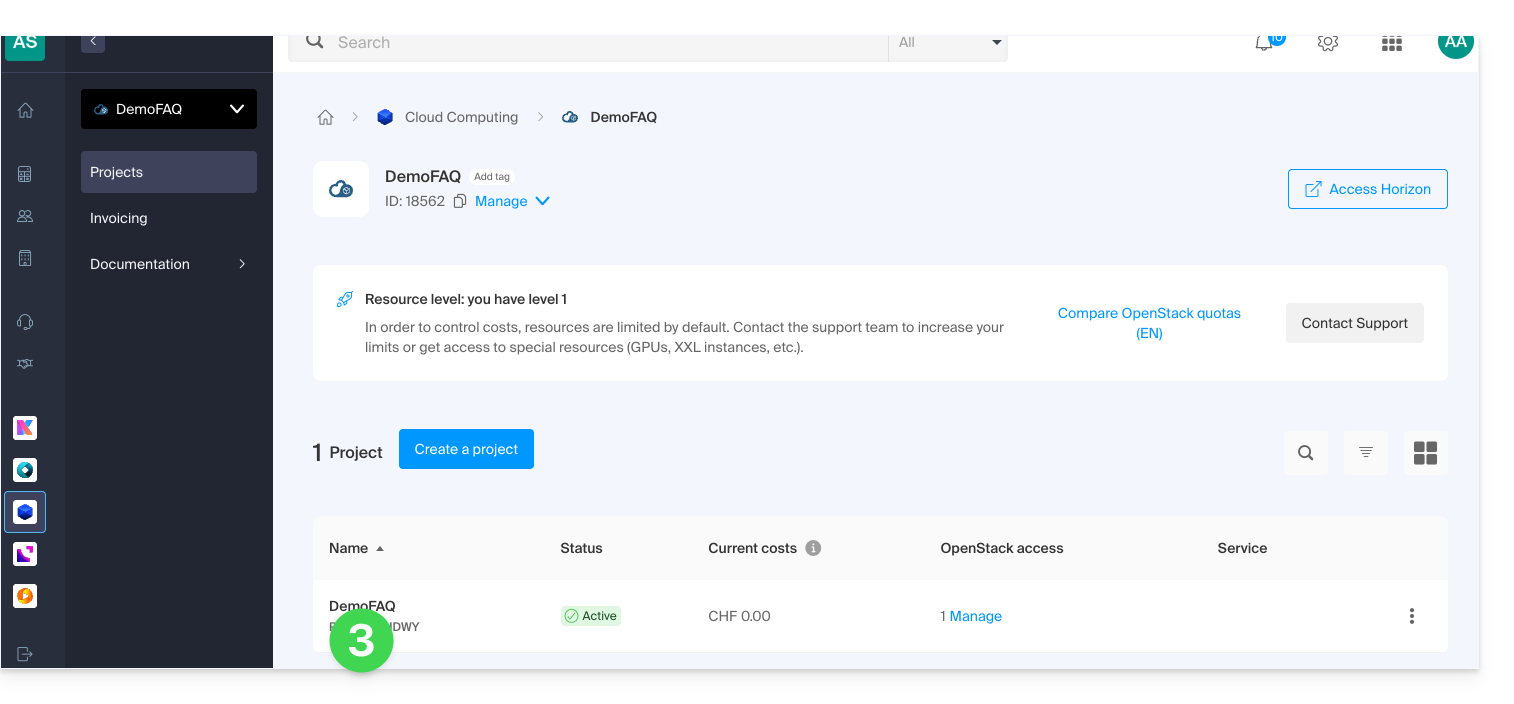
- Você pode:
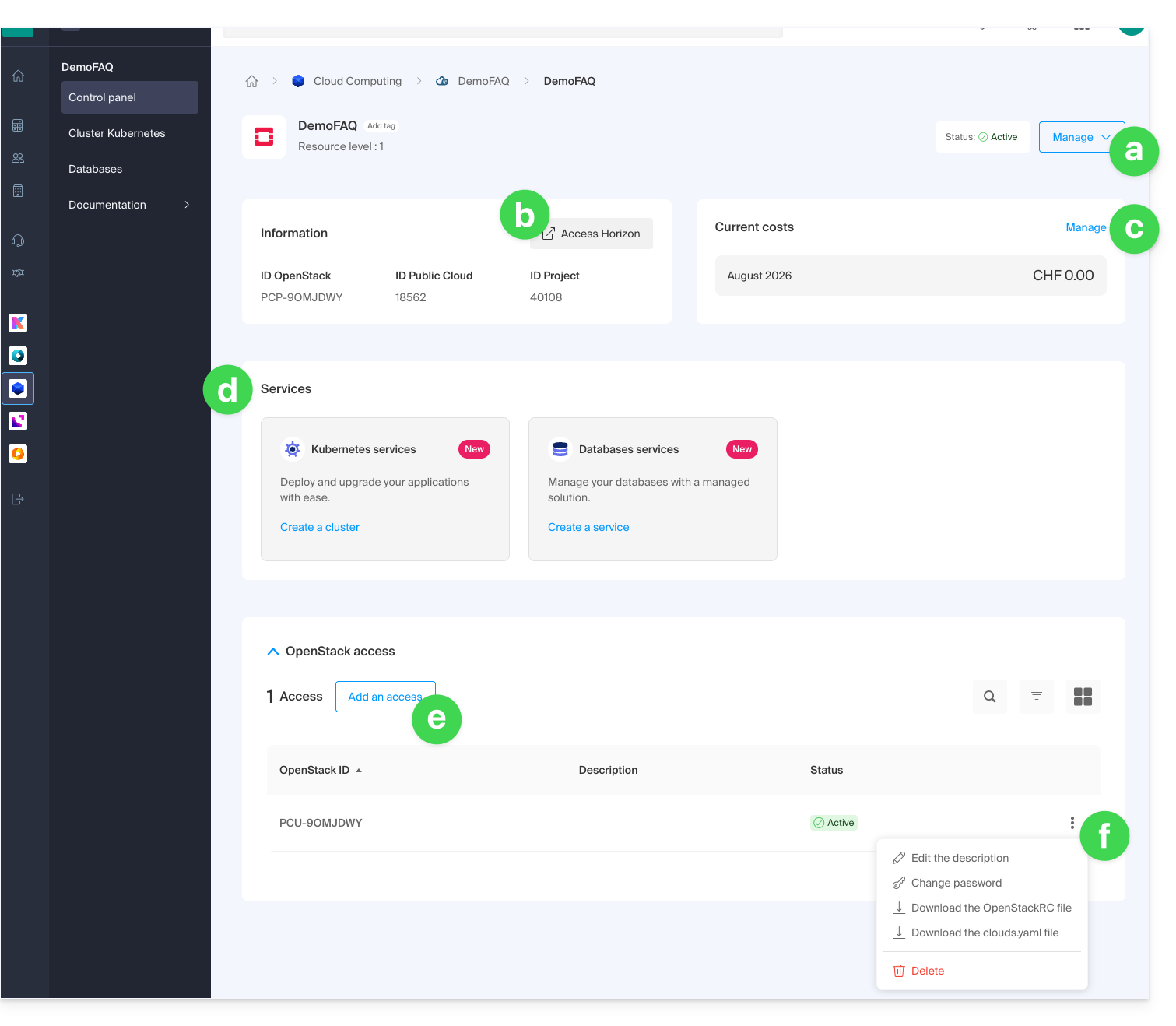
- renomear ou excluir o projeto
- acessar o painel OpenStack Horizon
- gerenciar a faturação
- acessar os serviços como Kubernetes ou dbaas
- adicionar um novo acesso de usuário
- gerenciar as informações de acesso do usuário em questão:
- adicionar ou modificar a descrição do usuário
- modificar a senha para o acesso ao projeto para o usuário
- baixar arquivos de configuração (1 arquivo OpenStackRC ou 1 arquivo clouds.yaml) para acessar seu projeto a partir da CLI
- excluir o usuário do projeto
Link para esta FAQ: https://faq.infomaniak.com/2604
Esta seção de perguntas frequentes foi útil?
Este guia detalha o funcionamento da faturação da sua Public Cloud Infomaniak.
Funcionamento da faturação
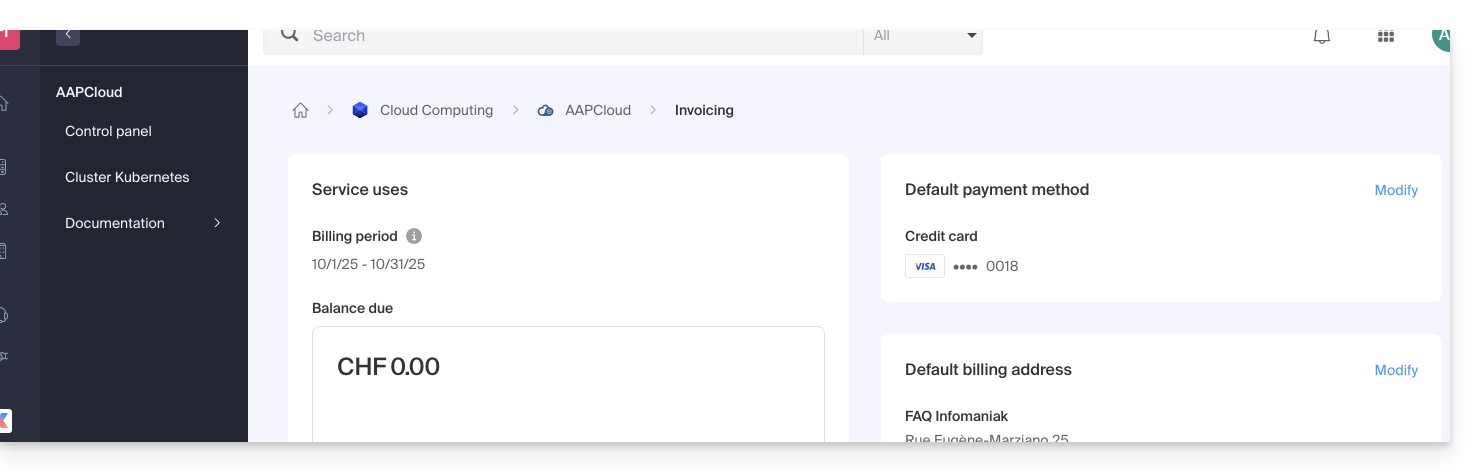
Quais são os métodos de pagamento aceites?
É possível pagar as faturas do serviço Public Cloud apenas com um cartão de crédito.
Quando é que o cartão de crédito é debitado?
O período de faturação vai do primeiro dia do mês ao último dia do mesmo. O cartão de crédito é geralmente debitado no primeiro dia do mês seguinte (dependendo do seu banco, pode haver alguns dias de atraso no débito). Uma fatura é emitida no momento do débito do cartão.
As instâncias desligadas são cobradas?
As instâncias desligadas não são cobradas, exceto:
- o armazenamento que continua a utilizar espaço, mesmo que não esteja a ser utilizado
- a GPU e o endereço IPv4 das instâncias colocadas numa rede pública
Iniciei uma instância por menos de uma hora; como serei cobrado?
Qualquer hora iniciada será cobrada.
Por exemplo, se uma instância for cobrada a CHF 10.- por hora e tiver funcionado durante parte da última hora, serão cobrados CHF 10.- por essa hora.
O que são as ICUs Infomaniak?
O Openstack baseia a sua faturação através de tokens, e, por isso, foi criada a Infomaniak Cloud Unit ou ICU. Este token permite converter o custo de utilização dos recursos no Openstack em CHF ou em EUR.
Tabela de conversão ICU para CHF ou EUR:
| Moedas | Valor | Unidade de Cloud Infomaniak (ICU) |
|---|---|---|
| CHF (Franco Suíço) | 1 | 50 |
| EUR (euro) | 1 | 55,5 |
Para saber mais sobre as unidades de custo e as modalidades de conversão, consulte estes guias da Infomaniak.
Saiba mais
- Guia de início: Nuvem Pública
- Cloud pública: Ação em um projeto existente
- Documentação completa do produto: https://docs.infomaniak.cloud
Link para esta FAQ: https://faq.infomaniak.com/2605
Esta seção de perguntas frequentes foi útil?
Este guia fornece algumas informações sobre as licenças do Windows para o Public Cloud Infomaniak.
Informações sobre as licenças do Windows
Como Parceiro Microsoft, a Infomaniak fornece e fatura automaticamente as licenças Microsoft para os seguintes sistemas operativos:
- Windows Server 2019 Standard e Datacenter
- Windows Server 2022 Standard e Datacenter
- Windows Server 2025 Standard e Datacenter
A faturação é calculada com base no número de vCPUs da instância.
A licença pertence à Infomaniak e não é propriedade do cliente. Ela é ativada no momento em que o cliente utiliza uma das versões do Windows Server e é desativada no momento em que a instância é eliminada.
Não há cobrança de licenças durante a suspensão ou interrupção da instância.
Parceiro Microsoft
- Como parceira da Microsoft, a Infomaniak fornece, na nuvem pública, através do Horizon ou da CLI Openstack, imagens pré-ativadas correspondentes.
- Em caso de falha na ativação, consulte este outro guia sobre o assunto.
- Como parceira da Microsoft, a Infomaniak não autoriza o uso de uma licença pessoal do cliente (Bring Your Own Licence); no caso de uso de sua própria licença, a Infomaniak disponibiliza e fatura automaticamente as licenças fornecidas pela Infomaniak.
- O cliente pode então ativar o seu sistema operativo através do procedimento de ativação.
- Como parceiro da Microsoft, o não uso de licenças (ou seja, uma versão de avaliação de 180 dias) também não é permitido.
- Essas versões são destinadas a testes em um ambiente interno.
- No caso de uso de uma versão de avaliação, a Infomaniak disponibiliza e fatura automaticamente as licenças fornecidas pela Infomaniak.
- O cliente pode então ativar seu sistema operacional por meio do procedimento de transformação de uma versão de avaliação em uma versão normal ativada.
- Se você usar softwares da Microsoft dentro do Windows Server que exigem uma Licença de Mobilidade, como Microsoft SQL Server, Microsoft Sharepoint Server ou Microsoft Exchange Server, você deve obrigatoriamente enviar o documento de Software Assurance por meio do formulário de contato da Infomaniak.
Link para esta FAQ: https://faq.infomaniak.com/2797
Esta seção de perguntas frequentes foi útil?
Este guia aborda a criação de redes privadas entre diferentes ofertas de hospedagem da Infomaniak, como VPS Cloud / VPS Lite, Public Cloud, NAS Synology, etc.
Criar uma VLAN entre VPS
Não é possível criar uma rede privada (VLAN) entre VPS Cloud / VPS Lite e outros produtos, como um NAS Synology, por exemplo, pois eles são instalados em redes distintas.
Recomenda-se migrar para a oferta Public Cloud para criar essas redes privadas entre VMs.
Link para esta FAQ: https://faq.infomaniak.com/2808
Esta seção de perguntas frequentes foi útil?
Este guia diz respeito à Cloud Pública e à possibilidade, em alguns casos, de aumentar os recursos solicitando a ativação de determinados serviços.
Pré-requisitos
- Será solicitado que forneça algumas informações através do kCheck, bem como que recarregue, se necessário, os créditos disponíveis.
Ativar os níveis de desempenho e serviços especiais
Para ter a possibilidade de criar instâncias com um nível de desempenho mais elevado e/ou recursos específicos, como a possibilidade de usar instâncias com GPU, contacte o departamento de suporte da Infomaniak por e-mail, indicando o ID do projeto Public Cloud (PCP-XXXXX) e os recursos desejados.
Por exemplo:
Gostaria de aumentar as quotas para o projeto PCP-XXXXX. Poderiam ativar o nível de recurso 2 e os tamanhos grandes (XXL)?
Link para esta FAQ: https://faq.infomaniak.com/2809
Esta seção de perguntas frequentes foi útil?
Este guia aborda a recuperação de senha de uma imagem Windows (qualquer versão) na Public Cloud.
Conexão à instância Windows
Por padrão, o nome de usuário é Administrator.
A senha, por sua vez, é gerada durante a primeira sequência de inicialização da instância.
Se não conseguir estabelecer a primeira conexão com a sua instância Windows, precisará da chave privada utilizada durante o processo de implementação. Insira este comando para instalar ou verificar se o nova-client está instalado:
pip3 install python-novaclientEm seguida, para recuperar a senha da instância:
Consulte a documentação oficial.
Prenez connaissance de la documentation officielle.
Consulte também os eventuais problemas em curso em status.infomaniak.com.
Especificamente para a Cloud Pública, a lista das manutenções programadas e dos problemas em curso pode ser encontrada em status.infomaniak.cloud.
Link para esta FAQ: https://faq.infomaniak.com/2817
Esta seção de perguntas frequentes foi útil?
Este guia detalha o sistema Kubernetes da Public Cloud, que pode ser encomendado e instalado diretamente no seu painel de controlo: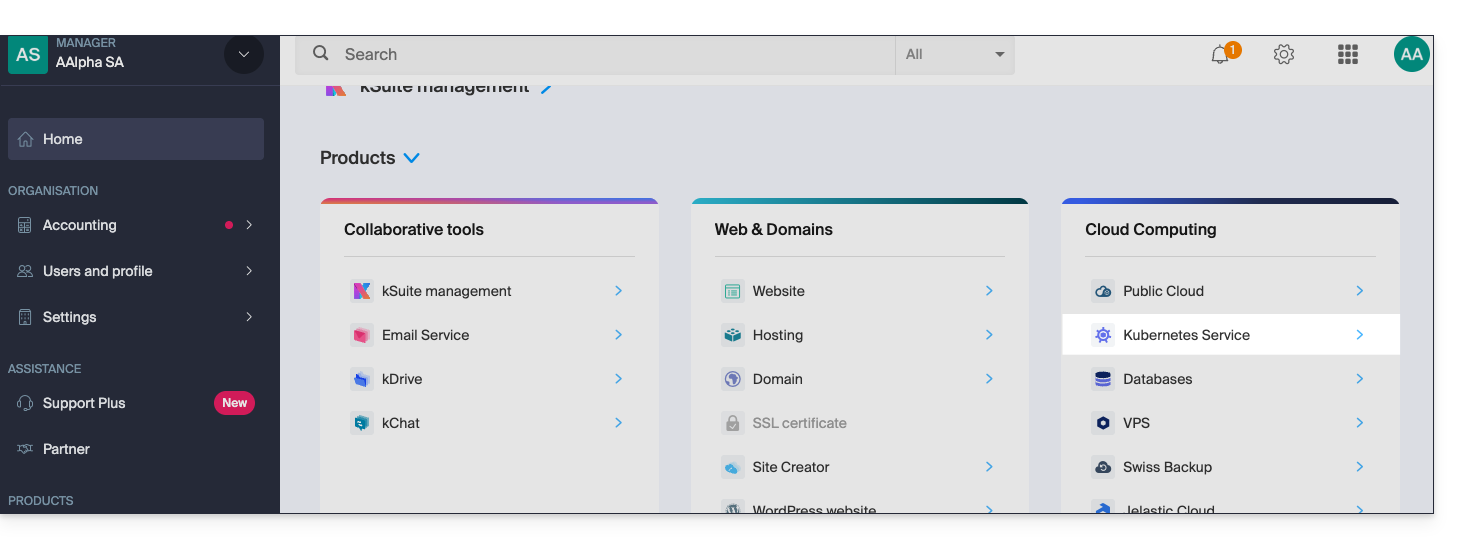
Interfaces e preços do serviço Kubernetes da Infomaniak
A Infomaniak oferece uma solução Kubernetes completa com várias interfaces de gestão e uma política de preços flexível, adaptada às suas necessidades.
Interfaces disponíveis
O serviço Kubernetes da Infomaniak oferece vários métodos de acesso e gestão:
- API Kubernetes nativa: Interaja diretamente com o seu cluster através da API Kubernetes padrão.
- Arquivo kubeconfig: Configure facilmente suas ferramentas de linha de comando, como o kubectl.
- Terraform/OpenTofu: Gerencie sua infraestrutura como código (IaC).
- Kubernetes Manager: Interface web intuitiva para gerenciar seus clusters
- CLI da Infomaniak: Automatize suas operações via linha de comando
Estrutura de preços
O serviço Kubernetes da Infomaniak oferece várias opções que correspondem ao preço do plano de controle. É importante notar que os recursos, incluindo rede, instâncias, etc., não estão incluídosnesta tarifa básica.
As instâncias necessárias para o funcionamento das suas aplicações são faturadas de acordo com as tarifas padrão da Cloud Pública da Infomaniak. Beneficia automaticamente das vantagens tarifárias da Infomaniak, incluindo o tráfego incluído e as instâncias de baixo custo, disponíveis na página Preços.
- Instâncias (VMs): a partir de um valor faturado por hora, dependendo da configuração escolhida
- Armazenamento em bloco: a partir de um valor cobrado por GB por mês
- Snapshot: a partir de um valor cobrado por GB por mês
Esta estrutura permite que você pague apenas pelos recursos que realmente utiliza, ao mesmo tempo em que se beneficia de um plano de controle Kubernetes totalmente gerenciado pela Infomaniak.
Link para esta FAQ: https://faq.infomaniak.com/2819
Esta seção de perguntas frequentes foi útil?
Este guia aborda um problema de acesso à API Server que pode ocorrer ao usar o Kubernetes as a Service (KaaS) na Public Cloud da Infomaniak.
Introdução
- No âmbito do Kubernetes como Serviço, o certificado SSL que permite a conexão ao Servidor de API (a interface de gestão para o cliente) é renovado uma vez por ano.
- Informe-se sobre eventuais problemas em curso em https://status.infomaniak.cloud/.
Servidor da API inacessível
Se o certificado foi renovado, pode ser que não consiga mais se conectar ao seu cluster. Se estiver a usar a ferramenta de linha de comandos kubectl, poderá ver o seguinte erro:
"Erro não tratado" err="não foi possível obter a lista atual de grupos de API do servidor: o servidor solicitou que o cliente forneça as credenciais"
Resolução do problema
Para resolver este problema, você precisa atualizar suas credenciais de acesso de acordo com o método de implantação utilizado.
1. Através do Painel de Controle Infomaniak (configuração manual)
É necessário baixar novamente o arquivo Kubeconfig atualizado:
- Clique aqui para acessar o gerenciamento do seu cluster no Manager Infomaniak (precisa de ajuda?).
- Clique diretamente no nome atribuído ao produto em questão:
- Descarregue o novo ficheiro
Kubeconfig. - Substitua o seu ficheiro local antigo (geralmente
~/.kube/config).
2. Através do Terraform (Infraestrutura como Código)
Se você gerencia sua infraestrutura com Terraform, o comportamento esperado é o seguinte:
- Insira o comando
terraform refresh. - O provedor deverá, normalmente, recuperar automaticamente o novo
Kubeconfigdurante a etapa de leitura (read). - A ferramenta atualizará os dados e fará o download da nova versão do certificado a partir da API Infomaniak.
Consulte também a documentação oficial da Public Cloud para obter mais informações sobre a gestão dos seus recursos.
Link para esta FAQ: https://faq.infomaniak.com/2906
Esta seção de perguntas frequentes foi útil?