Base de conhecimento
1000 perguntas frequentes, 500 tutoriais e vídeos explicativos. Aqui, você encontra apenas soluções!
Este guia explica como obter um certificado SSL personalizado que poderá utilizar com o Jelastic Cloud da Infomaniak.
Os certificados SSL personalizados estão disponíveis apenas com uma conta paga.
Documentação sobre SSL
Consulte estes guias:
- É perfeitamente possível adquirir um certificado SSL na Infomaniak para, posteriormente, instalá-lo no Jelastic Cloud.
- Integrado ao Jelastic Cloud, você também encontrará um certificado válido para domínios
xxx.jcloud.ik-server.com. - Os certificados Let's Encrypt também podem ser obtidos gratuitamente e para qualquer domínio.
- É possível obter um certificado pago, para qualquer domínio.
- Para fins de teste, você também pode configurar um certificado autoassinado.
Link para esta FAQ: https://faq.infomaniak.com/169
Esta seção de perguntas frequentes foi útil?
Este guia detalha as diferentes extensões Infomaniak disponíveis na loja Jelastic Cloud.
Introdução
- Leia este artigo da Infomaniak sobre o assunto.
Instalar uma extensão a partir do Marketplace
Para isso:
- Acesse o Painel de Controle Jelastic Cloud do seu servidor.
- Acesse a seção Marketplace.
- Pesquise e instale a extensão desejada:
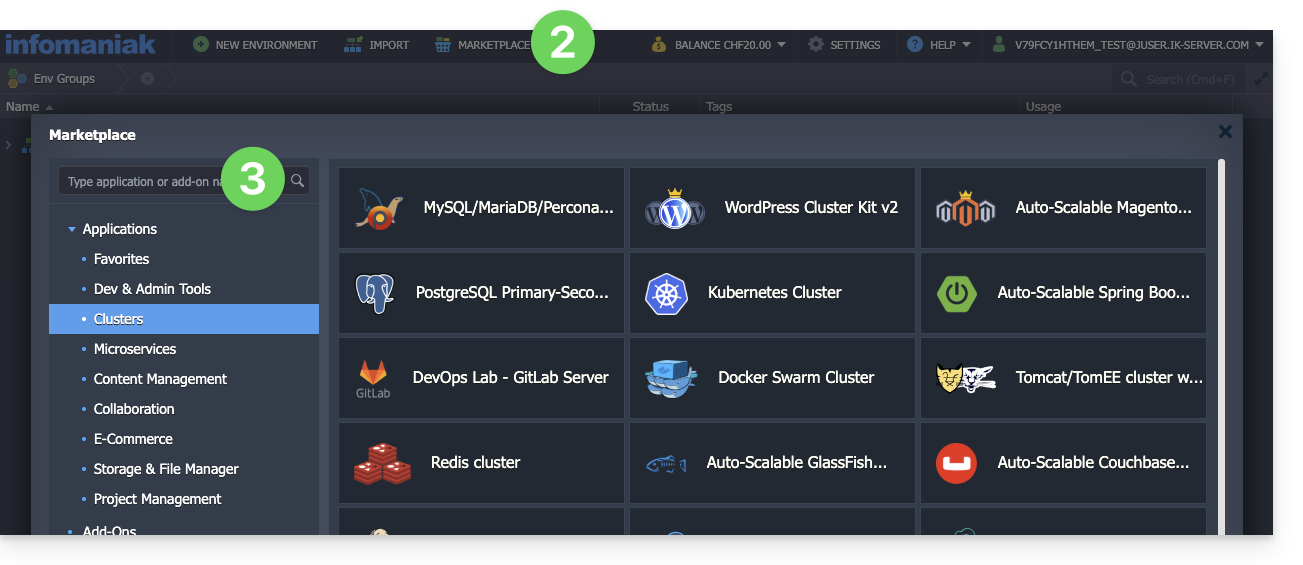
Lista de extensões Jelastic Cloud
- Calculadora de CPU simplifica a estimativa da potência de que precisa em vCPU.
- BitNinja protege, com um único clique, o ambiente Jelastic Cloud de sua escolha contra as ameaças mais comuns.
- Swiss Backup automatiza o backup de pastas e ambientes de sua escolha. O plugin permite configurar a frequência e a política de retenção dos backups.
- ClamAV é um antivírus para analisar, sob demanda, os contêineres que você escolher. É útil para verificar a presença de códigos maliciosos, programas de mineração ou vírus.
- Grafana e Prometheus permitem coletar métricas úteis dos seus contêineres e visualizá-las em painéis modernos no Grafana.
- Zabbix Server simplifica a implementação de um sistema de alertas totalmente personalizável.
- Acesso SSH Direto facilita o acesso aos seus contêineres sem passar pelo gateway público do Jelastic. Ideal para ter um acesso de backup aos seus servidores.
Link para esta FAQ: https://faq.infomaniak.com/174
Esta seção de perguntas frequentes foi útil?
Git e GitHub estão disponíveis na Infomaniak com todas as ofertas de hospedagem em…
e, claro, a oferta Jelastic Cloud, que permitirá uma integração profunda do controle de versão (❓: ajuda).
Link para esta FAQ: https://faq.infomaniak.com/402
Esta seção de perguntas frequentes foi útil?
Este guia explica como ativar o recarregamento automático de crédito do Jelastic Cloud.
Introdução
- O recarregamento permite atualizar automaticamente o saldo assim que este se encontra abaixo do limite definido.
- É possível ativar um acompanhamento por e-mail.
Definir um perfil de pagamento
Para aceder ao Jelastic Cloud:
- Clique aqui para acessar o gerenciamento do seu produto no painel de controle Infomaniak (precisa de ajuda?).
- Clique no botão para adicionar créditos:
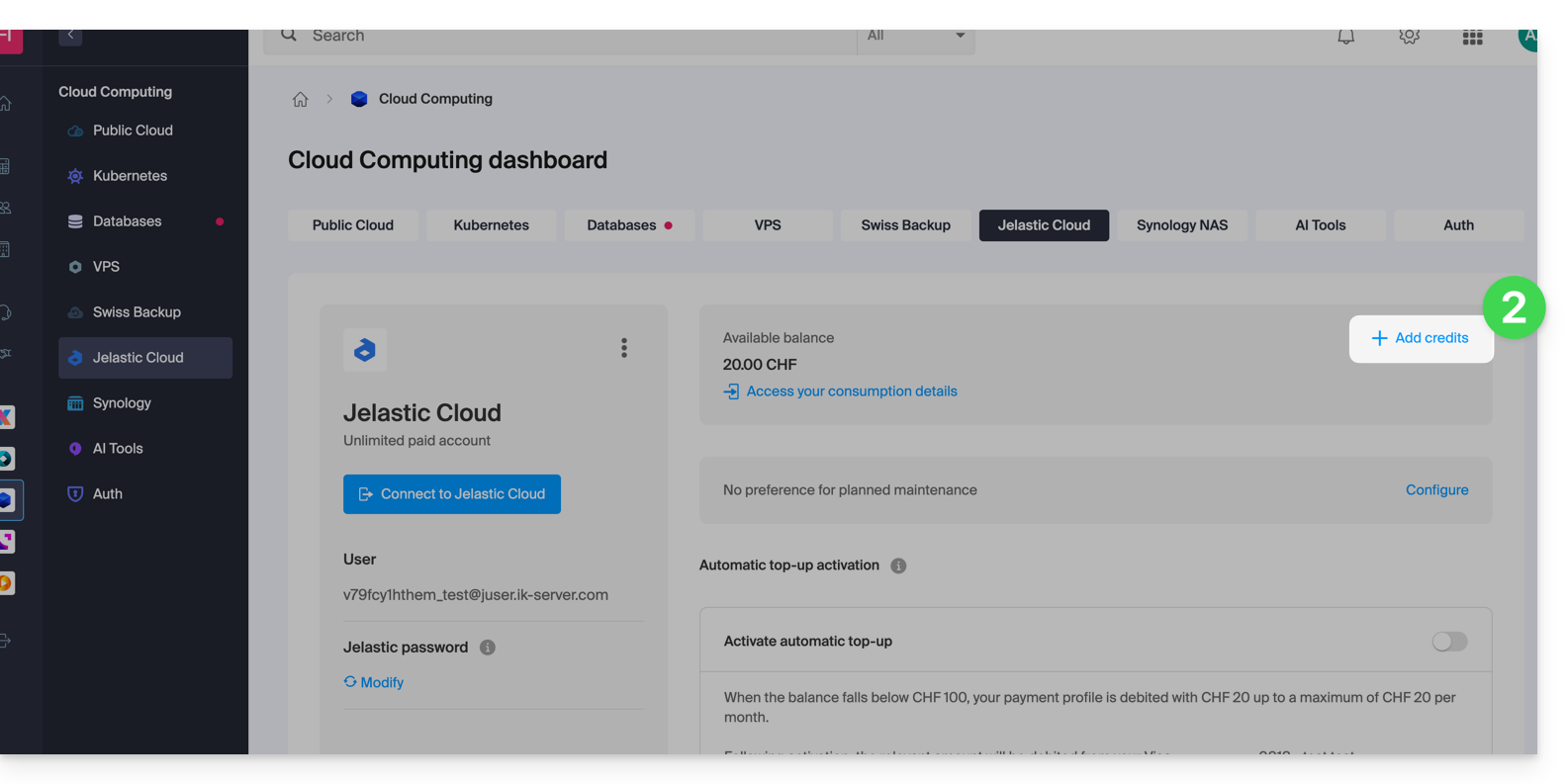
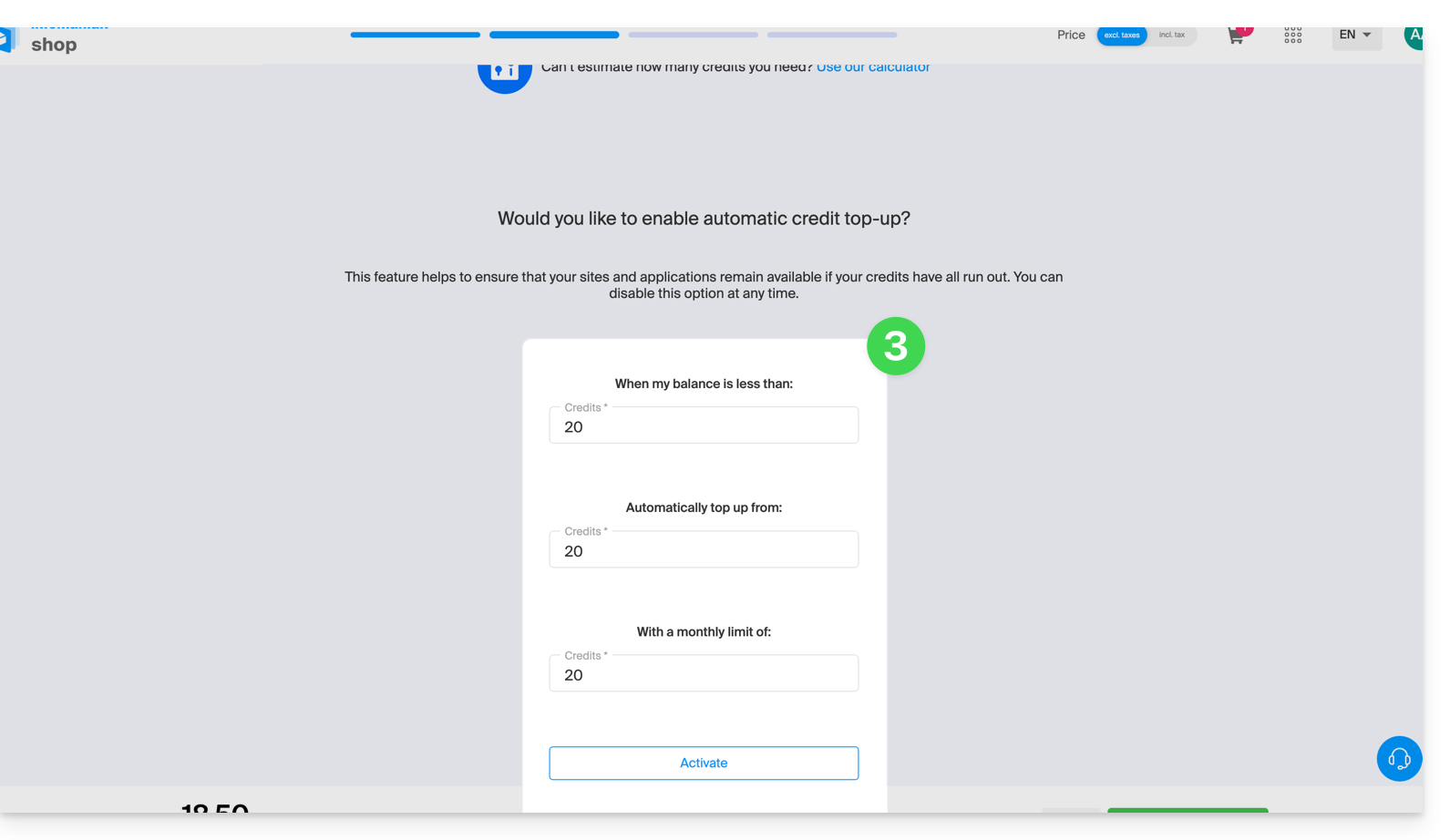
- Desde a loja Infomaniak, ative a recarga automática através da compra de crédito tradicional:
Link para esta FAQ: https://faq.infomaniak.com/1368
Esta seção de perguntas frequentes foi útil?
Este guia explica quais são as diferenças entre as ofertas de hospedagem web da Infomaniak para ajudá-lo a escolher a melhor solução de acordo com suas necessidades de TI.
Se você deseja hospedar seu serviço de e-mail, consulte este outro guia.
1. Criador de Sites
Ofertas independentes, que não dependem de um serviço de hospedagem como o apresentado no ponto 3.
Site Creator é uma solução completa que permite criar facilmente um site institucional, um blog ou uma loja virtual sem a necessidade de conhecimentos técnicos específicos. Oferecido como uma solução independente (standalone, sem a necessidade de hospedagem web tradicional), está disponível em diversas opções, de acordo com as suas necessidades:
- Site Creator Free: uma versão gratuita para testar e personalizar uma página web com as funcionalidades básicas
- Site Creator Lite: ideal para publicar um site institucional ou um blog (até 6 páginas web, 15 GB de espaço em disco e nome de domínio oferecido por 1 ano)
- Site Creator Pro: a solução completa para lojas online (páginas ilimitadas, 50 GB de espaço em disco, funcionalidades de comércio eletrônico com gestão de pagamentos e de estoque, nome de domínio oferecido por 1 ano)
Saiba mais sobre as ofertas Site Creator e compare os recursos.
2. Hospedagem Web Starter
A hospedagem web simples e gratuita
A hospedagem web Starter é oferecida gratuitamente com cada nome de domínio registrado na Infomaniak. Ela oferece 10 MB de espaço em disco para criar um site (páginas básicas em linguagem HTML apenas – sem PHP, sem banco de dados), mesmo sem conhecimento específico, graças à ferramenta Página de Boas-vindas.
- Registar ou transferir um nome de domínio para a Infomaniak
- Saber mais sobre as vantagens incluídas com um nome de domínio
3. Hospedagem web compartilhada
A oferta ideal para criar seus sites
Estas soluções de hospedagem web são ofertas compartilhadas (os sites serão hospedados em servidores cujos recursos são compartilhados com outros clientes). Para garantir a confiabilidade destes serviços compartilhados, os servidores Infomaniak utilizam, em média, apenas 40% da capacidade dos processadores e são equipados com discos SSD profissionais de última geração.
A hospedagem web oferece um mínimo de 250 GB de espaço em disco e permite gerenciar vários sites com vários nomes de domínio. Esta oferta inclui todas as tecnologias normalmente utilizadas para criar sites profissionais: PHP, MySQL, acesso FTP e SSH, certificados SSL e instalação fácil de WordPress ou CMS populares, etc. Também é possível adicionar um site Node.js e/ou Site Creator.
Note que, sem qualquer tipo de hospedagem, também é possível obter e utilizar o Site Creator de forma “autónoma”. Consulte este outro guia.
3. Servidor Cloud
A hospedagem web profissional
Com um Servidor Cloud,os recursos que lhe são alocados não são partilhados com outros clientese pode personalizar a configuração de hardware e software do seu servidor de acordo com as suas necessidades. Um Servidor Cloud também permite utilizar componentes que não estão disponíveis em alojamentos Web partilhados (Node.js, mongoDB, Sol, FFMPEG, etc.).
- Um Servidor Cloud permite administrar facilmente o seu servidor através da mesma interface de administração dos serviços de hospedagem web – você gerencia os sites da mesma forma.
- Um VPS permite gerenciar o seu servidor de forma 100% autônoma, com a versão do Windows ou a distribuição Linux de sua escolha (
Debian,Ubuntu,openSUSE, ...) – são necessárias sólidas competências técnicas para utilizar um VPS, incluindo o VPS Lite.
4. Public Cloud (et Kubernetes Service)
Solução IaaS aberta, comprovada e segura
Para a Infomaniak, é a infraestrutura que impulsiona o kDrive, o Swiss Backup e o Webmail, serviços utilizados por vários milhões de utilizadores. Mas a Cloud Pública está acessível a todos e disponibiliza os recursos de que precisa para o desenvolvimento dos seus projetos.
Com as ofertas personalizadas e sob medida, você não terá dificuldades em gerenciar seu orçamento de desenvolvimento. Sem custos de ativação. Sem valor mínimo. Cancelável a qualquer momento. Você paga apenas pelos recursos efetivamente utilizados com o Public Cloud no final de cada mês, o mesmo para o Kubernetes Service.
5. Jelastic Cloud
Hospedagem web personalizada com as tecnologias de sua preferência
Jelastic Cloud permite criar ambientes de desenvolvimento personalizados com as tecnologias de sua preferência (PHP, Java, Docker, Ruby, etc.). É uma oferta de nuvem flexível:
- Redimensionamento horizontal e vertical dos recursos.
- Pagamento com base no consumo real dos recursos.
- Personalização fácil da sua infraestrutura (redundância, IP, SSL, balanceamento de carga, etc.).
Link para esta FAQ: https://faq.infomaniak.com/2019
Esta seção de perguntas frequentes foi útil?
Este guia aborda a colaboração de utilizadores em ambientes Jelastic Cloud, funcionalidade que não é oferecida diretamente na infraestrutura Jelastic atual.
Conceder acesso a outros utilizadores
As soluções propostas para que outros utilizadores possam aceder ao seu ambiente Jelastic dependem do tipo de acesso desejado:
Primeiro caso
Deseja partilhar o acesso ao painel de controlo Jelastic (note que o utilizador a quem estes direitos são atribuídos terá acesso a todos os ambientes presentes no painel de controlo do Jelastic Cloud).
Para esta operação, é necessário atribuir permissões ao produto diretamente durante a criação do usuário. Permissões de colaborador são suficientes.
Segundo cenário
Você deseja compartilhar as permissões em um único ambiente, no entanto, essa ação não é possível no momento, pois a colaboração está desativada por motivos de segurança.
É possível transferir um ambiente para a pessoa desejada, desde que esta possua uma conta Jelastic Cloud no mesmo grupo de faturamento (faturamento em EUR ou CHF, por exemplo). Para realizar esta ação, é necessário alterar o proprietário do ambiente (ação que pode ser realizada diretamente no painel do Jelastic, na aba de configuração do ambiente).
Consulte também este outro guia.
Link para esta FAQ: https://faq.infomaniak.com/2152
Esta seção de perguntas frequentes foi útil?
Obrigado por escolher a Infomaniak para criar a sua PaaS!
Este guia ajudará você a utilizar rapidamente as principais funcionalidades do seu novo produto Jelastic Cloud.
Perguntas frequentes
- Apresentação do Jelastic
- Contêineres e nós: como funcionam
- Faturação do Jelastic e funcionamento dos Cloudlets
- Tecnologias compatíveis com o Jelastic Cloud
- Criar um VPS com o Jelastic Cloud
- Métodos de implantação de uma aplicação
- Diferenças entre Jelastic Cloud e um VPS
- Recursos disponíveis de acordo com o tipo de conta
Acesse todas as perguntas frequentes sobre o Jelastic Cloud.
Recursos técnicos
Consulte a documentação oficial do Jelastic (em inglês) para obter mais detalhes técnicos:
- Implantação de aplicações em cluster (WordPress, Magento, etc.)
- Criação de um ambiente
- Implantação de aplicações ou código
- Configuração dos servidores (Java, PHP, Ruby, etc.)
- Associar um nome de domínio
- Adicionar um endereço IP público
- Acompanhamento das estatísticas da aplicação
- Acesso SSH ao seu ambiente
- Gestão dos alertas de consumo de recursos
- Redimensionamento dinâmico: horizontal e vertical
- Instalar pacotes sem acesso root com o Yum Packages Installer
Para qualquer dúvida ou dificuldade, não hesite em contactar o suporte da Infomaniak.
Link para esta FAQ: https://faq.infomaniak.com/2252
Esta seção de perguntas frequentes foi útil?
Este guia explica como implantar o n8n usando sua imagem Docker oficial na plataforma Jelastic Cloud (PaaS Infomaniak).
Introdução
- Ao contrário de ferramentas como Zapier ou Make, o n8n, uma ferramenta de automação de fluxo de trabalho com código aberto, pode ser auto-hospedado, permitindo que você mantenha o controle total sobre seus dados e conecte centenas de serviços por meio de uma interface visual intuitiva.
- A imagem oficial utilizada é
n8nio/n8n. - O uso de um banco de dados externo (PostgreSQL) é fortemente recomendado para garantir a estabilidade e o gerenciamento de grandes volumes de dados.
- A porta interna padrão é a
5678.
1. Criação do ambiente Jelastic
Siga os passos abaixo para configurar a sua topologia:
- Faça login no painel de controle do Jelastic Cloud.
- Clique em Novo ambiente.
- No assistente de criação:
- Vá para a aba Docker.
- Clique em Selecionar uma imagem e procure por
n8nio/n8n. Defina uma versão (ex:latestou uma versão específica como1.75.0). - Balanceador de carga: adicione um nó (ex: Nginx) para gerenciar o SSL e o acesso público.
- Base de dados: adicione um nó PostgreSQL (versão 14+ recomendada).
- Atribua Cloudlets suficientes (8 min. recomendados para n8n em produção) e dê um nome ao seu ambiente.
- Clique em Criar.
Observação: adicionar um balanceador de carga permite ativar facilmente o módulo Let's Encrypt para proteger suas comunicações e seus webhooks em HTTPS.
2. Configuração do armazenamento e da persistência
Por padrão, os dados do Docker são efêmeros. É imperativo montar um volume:
- No nó n8n, clique no ícone Configuração (o ícone de engrenagem).
- Acesse a seção Volumes.
- Clique em Adicionar:
- Caminho local:
/home/node/.n8n
- Caminho local:
- Salve; os arquivos de configuração e a criptografia local serão preservados.
3. Variáveis de ambiente essenciais
Acesse a seção Variáveis de ambiente do contêiner n8n para definir os seguintes parâmetros:
| Variável | Valor sugerido / Descrição |
|---|---|
N8N_HOST | O nome de domínio do seu ambiente (ex: n8n.nom.jpc.infomaniak.com). |
WEBHOOK_URL | A URL completa em HTTPS (ex: https://n8n.mondomaine.com/). Essencial para os acionadores HTTP. |
GENERIC_TIMEZONE | Europe/Bern (ou seu fuso horário local). |
N8N_ENCRYPTION_KEY | Gere uma cadeia aleatória longa. Anote-a com cuidado! |
Ligação com o PostgreSQL
Para utilizar a base de dados externa, adicione também:
DB_TYPE:postgresdbDB_POSTGRESDB_HOST: Endereço IP interno ou DNS do nó Postgres.DB_POSTGRESDB_PORT:5432DB_POSTGRESDB_DATABASE: Nome da base de dados (ex:n8n).DB_POSTGRESDB_USER: Seu nome de usuário.DB_POSTGRESDB_PASSWORD: A sua senha.
4. Primeiro acesso e segurança
- Após reiniciar o contêiner, abra o URL do seu ambiente.
- Criação da conta: o n8n solicitará que você crie a primeira conta de administrador.
- SSL: se você estiver usando um domínio personalizado, instale o complemento Let's Encrypt no nó do balanceador de carga.
A partir da versão 1.0, as variáveis antigas N8N_BASIC_AUTH estão obsoletas. O gerenciamento de usuários agora é feito diretamente na interface gráfica do n8n.
5. Verificação pós-instalação
- Crie um fluxo de trabalho de teste com um nó Webhook e verifique se a URL gerada está em
https. - Verifique nos logs do contêiner se não há erros de conexão com o banco de dados.
Link para esta FAQ: https://faq.infomaniak.com/2253
Esta seção de perguntas frequentes foi útil?
Este guia é sobre o Jelastic Cloud, que permite criar, com um único clique, contêineres pré-configurados para Java, PHP, Ruby, Node.js, Python e Go. Você também tem a opção de implantar qualquer contêiner Docker personalizado na nuvem.
Introdução
- No contexto do Jelastic, um contêiner ou nó refere-se a uma unidade de isolamento e execução na qual suas aplicações são implantadas e executadas, ao mesmo tempo em que se beneficiam dos recursos fornecidos pelo nó no qual estão localizadas.
- Isso permite uma gestão eficiente das aplicações e uma otimização dos recursos de acordo com as necessidades do seu projeto.
Contêiner
No Jelastic, um contêiner é um ambiente de execução virtual que isola suas aplicações e suas dependências do restante do sistema. Pode ser um contêiner Docker ou outro tipo de contêiner suportado pelo Jelastic.
Cada contêiner funciona como uma unidade distinta, o que significa que você pode executar várias aplicações em contêineres diferentes sem que elas interfiram umas nas outras.
Nó
Um nó é uma instância de servidor virtual ou físico na qual um ou mais contêineres podem ser implantados. Em outras palavras, um nó é uma máquina virtual ou física que fornece os recursos (como CPU, memória, armazenamento, etc.) necessários para executar suas aplicações.
O Jelastic distribui automaticamente os contêineres em diferentes nós, com base na carga e nos recursos disponíveis, para garantir um desempenho ideal e alta disponibilidade.
Link para esta FAQ: https://faq.infomaniak.com/2254
Esta seção de perguntas frequentes foi útil?
Este guia detalha o funcionamento da faturação do seu Jelastic Cloud Infomaniak.
Preços flexíveis
O Jelastic Cloud oferece um modelo de preços flexível que se adapta a todos os tipos de utilização:
- Os recursos da sua PaaS são provisionados com unidades granulares, os Cloudlets: a potência dos seus ambientes é, assim, determinada em função do número de Cloudlets que aloca a eles, um Cloudlet oferecendo 128 MB de RAM e 400 MHz de CPU.
- O redimensionamento automático vertical e horizontal dos recursos oferece a garantia de que você aproveitará o melhor desempenho para suas aplicações, sem ter que pagar por recursos não utilizados.
- Ao consumir Cloudlets, você beneficia automaticamente de descontos de até 65%.
Diferença entre Cloudlets reservados e dinâmicos
Ao criar um contêiner, você pode escolher alocar Cloudlets reservados e dinâmicos ao seu ambiente:
- Os Cloudlets reservados são recursos disponíveis permanentemente; são mais vantajosos do que os Cloudlets dinâmicos, mas são cobrados independentemente do seu uso.
- Os Cloudlets dinâmicos são recursos que são ativados em caso de picos de consumo; são cobrados apenas quando utilizados e de acordo com as suas regras.
Se não conseguir estimar os recursos alocados de que precisa, recomenda-se começar com um número limitado de Cloudlets e ajustar a sua configuração posteriormente. O período de teste de 14 dias também permite avaliar as suas necessidades sem qualquer compromisso.
Recursos gratuitos incluídos
Consulte este outro guia se precisar de informações sobre os recursos e funcionalidades de uma conta paga.
Saiba mais
Link para esta FAQ: https://faq.infomaniak.com/2255
Esta seção de perguntas frequentes foi útil?
Jelastic Cloud Infomaniak permite criar servidores virtuais privados personalizados com CentOS, Ubuntu, Debian, AlmaLinux 8.7, Imagem Docker, graças a pacotes pré-configurados e certificados: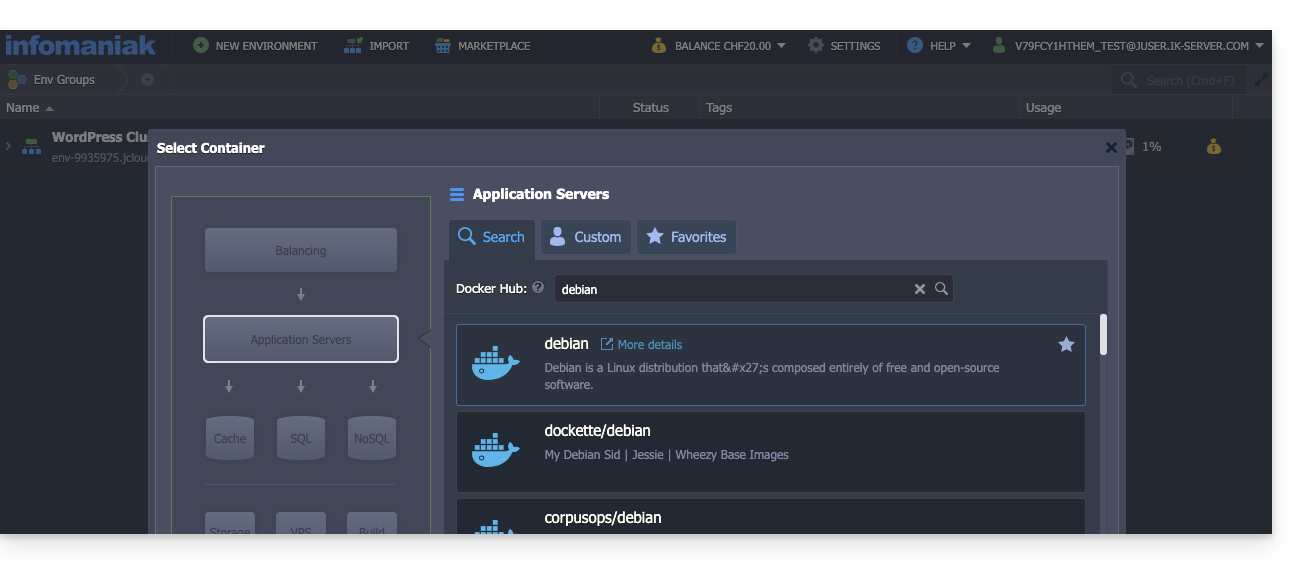
Consulte o Guia de Início do Jelastic Cloud
Link para esta FAQ: https://faq.infomaniak.com/2256
Esta seção de perguntas frequentes foi útil?
Jelastic Cloud Infomaniak é uma das soluções PaaS mais completas e flexíveis do mercado.
Introdução
Node.js= nome oficial da linguagem/ambiente.NodeJS= nome "técnico" ou simplificado em alguns contextos (geralmente por razões práticas, não há diferença técnica real).
Linguagens suportadas
Poderá implementar aplicações Java, PHP, Ruby, Node.js, Python e Go sem ter de adaptar o seu código, utilizando Docker, Kubernetes, GIT, SVN ou extensões integradas como Maven, Ant, Eclipse, NetBeans ou ainda IntelliJ IDEA.
Bases de dados SQL e NoSQL suportadas
MariaDB, MongoDB, MySQL, Postgre, Redis, Neo4j, Cassandra, OrientDB, PerconaDB, CouchDB, Couchbase.
Servidores de aplicação suportados
Tomcat, TomEE, Jetty, GlassFish, Payara, Apache PHP, Apache Ruby, Apache Python, NGINX PHP, NGINX Ruby, NodeJS, JBoss, SmartFoxServer, SpringBoot, WildFly, Golang.
Balanceadores de carga suportados
NGINX, Apache Balancer, HAProxy, Varnish.
Link para esta FAQ: https://faq.infomaniak.com/2257
Esta seção de perguntas frequentes foi útil?
Na Jelastic Cloud, as aplicações podem ser implementadas utilizando um ficheiro local (zip, war, ear) ou através de GIT, SVN, com atualizações automáticas.
A Jelastic também permite o uso de outras ferramentas de implementação através das seguintes extensões: Maven, Jenkins, Ant, Eclipse, NetBeans, IntelliJ IDEA.
Saiba mais
Link para esta FAQ: https://faq.infomaniak.com/2258
Esta seção de perguntas frequentes foi útil?
Este guia compara as diferentes soluções de Cloud da Infomaniak para o ajudar a escolher a infraestrutura mais adequada às suas necessidades. Em todos os casos, terá acesso a recursos dedicados e escaláveis.
Jelastic Cloud (PaaS)
Jelastic Cloud é uma plataforma que permite criar ambientes de desenvolvimento sob demanda, sem gerenciar a administração do sistema:
- Máxima flexibilidade: a plataforma ajusta automaticamente seus recursos de acordo com a carga em tempo real.
- Vantagem: ideal se o seu consumo (CPU, RAM) variar muito ao longo do ano.
- Faturação: você paga apenas pelos recursos que realmente utilizou.
Servidor Cloud Gerenciado
Um Servidor Cloud permite gerenciar sites e aplicações web por meio de uma interface simplificada, ao mesmo tempo em que possibilita a instalação de softwares específicos:
- Simplicidade: tão fácil de usar quanto uma hospedagem compartilhada, mas com o poder de recursos dedicados.
- Vantagem: ideal se o seu consumo de recursos for estável e previsível.
- Gestão: A Infomaniak trata da manutenção técnica e das atualizações de segurança do servidor.
VPS Cloud e VPS Lite
Os Servidores Virtuais Privados (VPS) na Nuvem ou VPS Lite oferecem acesso root completo a uma distribuição Linux:
- Controle total: você gerencia todo o seu servidor e suas configurações de software.
- Competências exigidas: é indispensável ter uma sólida experiência técnica em administração de sistemas.
- Utilização: recomendado para necessidades específicas com um consumo de recursos estável.
Para necessidades de infraestrutura em grande escala, consulte a oferta Cloud Pública.
Link para esta FAQ: https://faq.infomaniak.com/2259
Esta seção de perguntas frequentes foi útil?
Este guia apresenta o Jelastic Cloud, resultado de uma estreita colaboração entre a Infomaniak e a empresa Jelastic (Virtuozzo).
Infomaniak
A Infomaniak garante a infraestrutura, o suporte e o desempenho, a segurança e a fiabilidade da solução. A sua infraestrutura garante sempre a disponibilidade e a fluidez das aplicações, respondendo aos picos de tráfego e reduzindo automaticamente o consumo de recursos durante os períodos de menor atividade. Esta flexibilidade otimiza a relação custo/desempenho, contabilizando apenas os recursos realmente utilizados.
Com este serviço de Cloud, os recursos informáticos ajustam-se às flutuações da procura, mantendo o controlo orçamental. Todos os dados são geridos na Suíça, nos datacenters da Infomaniak, com suporte disponível em cinco idiomas.
Jelastic
Jelastic garante a manutenção, o desenvolvimento de software e fornece a parte de software do produto.
Fundada em 2011, a Jelastic automatiza a criação, o redimensionamento, o agrupamento em cluster e as atualizações de segurança de aplicações tradicionais e nativas na nuvem. Também oferece suporte a ambientes Java, PHP, Ruby, Node.js, Python, .NET, Go, bem como ao cluster Docker.
Link para esta FAQ: https://faq.infomaniak.com/2260
Esta seção de perguntas frequentes foi útil?
Este guia apresenta recomendações a serem seguidas em caso de erro 502 com o Jelastic Cloud da Infomaniak.
Em caso de problema
Verifique os seguintes pontos:
- Verifique o URL inserido na barra de endereço do navegador, como Brave, Chrome, Edge, Firefox, Opera, Safari…
- No seu painel Jelastic, clique no ambiente em questão e, em seguida, no ícone "Abrir no navegador":

- Verifique se o ambiente não está parado ou em pausa.
Se o problema persistir:
- Verifique se o certificado SSL está ativado.
- Verifique se o aplicativo está funcionando corretamente.
Se estas recomendações não resolverem o problema, entre em contato com o suporte da Infomaniak.
Link para esta FAQ: https://faq.infomaniak.com/2261
Esta seção de perguntas frequentes foi útil?
Este guia detalha os recursos dos quais você pode usufruir com um Jelastic Cloud, dependendo do tipo de conta que você possui.
Introdução
- Todas as contas Jelastic Cloud oferecem as seguintes vantagens:
- Aplicações web: mais de 40 CMS instaláveis com um único clique.
- Suporte a diversas tecnologias.
- Bancos de dados: SQL e NoSQL.
- Certificados SSL: gratuitos com o Let's Encrypt.
Conta de teste de 14 dias
O período de teste permite experimentar o Jelastic Cloud sem compromisso. Assim, pode verificar se esta solução corresponde às suas expectativas e estimar os recursos de que necessita. Graças à calculadora, poderá determinar o preço por hora ou por mês do seu PaaS com base nos seus testes.
Durante o período de teste, tem à sua disposição os seguintes recursos:
- número de ambientes: 5
- potência: 8 Cloudlets (3,2 GHz de CPU e 1 GB de RAM)
- armazenamento SSD: 10 GB
- largura de banda: 20.000 Kb/s
Os endereços IP públicos, os certificados SSL personalizados, as imagens Docker e os VPS Elásticos estão disponíveis apenas com uma conta paga.
Conta paga
Assim que você adquire créditos Jelastic, as restrições da conta de avaliação são removidas e você pode ajustar livremente os recursos da sua plataforma PaaS de acordo com suas necessidades:
- número de ambientes: de acordo com suas necessidades
- potência: personalizável de acordo com as suas necessidades
- armazenamento SSD: 20 GB incluídos, expansível até 100 GB por ambiente
- tráfego de entrada e saída: 2,8 GB / hora (2,4 TB / mês) incluído, depois cobrado por GB
- largura de banda: 400.000 Kb/s
Link para esta FAQ: https://faq.infomaniak.com/2262
Esta seção de perguntas frequentes foi útil?
Este guia explica como alterar a senha do console do seu Jelastic Cloud.
Alterar a senha
Para acessar a interface de administração do seu servidor Jelastic Cloud:
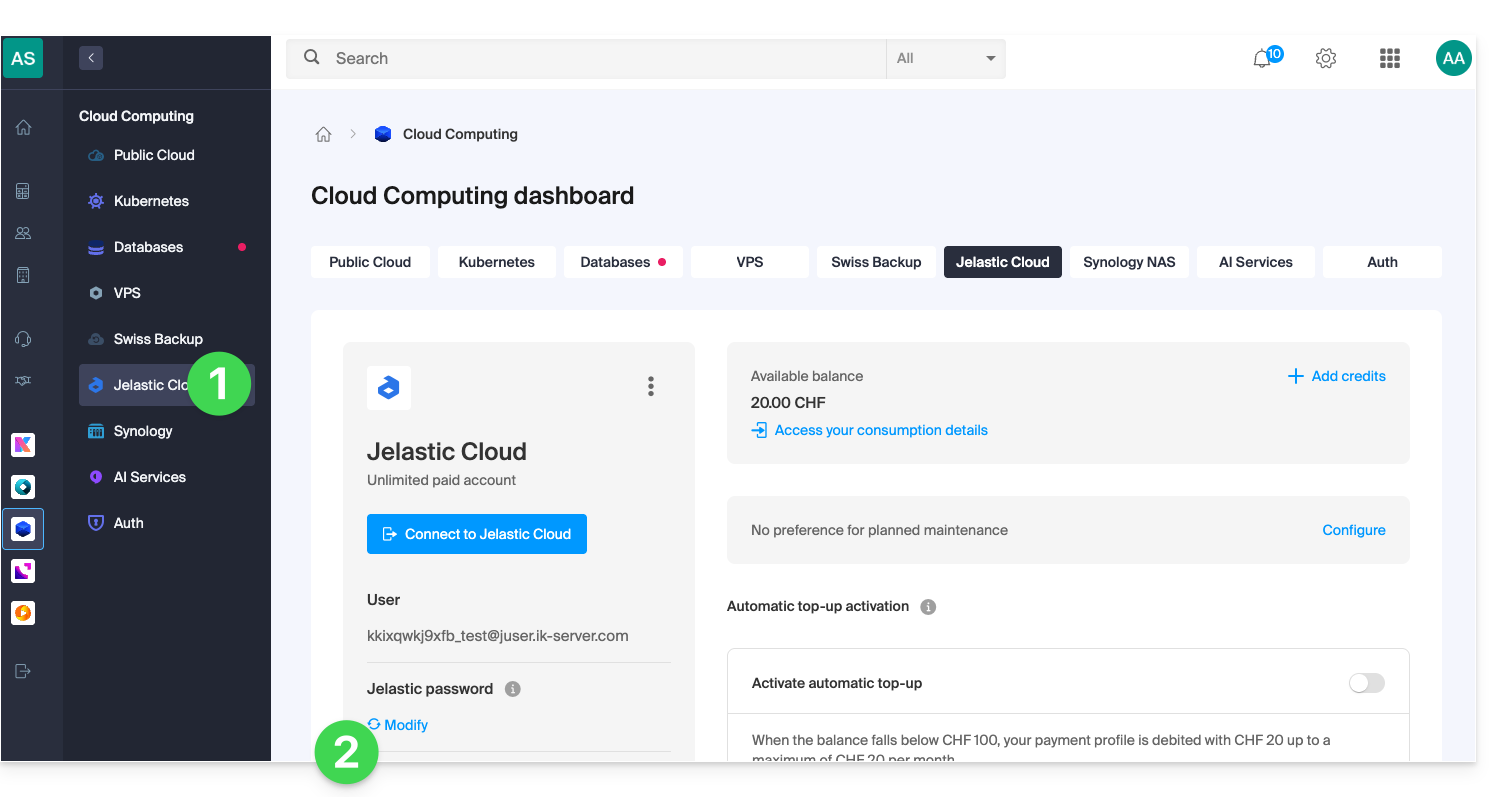
- Clique aqui para acessar o gerenciamento do seu produto no Manager Infomaniak (precisa de ajuda?).
- Clique em Editar em Senha Jelastic:
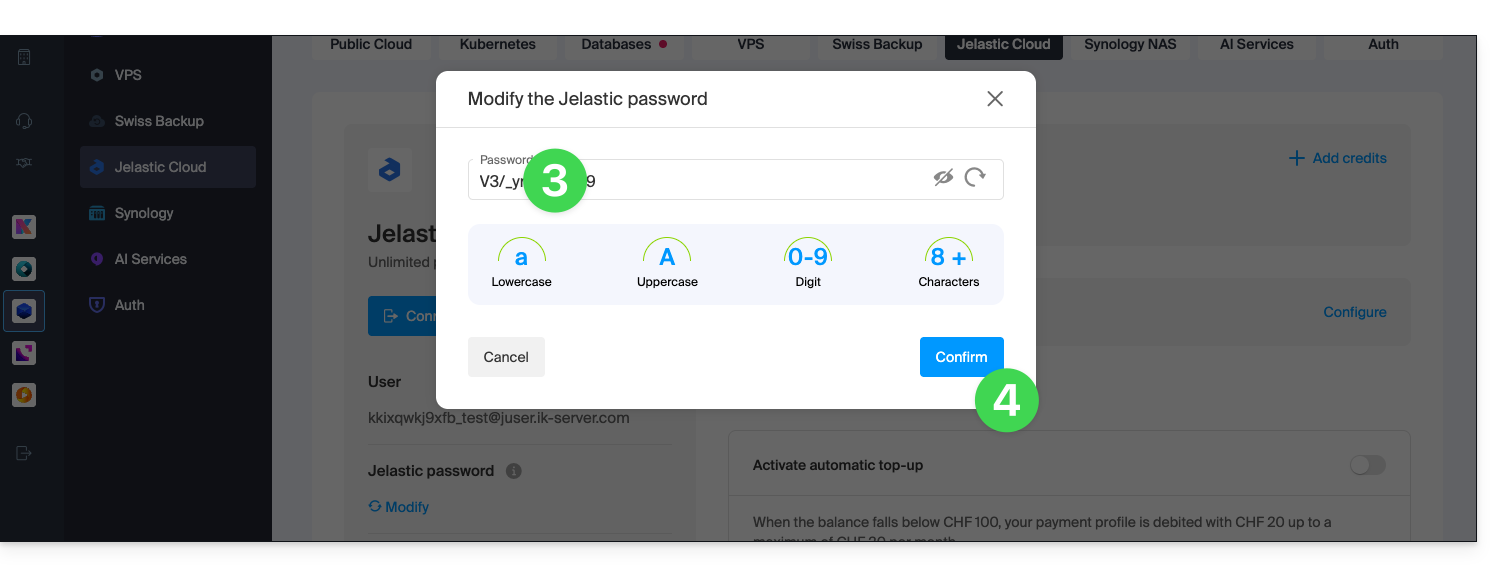
- Escolha uma nova senha.
- Confirme a alteração:
- Agora você pode acessar o console com esta nova senha e seu nome de usuário (por exemplo, XXXYYYZZZ@juser.ik-server.com).
Perdeu as suas palavras-passe?
Não confunda a palavra-passe da sua conta Infomaniak com a que lhe permite gerir o seu Jelastic Cloud:
- A sua conta Infomaniak permite gerir os seus produtos Infomaniak em manager.infomaniak.com
- A consola Jelastic Cloud / Virtuozzo permite administrar o seu servidor app.jpc.infomaniak.com, por exemplo
Link para esta FAQ: https://faq.infomaniak.com/2345
Esta seção de perguntas frequentes foi útil?
Este guia detalha o acesso root à Jelastic Cloud para executar comandos em qualquer um dos seus contêineres.
Introdução
- Alguns contêineres Jelastic Cloud não têm acesso root por padrão.
- É possível habilitar esse acesso nos contêineres de sua escolha por meio da instalação de um complemento.
- Consulte também este outro guia se precisar de informações sobre a instalação de pacotes sem acesso root.
Permitir o acesso root
Para isso:
- Acesse o painel de controle do seu Jelastic Cloud.
- Clique no botão Importar na barra de menu superior.
- Vá para o separador JPS.
Copie o seguinte código e cole-o na aba JPS:
type: update name: Root Access targetNodes: nodeGroup: '*' onInstall: - cmd[${targetNodes.nodeGroup}]: |- TARGET_UID=$(id -u jelastic 2>/dev/null) || TARGET_UID="700" getent passwd "${TARGET_UID}" &>/dev/null && TARGET_USER=$(getent passwd "${TARGET_UID}" | cut -d: -f1) || TARGET_USER="jelastic" sed -i "\$a${TARGET_USER}\ ALL=NOPASSWD\:\ ALL" /etc/sudoers; echo ${TARGET_USER} user: root - setGlobals: sudo_user: ${response.out} onUninstall: cmd[${targetNodes.nodeGroup}]: |- sed -i "/${globals.sudo_user}\ ALL=NOPASSWD\:\ ALL/d" /etc/sudoers user: root- Clique no botão Importar.
- Escolha o ambiente e o nó nos quais o acesso root é necessário.
- Clique no botão Instalar.
Para executar comandos como administrador, conecte-se via SSH à sua aplicação e insira o comando sudo su.
Link para esta FAQ: https://faq.infomaniak.com/2346
Esta seção de perguntas frequentes foi útil?
O Jelastic oferece um complemento que permite instalar pacotes que exigem permissões sudo sem a necessidade de acesso root.
Informações adicionais
O complemento Instalador de Pacotes Yum permite instalar pacotes que não são fornecidos por padrão nos contêineres Jelastic (pacotes RPM, ferramentas de desenvolvimento, etc.) usando o yum. Ele oferece uma alternativa para instalar pacotes quando o acesso root direto não está disponível.
Todas as informações necessárias para usar este complemento estão descritas no readme do complemento.
Exemplos de ações comuns realizadas através do complemento:
- Instalar ferramentas de compilação:
gcc autoconf make - Instalar um RPM externo: fornecer o URL completo do RPM no campo de instalação.
Link para esta FAQ: https://faq.infomaniak.com/2347
Esta seção de perguntas frequentes foi útil?