Base de conhecimento
1000 perguntas frequentes, 500 tutoriais e vídeos explicativos. Aqui, você encontra apenas soluções!
Substitua o Skype pelo Infomaniak
A Infomaniak oferece soluções para substituir o Skype, seja para chamadas individuais, reuniões remotas ou comunicação em grupo.
kMeet, a videoconferência para particulares e empresas
Apesar do seu sucesso inicial, a plataforma de comunicação Skype viu o seu uso diminuir face ao surgimento de soluções melhor integradas aos novos modelos de colaboração.
Uma das formas mais simples de substituir o Skype é adotar o kMeet:
- Chamadas de áudio e vídeo ilimitadas
- Acesso sem registo
- Compatibilidade com Web, dispositivos móveis e desktop
- Chat integrado e reações (emojis, sons)
- Compartilhamento de tela com ferramentas de desenho, controle remoto
- Salas de discussão (salas de subdivisão)
- Integração com a agenda (criação de link para videoconferência)
- Integração com o kDrive para armazenamento das gravações de reuniões
- Integração com o kChat para chamadas de vídeo
- Respeito pela privacidade (sem publicidade, hospedagem na Suíça)
- Segurança com criptografia AES-256
- Ecológico (energia renovável, compensação de CO₂)
Substituir o Skype por kMeet
A alternativa kMeet para substituir o Skype pode ser implementada de várias maneiras:
Para iniciar uma comunicação privada entre várias pessoas na Internet, basta que uma delas acesse o kMeet e compartilhe o link da reunião com as outras. Veja o procedimento passo a passo:
- Acesse kmeet.infomaniak.com em um navegador como Brave, Chrome, Edge, Firefox, Opera, Safari…
- Inicie uma reunião (❓: ajuda):
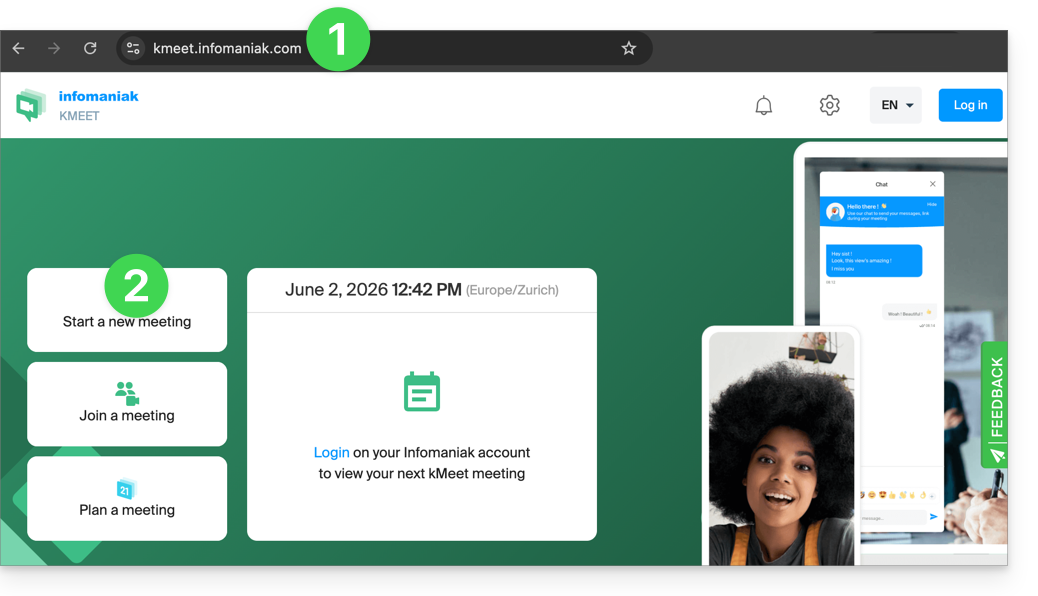
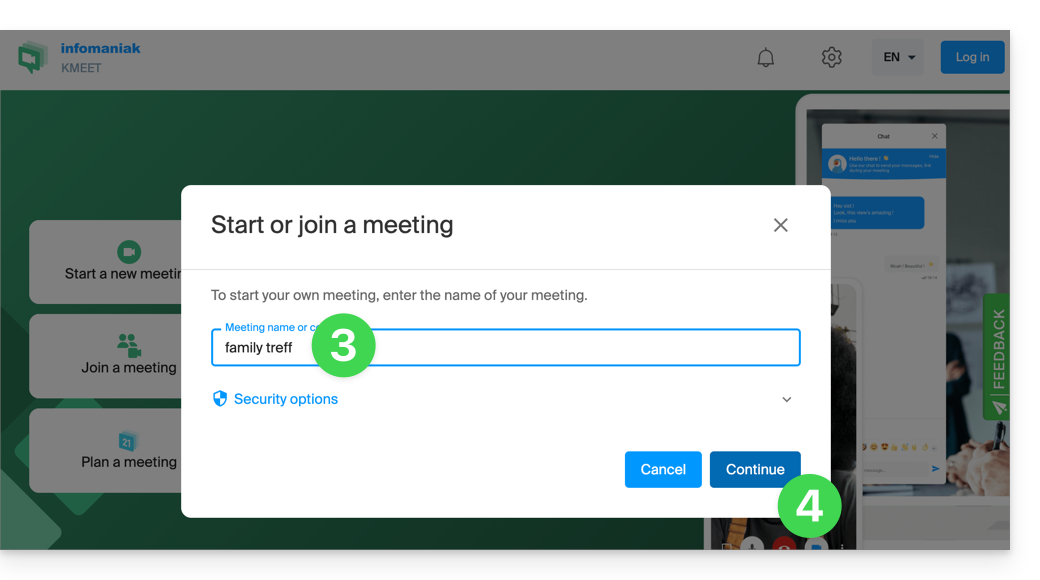
- Insira um nome para a reunião, o que permite indicar aos futuros participantes o tema da discussão à qual se juntarão.
- Clique no botão para Continuar:
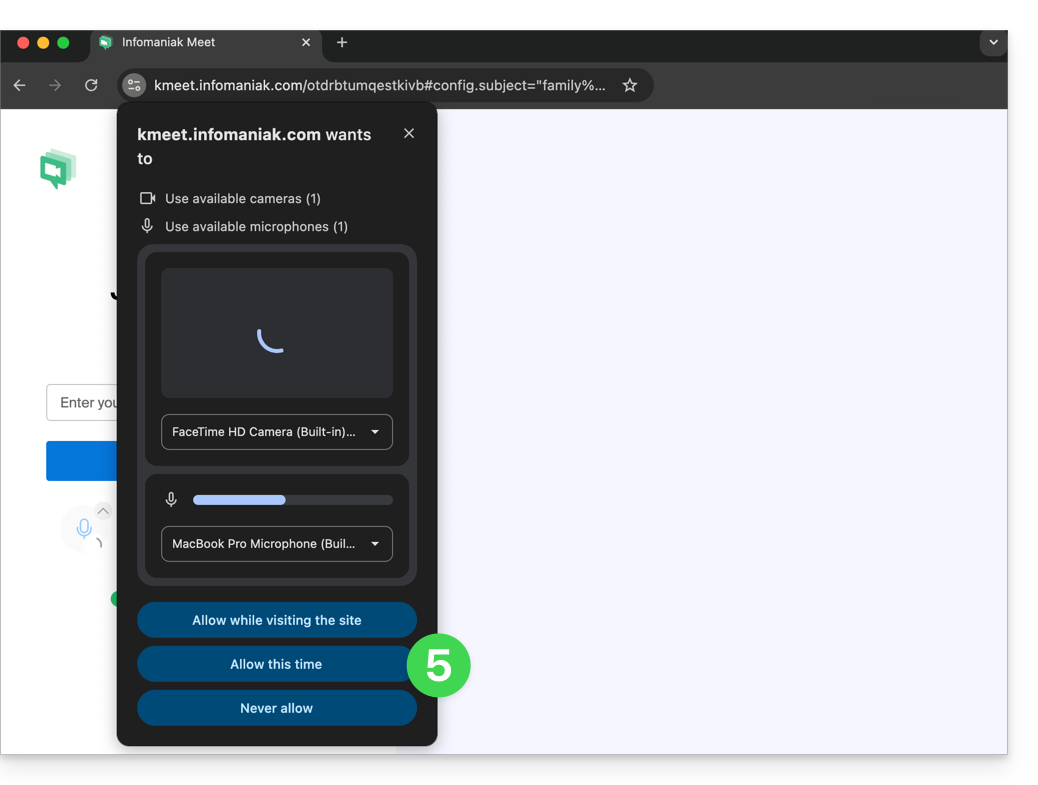
- Conceda as permissões necessárias ao kMeet:
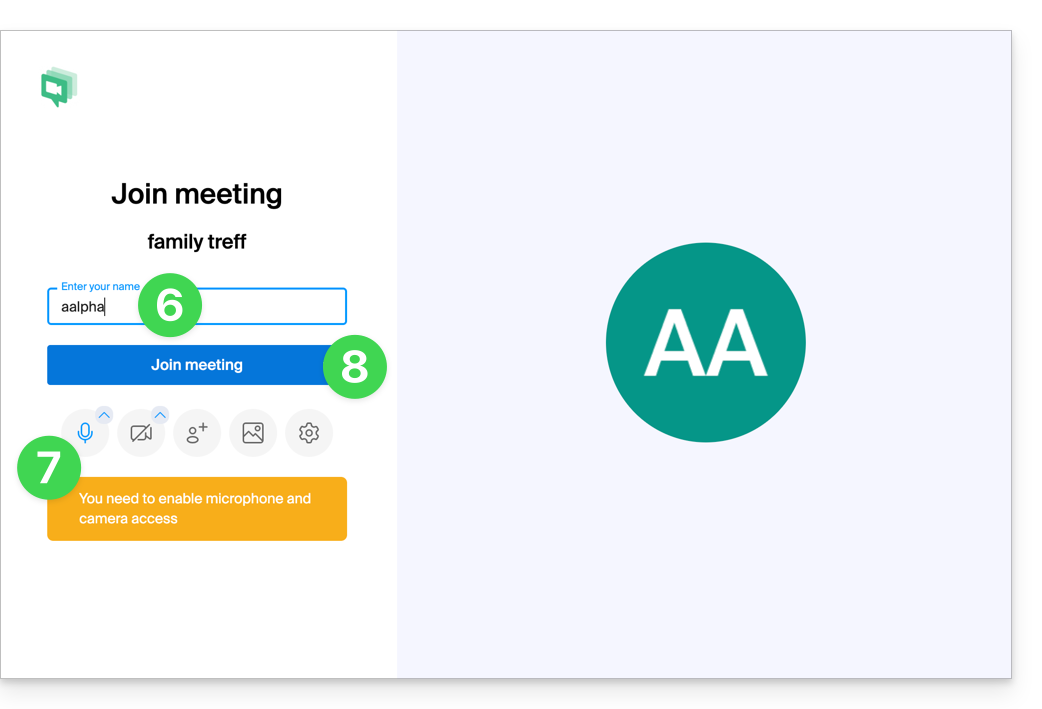
- Insira o seu nome, que será o nome que os outros participantes verão.
- Ative ou desative os eventuais canais de comunicação caso não devam ser utilizados neste momento.
- Clique no botão para entrar na sala de reunião virtual (como primeiro participante, já que, por enquanto, você é o único convidado):
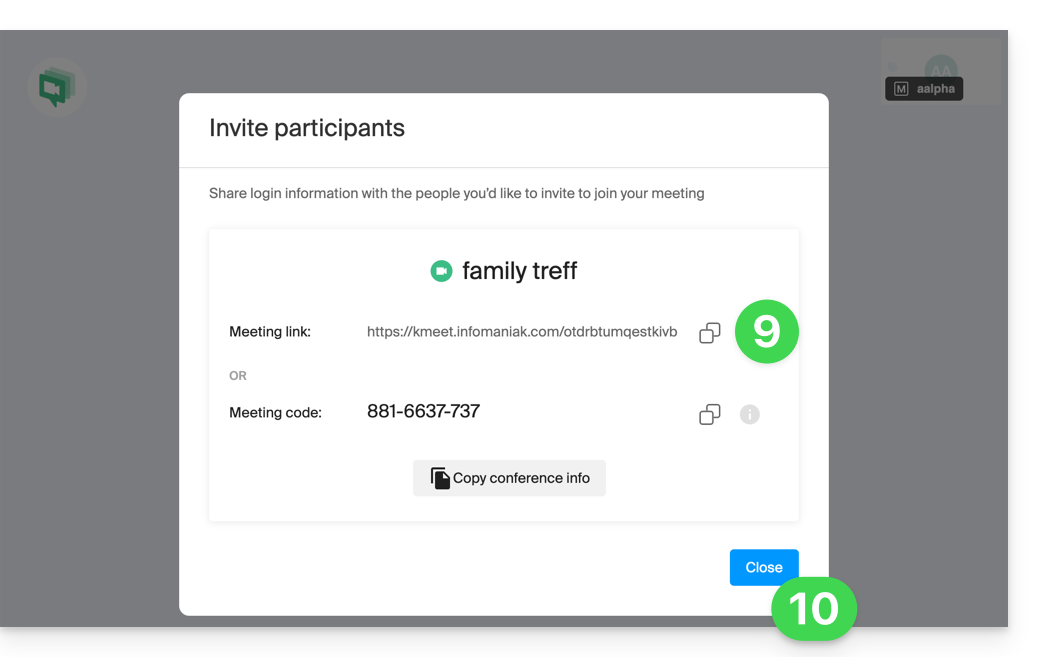
- Pronto, a sala foi criada e agora você pode copiar as informações sobre esta sessão e enviá-las aos seus contatos para que eles possam participar (eles só precisarão clicar no link que você enviar).
- Feche a janela de informações para que todos possam conversar:
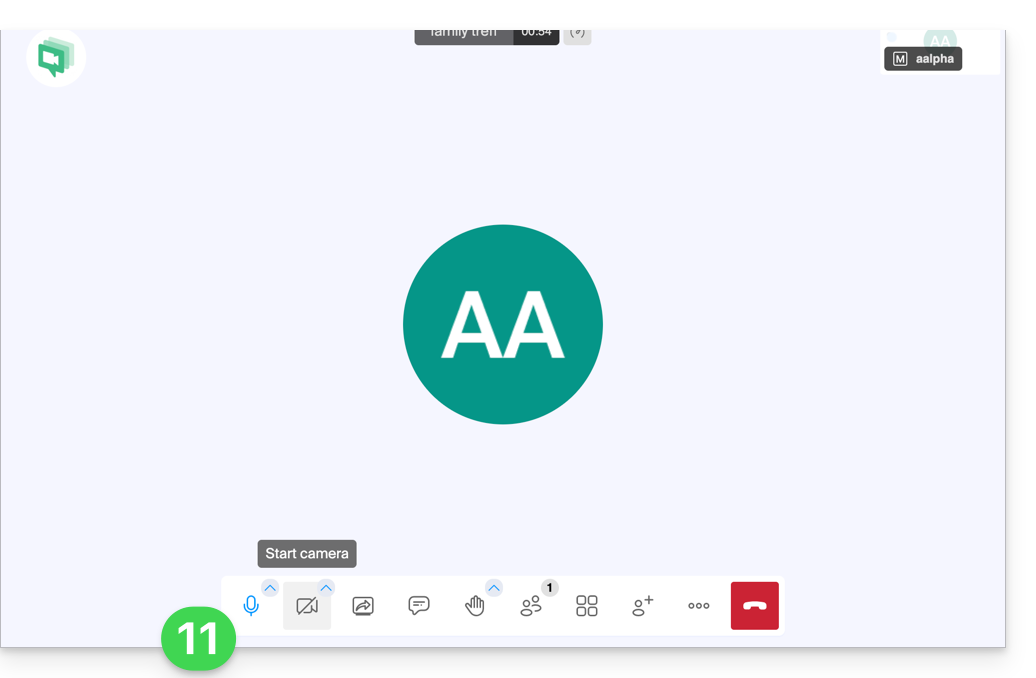
- A barra de ferramentas na parte inferior da tela permite ativar ou desativar o microfone, a câmera, etc.:
Para descobrir todas as possibilidades que o kMeet oferece, consulte este outro guia.
2. Agendamento e convites com my kSuite
Para trabalhar de forma eficiente, o kMeet pode ser conectado diretamente à sua agenda profissional. Isso significa que, sempre que você criar um evento em seu calendário…
- … um link de videoconferência é gerado automaticamente…
- … os participantes recebem o convite por e-mail com todas as informações…
- … e no dia da reunião, podem participar com um único clique, sem necessidade de inscrição ou instalação de software.
Vantagem: você centraliza a gestão das reuniões, reduz os esquecimentos e simplifica a organização, tudo a partir de uma única interface.
Para implementar esta solução:
- Registe-se gratuitamente no my kSuite para ter um endereço de e-mail, por exemplo
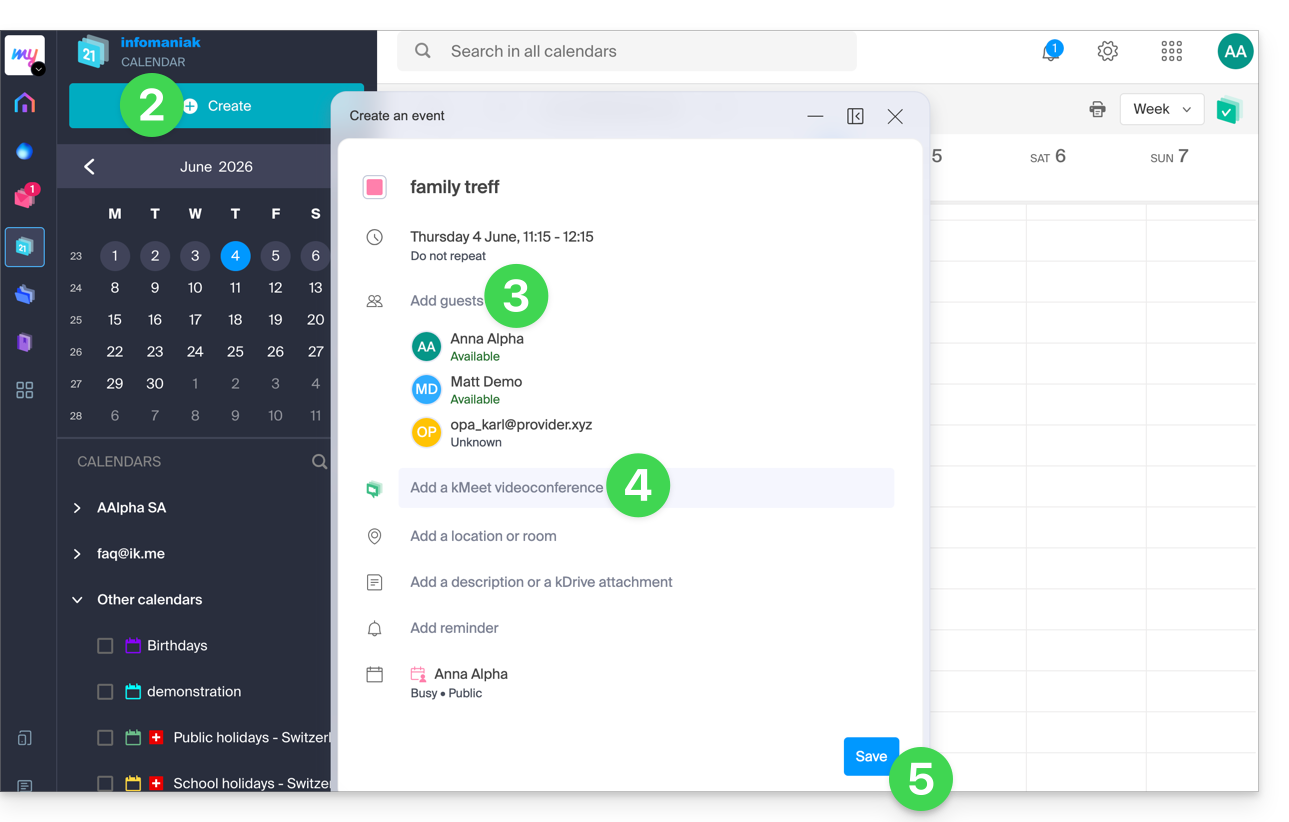
anna.alpha@ikmail.com, e, principalmente, acesso aos serviços Infomaniak. - Aceda ao calendário em ksuite.infomaniak.com/calendar e, em seguida, crie um evento no dia que desejar.
- Adicione participantes ao evento, mesmo que não sejam clientes Infomaniak.
- Clique no botão verde para gerar automaticamente um link kMeet que será adicionado ao evento.
- Clique no botão para salvar o seu evento:
- Responda com SIM à proposta de enviar notificações aos convidados.
- Convites serão então enviados automaticamente por e-mail aos participantes, contendo o link do kMeet, que pode ser clicado para acessar a discussão online no momento oportuno:
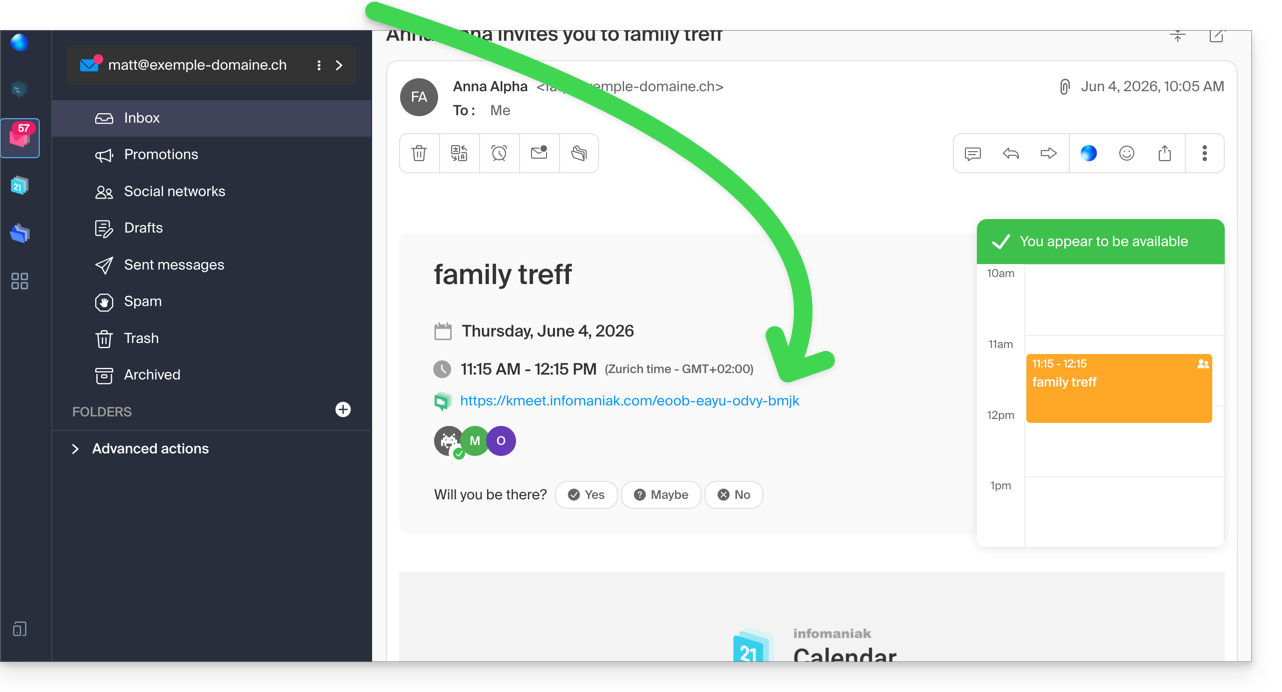
- O link da reunião do kMeet também está visível no evento, diretamente no calendário.
3. Ligar para o seu contato como no Skype
Para iniciar uma conversa a qualquer momento com um contato previamente registado no seu catálogo de endereços, é necessário que ambos tenham o kChat, disponível na kSuite Infomaniak. Para implementar esta solução, que pode ser estendida a um grupo de contatos:
- Registe-se no kSuite para ter acesso aos serviços Infomaniak correspondentes.
- Configure os utilizadores (estes podem até ser externos) no kSuite.
- Instale o aplicativo kChat ou acesse o URL https://ksuite.infomaniak.com/kchat
- Um usuário pode então ser chamado via kChat, o que fará com que o dispositivo do destinatário toque:
- = navegador se o URL do kChat estiver aberto nele, ou computador/dispositivo móvel se o aplicativo kChat estiver instalado.
- Consulte este outro guia para saber mais sobre as chamadas de videoconferência no kChat.
- Em seguida, cabe ao seu contato responder; a chamada será feita com a tecnologia kMeet dentro do kChat ou no aplicativo kMeet, caso este esteja instalado.
Link para esta FAQ: https://faq.infomaniak.com/2890
Esta seção de perguntas frequentes foi útil?