Base de conhecimento
1000 perguntas frequentes, 500 tutoriais e vídeos explicativos. Aqui, você encontra apenas soluções!
Cancelar uma modificação no Site Creator
Atualização 13/10/2026
Este guia aborda a função de anulação no Site Creator da Infomaniak.
Introdução
- Não é possível realizar cópias de segurança ou restaurações a partir do painel de controlo Infomaniak.
- Por exemplo, se eliminar um bloco de conteúdo e quiser restaurá-lo, pode desfazer até às 20 últimas operações no Site Creator.
Cancelar uma operação
Pré-requisitos
- Aceder ao Site Creator:
- Clique aqui para aceder à gestão do seu produto no Manager Infomaniak (precisa de ajuda?).
- Clique diretamente no nome atribuído ao Site Creator em questão.
- Clique no botão Editar o meu site para iniciar o editor:
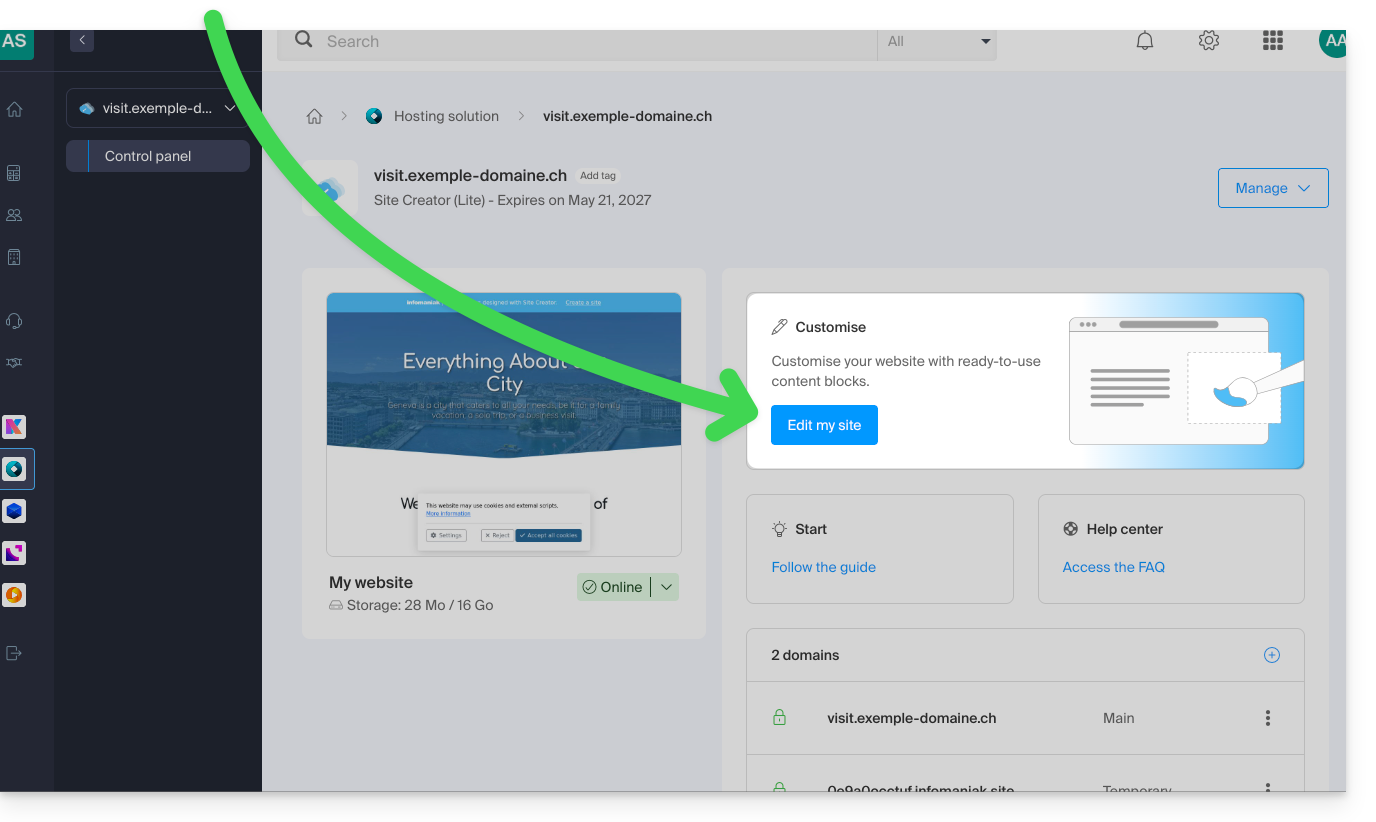
Depois de estar no Site Creator:
- Clique no botão … localizado na parte inferior do menu lateral esquerdo do Site Creator para expandir as opções de cancelamento.
- Clique em Cancelar e confirme a restauração (as setas ao lado permitem "navegar" entre as últimas cópias de segurança):
Link para esta FAQ: https://faq.infomaniak.com/2731
Esta seção de perguntas frequentes foi útil?