Base de conhecimento
1000 perguntas frequentes, 500 tutoriais e vídeos explicativos. Aqui, você encontra apenas soluções!
Cancelar o Site Creator Infomaniak
Atualização 07/09/2026
Este guia é sobre o Site Creator. A ferramenta é gratuita com um serviço de hospedagem web ou está disponível em diferentes planos quando adquirida separadamente.
Introdução
- Quando o Site Creator é instalado como um site em um de seus serviços de hospedagem web, você exclui o site (e seu conteúdo) criado com o Site Creator, como faria com qualquer outro site que você possui em um serviço de hospedagem web.
- Uma confirmação de cancelamento é enviada aos outros administradores da Organização, caso existam.
- As cópias de segurança serão permanentemente eliminadas quando um Site Creator for cancelado, tornando qualquer restauração impossível.
Procedimento para eliminar um Site Creator
Para remover o site criado com o Site Creator Infomaniak:
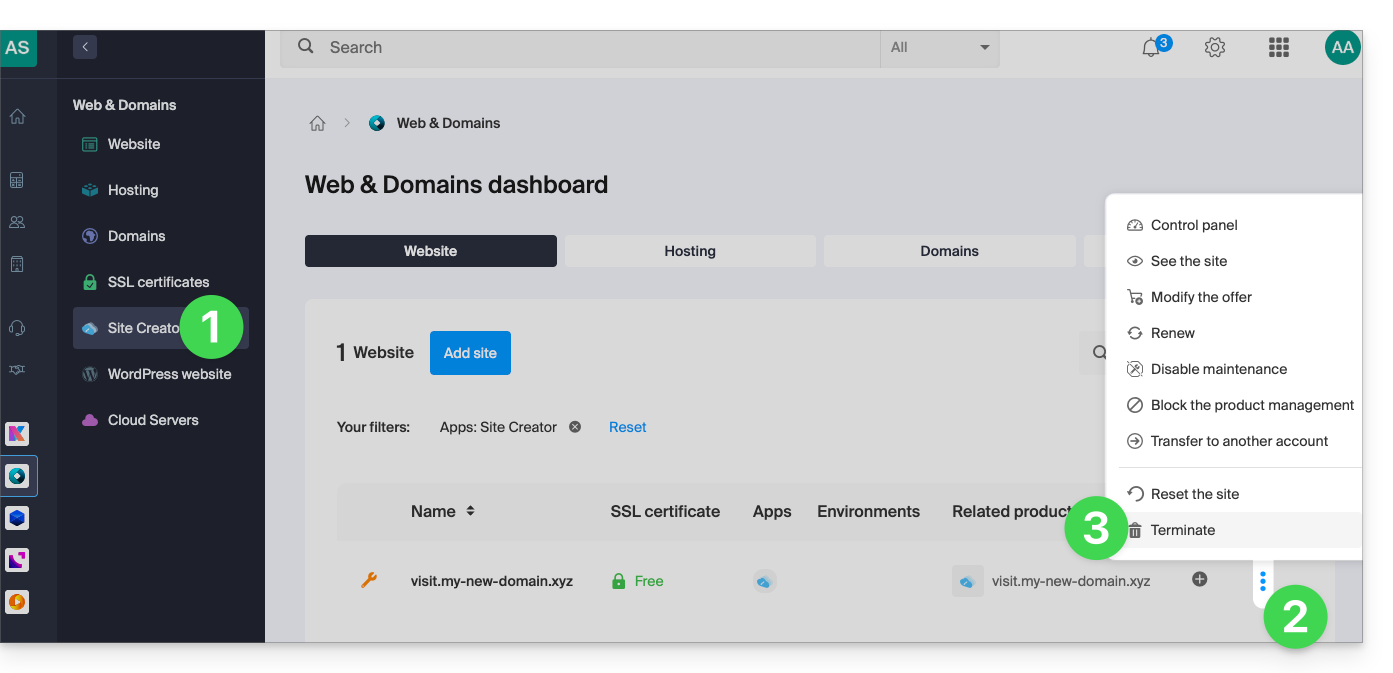
- Clique aqui para acessar o gerenciamento do seu produto no Manager Infomaniak (precisa de ajuda?).
- Clique no menu de ação ⋮ à direita do site em questão na tabela que aparece.
- Clique em Cancelar:
É possível reiniciar um Site Creator vazio após a remoção da ferramenta.
Link para esta FAQ: https://faq.infomaniak.com/2686
Esta seção de perguntas frequentes foi útil?