Base de conhecimento
1000 perguntas frequentes, 500 tutoriais e vídeos explicativos. Aqui, você encontra apenas soluções!
Gerenciar endereços de e-mail em massa
Este guia explica como executar uma ação em massa (exclusão, ativação do filtro antispam, etc.) em várias contas de e-mail existentes dentro de um Serviço de E-mail.
Introdução
Para definir, em vez disso, os parâmetros que devem ser aplicados a todas as futuras criações de contas de e-mail, consulte este outro guia.
Ações em massa
Para executar estas ações em “lote”:
- Clique aqui para acessar o gerenciamento do seu produto no Manager Infomaniak (precisa de ajuda?).
- Clique diretamente no nome atribuído ao produto em questão.
- Marque a caixa à esquerda de Endereço de e-mail para selecionar todos os endereços ou selecione os endereços desejados um por um.
- A lista de ações disponíveis aparecerá então na parte inferior da página, incluindo no menu de ação ⋮ :
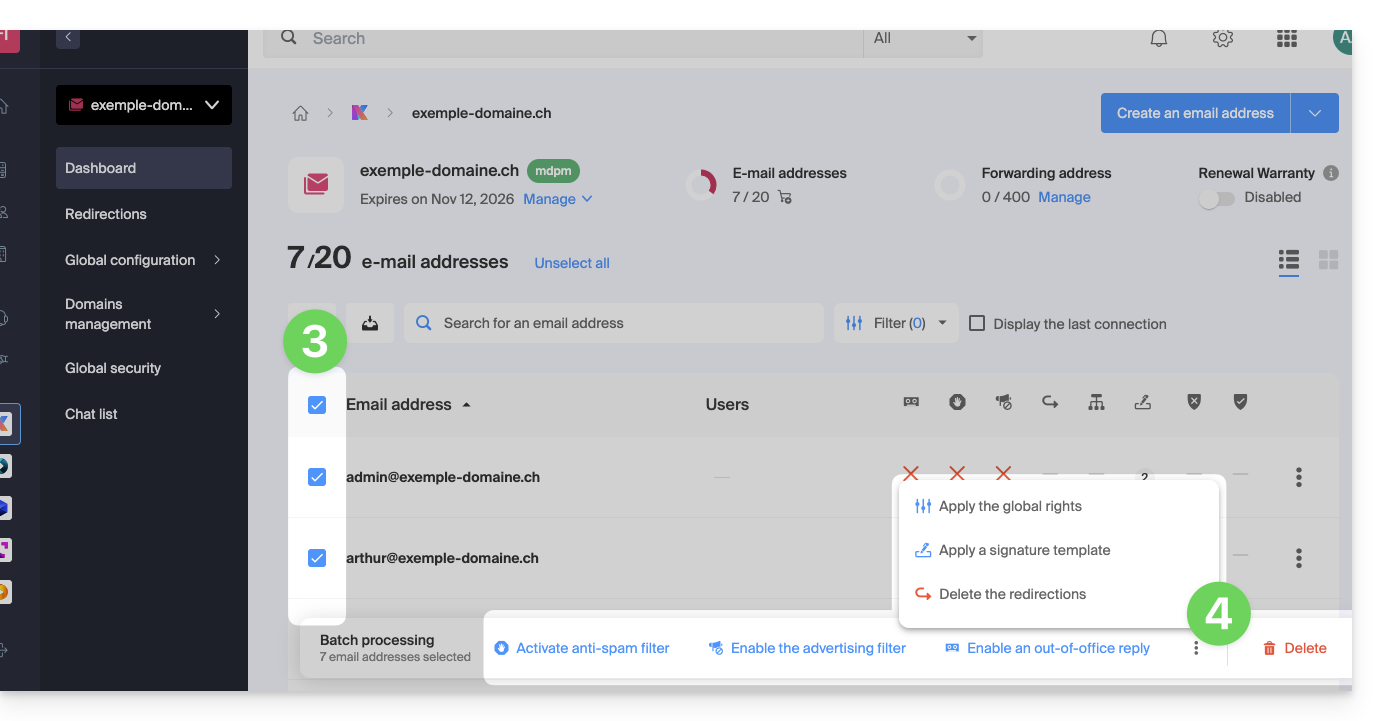
As ações em massa possíveis são as seguintes:
- ativar o filtro antispam
- ativar os filtros de publicidade
- aplicar permissões gerais
- ativar um atendedor automático
- aplicar um modelo de assinatura
- remover os redirecionamentos
- remover os endereços de e-mail
Link para esta FAQ: https://faq.infomaniak.com/2683
Esta seção de perguntas frequentes foi útil?