Base de conhecimento
1000 perguntas frequentes, 500 tutoriais e vídeos explicativos. Aqui, você encontra apenas soluções!
Substituir a fita da impressora de bilhetes
Atualização 06/10/2026
Este guia explica como substituir a fita da impressora de crachás IDP SMART 51 no âmbito do sistema de emissão de bilhetes Infomaniak.
Introdução
- As fitas permitem realizar impressões em cartões de PVC, de forma semelhante aos cartuchos de tinta em uma impressora comum.
- As fitas a preto e branco permitem realizar cerca de 1200 impressões, e as fitas a cores, cerca de 250.
- Se a qualidade das suas impressões começar a diminuir ou se o sistema indicar que o cartucho está gasto, você deve substituí-lo.
- Por favor, siga rigorosamente cada uma destas etapas: uma manipulação incorreta pode causar um mau funcionamento temporário ou até mesmo definitivo da impressora.
Procedimento de substituição da fita
Para tal:
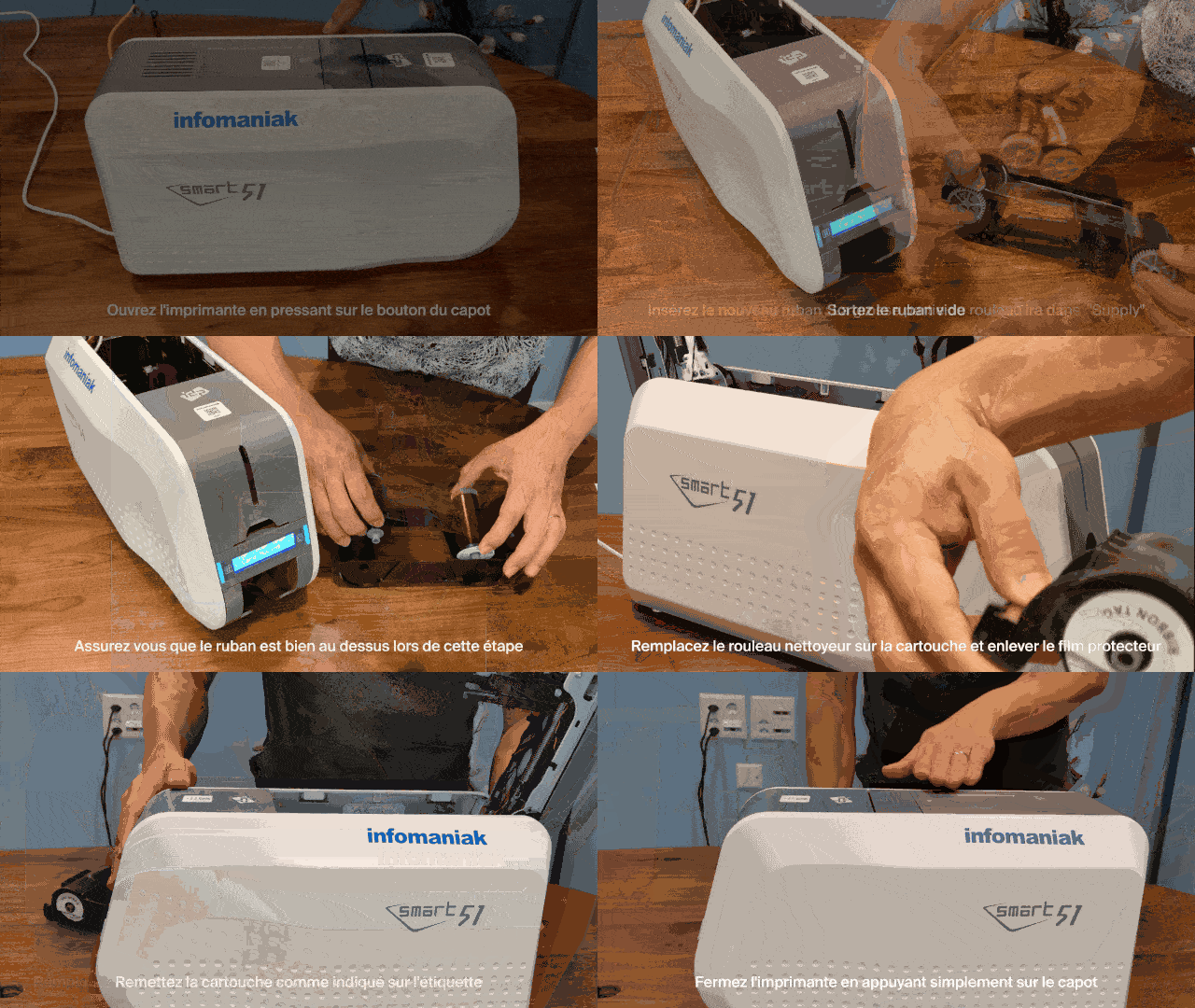
- Abra a impressora: pressione o botão localizado na tampa superior para destravar e abrir a tampa.
- Remova o cartucho: retire todo o conjunto do chassi/cartucho de fita da impressora.
- Remova a fita usada: desencaixe os dois rolos da fita vazia para separá-los do chassi.
- Instale a nova fita no cartucho:
- A parte mais espessa do rolo deve ser posicionada no local identificado como « Fornecimento ».
- Insira primeiro o lado sem engrenagem em seu compartimento e, em seguida, pressione a parte com as rodas dentadas para encaixá-la firmemente nas ranhuras previstas para esse fim:
- Certifique-se de que a fita passe bem acima do chassi durante esta etapa, de modo que fique orientada para baixo após o cartucho ser virado.
- Substitua o rolo de limpeza:
- Instale o novo rolo adesivo/de limpeza fornecido com o cartucho.
- Remova o filme protetor branco puxando firmemente a aba designada para esse fim:
- Reinsira o cartucho na impressora: deslize o sistema de abertura para a frente da impressora e coloque o cartucho de volta, respeitando a orientação indicada no rótulo interno.
- Feche a impressora: dobre a tampa pressionando-a até ouvir o clique de fechamento.
Saiba mais
Link para esta FAQ: https://faq.infomaniak.com/2655
Esta seção de perguntas frequentes foi útil?