Base de conhecimento
1000 perguntas frequentes, 500 tutoriais e vídeos explicativos. Aqui, você encontra apenas soluções!
Sistema de tickets: instalar o ponto de acesso Wi-Fi
Atualização 06/10/2026
Este guia explica como configurar e usar o ponto de acesso Wi-Fi para conectar seu kit de vendas ou seus scanners ao sistema de emissão de bilhetes Infomaniak.
Introdução
- O ponto de acesso Wi-Fi funciona como um ponto de acesso de rede para os seus dispositivos de venda no local (tablets, impressoras) e scanners.
- Ao contrário do ponto de acesso 4G, este requer uma ligação à sua rede com fios (Ethernet) que tenha acesso à Internet.
- Ela é alimentada e conectada à rede por meio de um adaptador PoE (Power over Ethernet).
Configurar o ponto de acesso Wi-Fi
Pré-requisitos
- Dispor de uma porta Ethernet (RJ45) na parede ou de um roteador com uma conexão de Internet funcional.
- Ter uma tomada elétrica próxima.
Como usar o ponto de carregamento
Para isso:
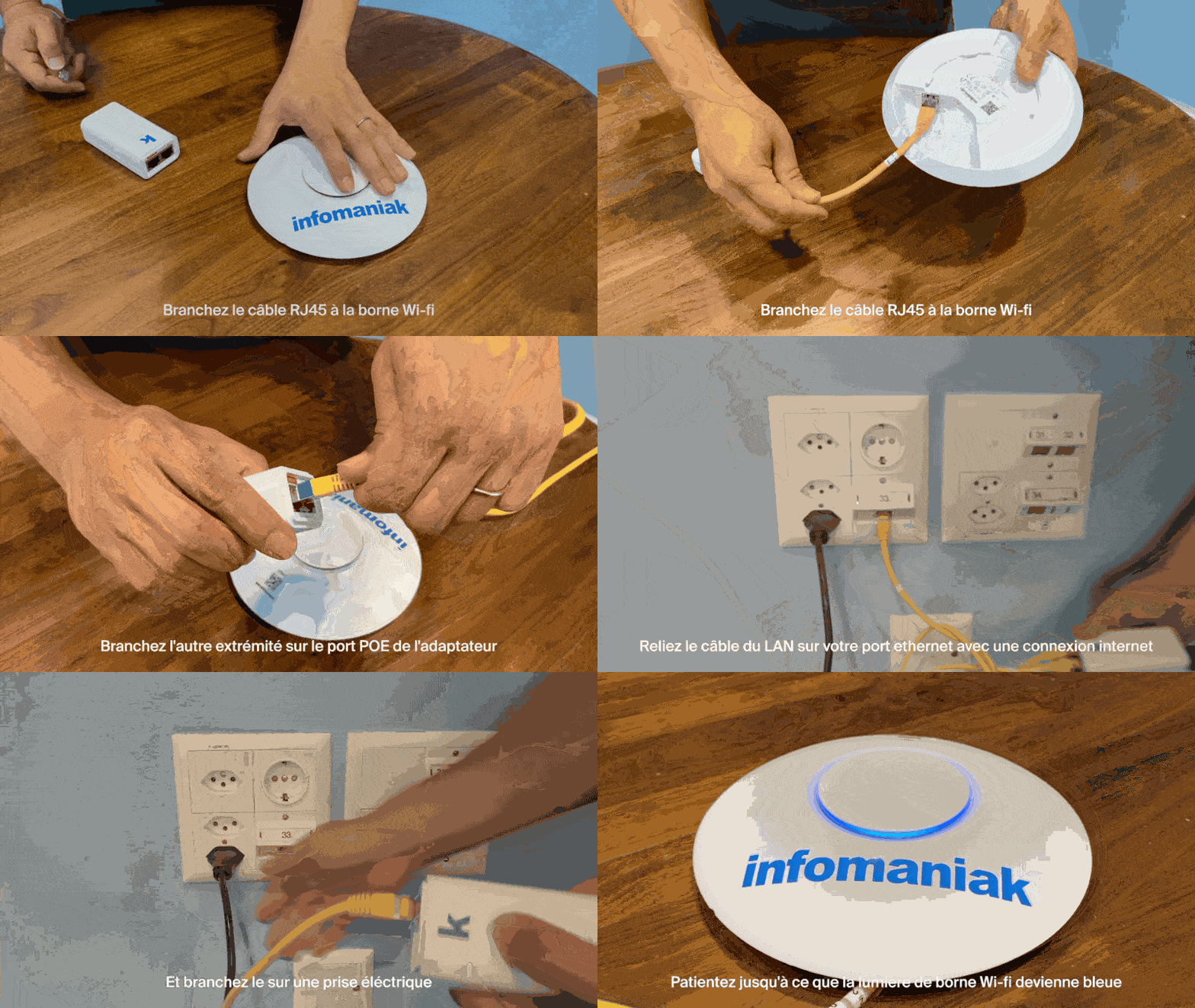
- Conecte um cabo Ethernet (RJ45) na base do dispositivo Wi-Fi:
- Conecte a outra extremidade deste cabo à porta POE do adaptador:
- Conecte o segundo cabo Ethernet à porta LAN do adaptador e, em seguida, conecte-o à sua porta Ethernet de rede conectada à Internet:
- Conecte o cabo de alimentação ao adaptador e, em seguida, ligue-o a uma tomada elétrica.
- Aguarde até que a luz do ponto de acesso Wi-Fi fique azul:
- Depois de ligada e conectada à rede, a estação criará uma rede com o nome Infomaniak.
- As impressoras, tablets e scanners Infomaniak serão conectados automaticamente a esta rede.
Saiba mais
Link para esta FAQ: https://faq.infomaniak.com/2646
Esta seção de perguntas frequentes foi útil?