Base de conhecimento
1000 perguntas frequentes, 500 tutoriais e vídeos explicativos. Aqui, você encontra apenas soluções!
Sync IMAP folders (email)
This guide explains how to display the folders of your Infomaniak email account using an email client, via the IMAP protocol.
Introduction
- The various generic folders are created by Mail Infomaniak during the very first connection to the interface.
- Therefore, some email/IMAP clients may not display any folders if no connection has been made beforehand to Mail.
- And even if they are present in Mail, some folders may still not appear in your email client configured with IMAP.
Force the synchronization of IMAP folders…
… in Microsoft Outlook
In some cases, after configuring an Infomaniak address in the Outlook email client, some folders may not appear. In this case, it is necessary to check the synchronization with the subscribed folders in Outlook:
- Start the Outlook software on your computer.
- Under your Infomaniak email address, without selecting it first, right-click on the Inbox folder.
- Select IMAP Folders from the menu that appears:

- If the IMAP Folders item is not present, deselect the address beforehand.
- If the IMAP Folders item is not present, deselect the address beforehand.
- Disable the option
When viewing the hierarchy in Outlook, only show subscribed foldersby unchecking the box: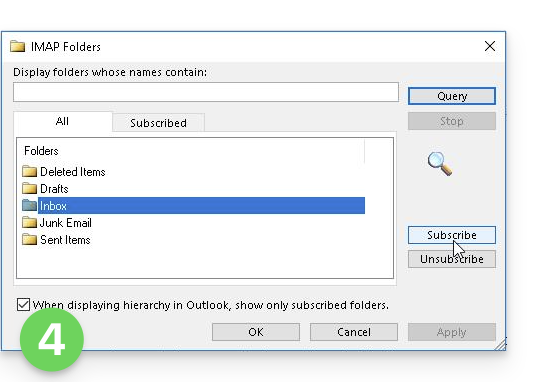
- Click on Apply.
Depending on the version, the menu can be found here: in some versions: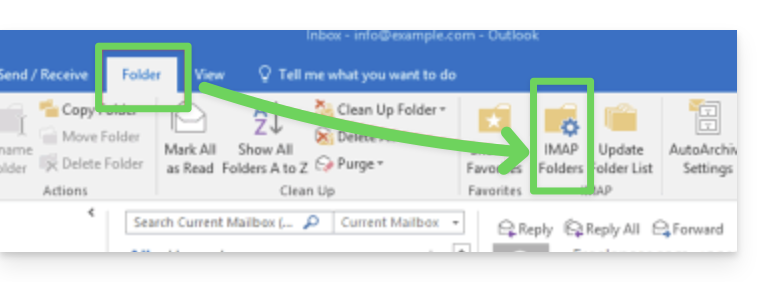
or here: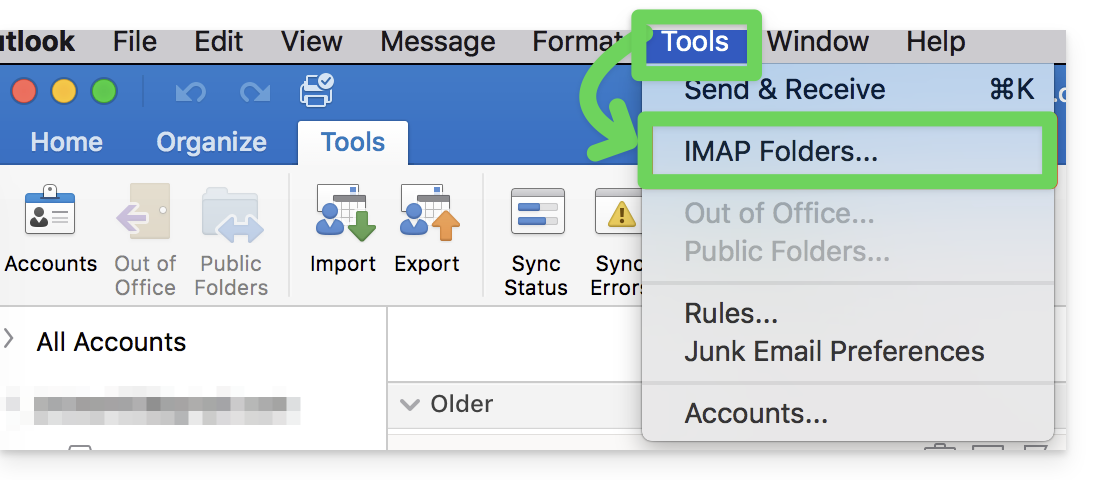
…in Thunderbird
In some cases, after configuring an Infomaniak address in the Thunderbird email client, some folders may not appear. In this case, you need to manually check these folders from the Thunderbird subscription menu:
- Start the Thunderbird software on your computer.
- Right-click on the Infomaniak address in question.
- Select the Subscribe menu:
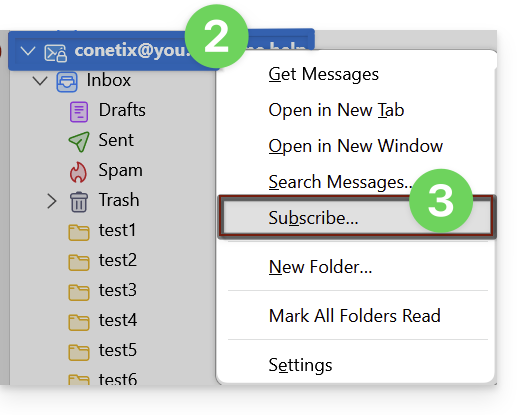
- Check the missing folders.
- Click OK to validate the selection.
… elsewhere
In your usual email client, find the term "IMAP folders" and/or "subscribe", "IMAP subscription", etc.
Modify the synchronized folders
Refer to this other guide to change the location of certain generic folders.
Link para esta FAQ: https://faq.infomaniak.com/2586
Esta seção de perguntas frequentes foi útil?