Base de conhecimento
1000 perguntas frequentes, 500 tutoriais e vídeos explicativos. Aqui, você encontra apenas soluções!
Cancelar a marca personalizada
Este guia explica como cancelar o serviço de personalização de URL a partir do seu painel de controlo Infomaniak.
Introdução
- Não será mais possível acessar as ferramentas a partir do seu nome de domínio. Lembre-se de comunicar aos seus usuários os endereços padrão (
ksuite.infomaniak.com,ksuite.infomaniak.com/mail, etc.). - As tarifas incorridas e que excedem o plano contratado permanecem devidas.
- Uma confirmação de cancelamento é enviada aos demais administradores da Organização, caso existam.
Procedimento de cancelamento do URL personalizado
Para cancelar a oferta Custom Brand:
- Clique aqui para acessar o gerenciamento do seu produto no Manager Infomaniak (precisa de ajuda?).
- Desça até o serviço Marca Personalizada e clique em Cancelar (você também pode simplesmente desativá-lo temporariamente):
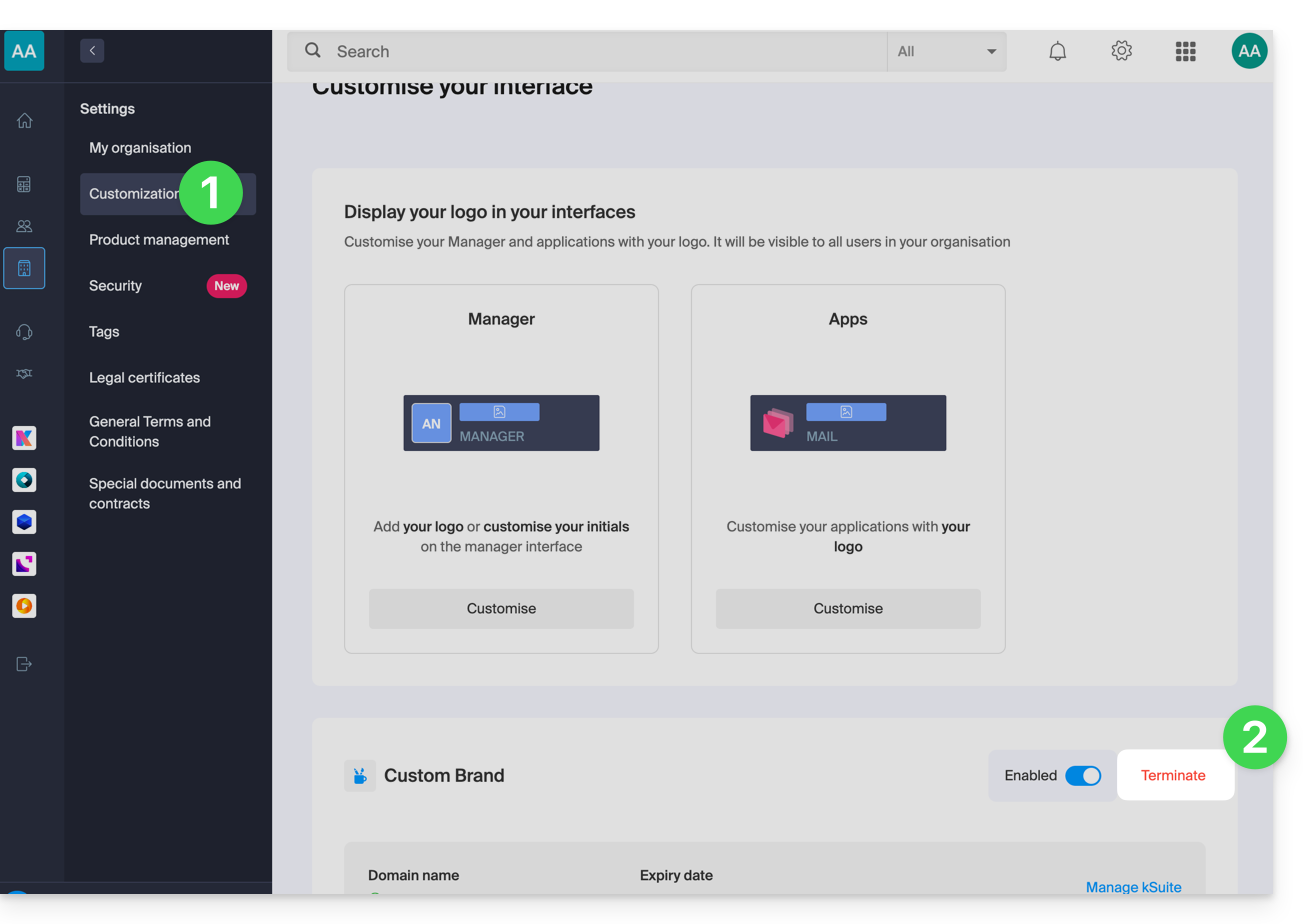
- Siga o procedimento até o fim.
Link para esta FAQ: https://faq.infomaniak.com/2503
Esta seção de perguntas frequentes foi útil?