Base de conhecimento
1000 perguntas frequentes, 500 tutoriais e vídeos explicativos. Aqui, você encontra apenas soluções!
Sincronizar o kDrive e o Qnap via WebDAV
Atualização 13/08/2026
Este guia fornece instruções para sincronizar o kDrive com um NAS Qnap (ou vice-versa) através do protocolo WebDAV, que pode ser encontrado na aplicação HBS 3 Hybrid Backup Sync.
✘ INDISPONÍVEL com
kSuite Free / kSuite Standard
my kSuite / my kSuite+ (ik.me, etik.com, ikmail.com)
Pré-requisitos
- Ter um NAS Qnap acessível pela Internet.
- Conheça o seu identificador kDrive (ID kDrive).
Sincronizar o kDrive e o Qnap através do HBS 3
Para isso:
- Aceda à interface de administração do NAS Qnap (QTS).
- Se necessário, descarregue e instale a aplicação HBS 3 Hybrid Backup Sync.
- Abra o HBS 3.
- Acesse Sincronização no menu à esquerda.
- Crie uma tarefa de sincronização (Tarefa de Sincronização Bidirecional).
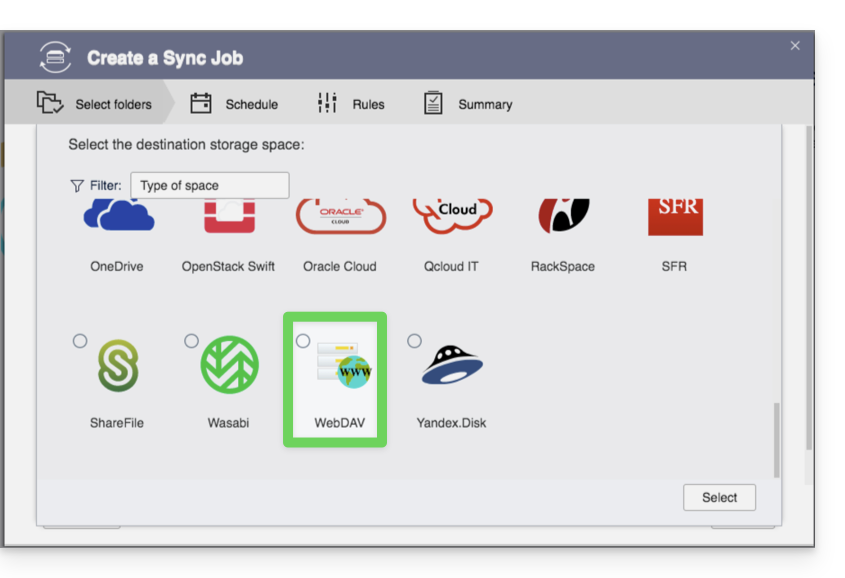
- Escolha WebDAV na lista de fornecedores de nuvem:
- Para as configurações da conta, utilize as seguintes informações:
- Endereço do servidor:
https://IDkDrive.connect.kdrive.infomaniak.com(consulte os pré-requisitos) - Nome de usuário: endereço de e-mail para fazer login na conta Infomaniak
- Senha: crie uma senha de aplicativo para este uso específico.
- Endereço do servidor:
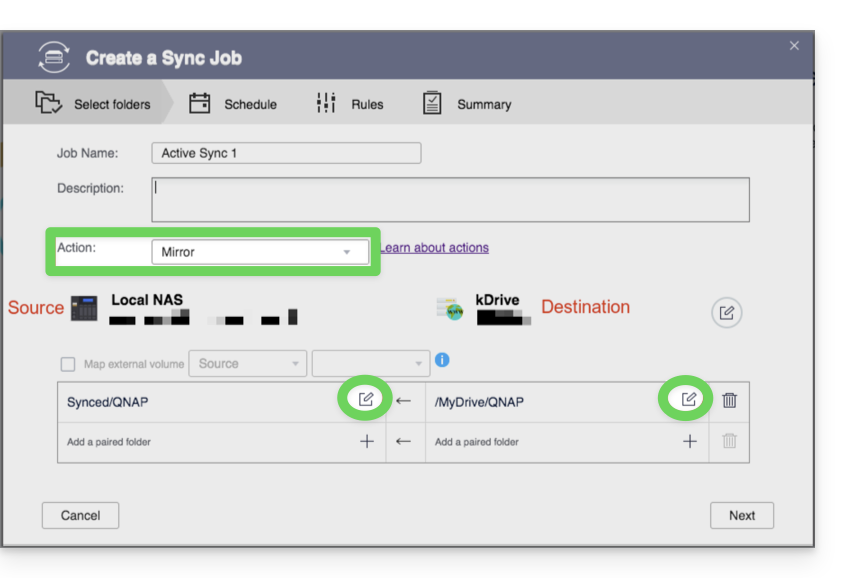
- Escolha a pasta local e de destino:
- Personalize a frequência da tarefa.
- Conclua o assistente.
Link para esta FAQ: https://faq.infomaniak.com/2405
Esta seção de perguntas frequentes foi útil?