Base de conhecimento
1000 perguntas frequentes, 500 tutoriais e vídeos explicativos. Aqui, você encontra apenas soluções!
Sync kDrive with a Synology using WebDAV
Atualização 12/11/2026
This guide provides instructions for synchronizing kDrive with a Synology NAS (or vice versa) via the WebDAV protocol, which can be found in the Cloud Sync application.
✘ UNAVAILABLE with
kSuite Free / kSuite Standard
my kSuite / my kSuite+ (ik.me, etik.com, ikmail.com)
Prerequisites
- You must have a Synology NAS that is accessible from the internet.
- Find your kDrive ID kDrive ID (❓: help).
Synchronize kDrive and Synology via Cloud Sync
To do this:
- Log in to the Synology DiskStation Manager (DSM).
- If necessary, download and install the Cloud Sync app from the Package Center.
- Open Cloud Sync.
- Click on the + at the bottom left to add a Cloud.
- Choose WebDAV at the bottom of the list of available Clouds:
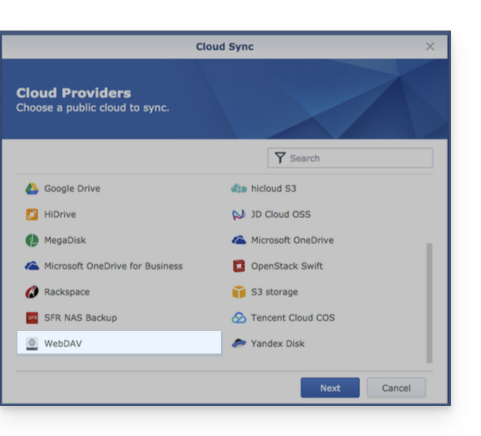
- For account settings, use the following information:
- Choose the local folder, the destination folder, and the desired synchronization type:
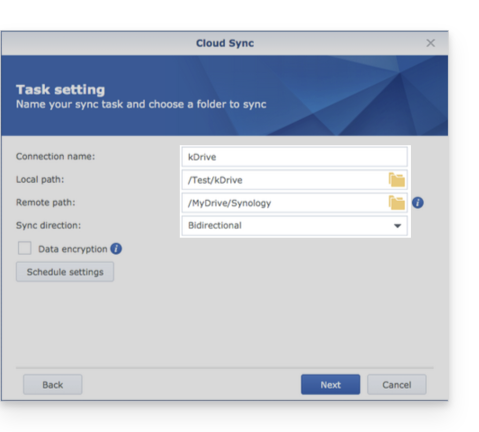
- Bidirectional: changes will be reflected in both directions.
- Download only remote changes: ideal for backing up a kDrive to your NAS.
- Download only local changes: ideal for backing up data from your NAS to a kDrive.
Link para esta FAQ: https://faq.infomaniak.com/2404
Esta seção de perguntas frequentes foi útil?