Base de conhecimento
1000 perguntas frequentes, 500 tutoriais e vídeos explicativos. Aqui, você encontra apenas soluções!
Usar o DynDNS Infomaniak e o FritzBox
Atualização 05/10/2026
Este guia explica como acessar, através de um nome de domínio, um Fritzbox conectado à Internet com um IP dinâmico.
Pré-requisitos
- Possuir um dispositivo que permita configurar um provedor de DNS dinâmico personalizado.
- Um DNS dinâmico deve ter sido criado no domínio em questão através do painel de controle Infomaniak (❓: ajuda).
Associar um Fritz!Box a um nome de domínio
Para isso:
- Abra a interface de gestão da Fritzbox, ativando, se necessário, o modo Avançado.
- Aceda a Internet e, em seguida, a Autorização de acesso.
- Clique na aba DNS Dinâmico:
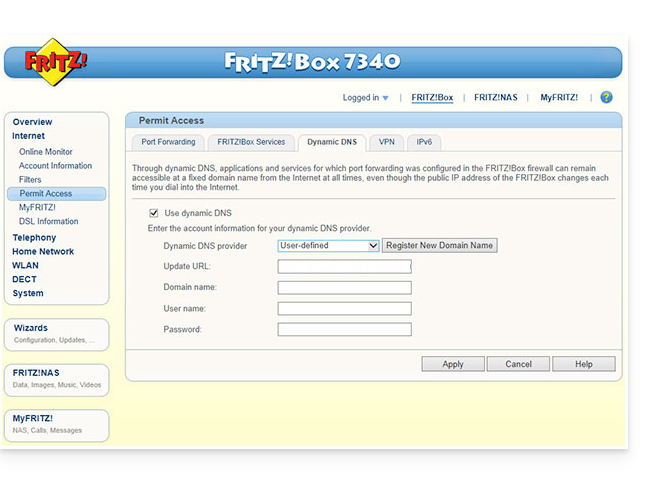
- Escolha o provedor: “Personalizado”.
- Preencha os seguintes campos:
- URL de atualização (conforme exibido abaixo, ou substituindo
ipaddrporip6addrse desejar que o Fritzbox substitua o "placeholder" pelo endereço IPv6 em vez do IPv4):https://infomaniak.com/nic/update?system=dyndns&hostname=<domain>&myip=<ipaddr> - Nome de domínio:
a URLconfigurada no Manager ao adicionar o Dynamic DNS (❓: ajuda). - Nome de usuário:
o identificadordefinido no Manager ao adicionar o Dynamic DNS (❓: ajuda). - Senha:
a senhadefinida no Manager ao adicionar o Dynamic DNS (❓: ajuda).
- URL de atualização (conforme exibido abaixo, ou substituindo
- Clique em Aplicar para finalizar.
Link para esta FAQ: https://faq.infomaniak.com/2400
Esta seção de perguntas frequentes foi útil?