Base de conhecimento
1000 perguntas frequentes, 500 tutoriais e vídeos explicativos. Aqui, você encontra apenas soluções!
Cancelar o Jelastic Cloud
Este guia explica como cancelar completamente o Jelastic Cloud.
Introdução
- Para a maioria dos produtos, confirme o pedido de cancelamento por e-mail, caso contrário, nenhum dado será apagado.
- As taxas incorridas e que não estão incluídas no plano permanecem devidas.
- Uma confirmação de cancelamento é enviada aos demais administradores da Organização, se houver.
- Os backups serão permanentemente eliminados durante o cancelamento, tornando qualquer restauração impossível.
Cancelar o Jelastic Cloud
Para aceder à opção de cancelamento da oferta:
- Clique aqui para acessar o gerenciamento do seu produto no Manager Infomaniak (precisa de ajuda?).
- Clique no menu de ação ⋮, como mostrado na imagem abaixo.
- Escolha Cancelar:
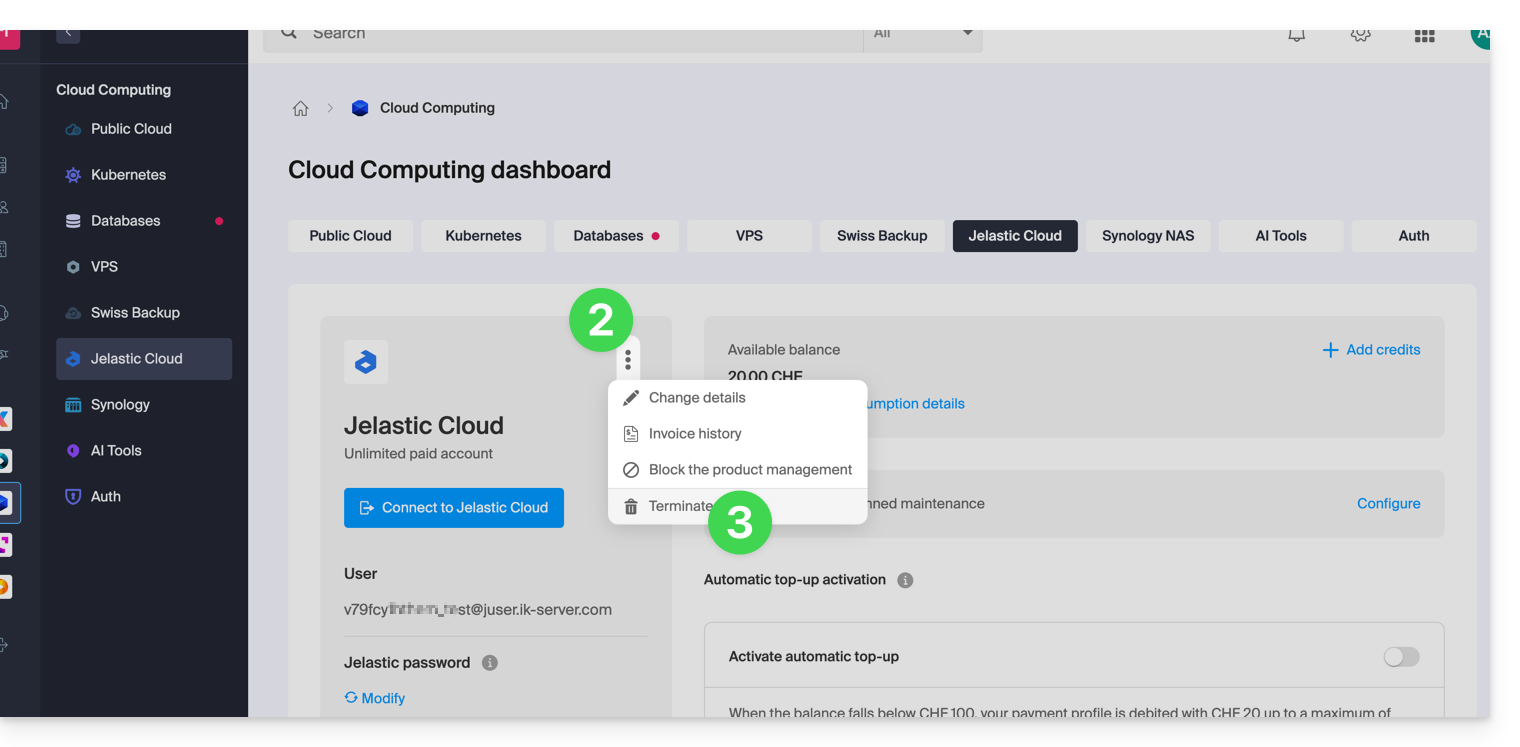
- Siga o procedimento até o fim.
Link para esta FAQ: https://faq.infomaniak.com/2334
Esta seção de perguntas frequentes foi útil?