Base de conhecimento
1000 perguntas frequentes, 500 tutoriais e vídeos explicativos. Aqui, você encontra apenas soluções!
Criar um alias de e-mail temporário para filtrar as mensagens recebidas
Este guia explica como organizar facilmente as suas mensagens usando o endereçamento adicional ("endereçamento +" ou "subendereçamento"), ou seja, alias do seu endereço de e-mail que não precisam ser criados de fato em um Serviço de E-mail Infomaniak.
Introdução
- Este recurso é gratuito, está disponível para todos os serviços de e-mail da Infomaniak e permite ter várias versões do seu endereço de e-mail existente (ou seja, alias), para, por exemplo, separar os seus e-mails pessoais das newsletters às quais está subscrito.
- Estes alias do tipo "caracter curinga" significam que uma mensagem pode ser enviada para um endereço de e-mail que contenha um
+(por exemplo,abc+def@domain.xyz) e, mesmo assim, chegará à caixa de entrada existenteabc@domain.xyze poderá ser filtrada e classificada automaticamente com base no que estiver após o "+" se você configurar isso. - Note que também existe a possibilidade de criar alias reais sem o caractere
+... - A Infomaniak é totalmente compatível com o sistema DEA, do qual depende a funcionalidade apresentada aqui; em caso de problemas, entre em contato com a entidade onde ele é utilizado.
Utilizar um alias “descartável” com um endereço de e-mail Infomaniak
Na próxima vez que se inscrever numa newsletter ou num espaço pessoal que exija um nome de utilizador:
- Simplesmente utilize uma variação do seu endereço de e-mail, incluindo o sinal "+" (exemplo: anna+evento@dominio.xyz) em vez de fornecer seu endereço de e-mail real:
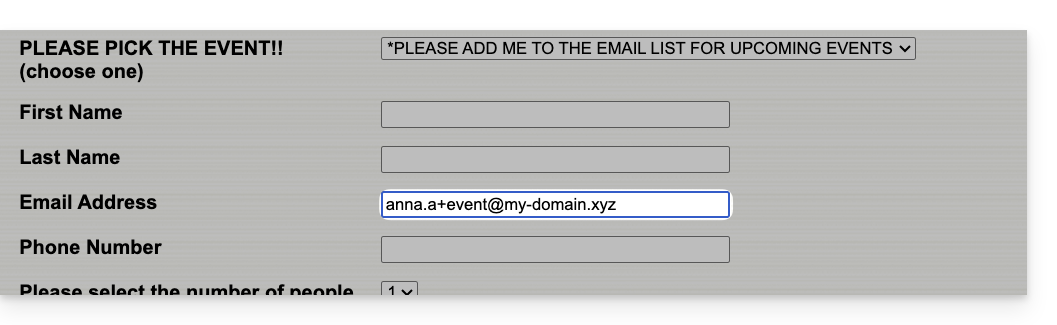
Portanto, se o seu endereço de e-mail habitual for anna@dominio.xyz, os e-mails enviados para anna+evento@dominio.xyz ou anna+nospam@dominio.xyz (em suma, anna+"o que quiser aqui"@dominio.xyz…) chegarão à caixa de entrada de anna@dominio.xyz.
Em seguida, para mover automaticamente as próximas mensagens recebidas para pastas específicas, consulte este outro guia para criar filtros de triagem que se baseiem no destinatário do e-mail recebido.
Você também pode configurar um programa/cliente de e-mail para que o envio a partir desse tipo de endereço de e-mail funcione: consulte a segunda parte de este outro guia — isso não funciona para envios realizados a partir do aplicativo web Mail Infomaniak (serviço online ksuite.infomaniak.com/mail).
Link para esta FAQ: https://faq.infomaniak.com/2317
Esta seção de perguntas frequentes foi útil?