Base de conhecimento
1000 perguntas frequentes, 500 tutoriais e vídeos explicativos. Aqui, você encontra apenas soluções!
Cancelar um nome de domínio gerenciado pela Infomaniak
Atualização 05/10/2026
Este guia explica como remover completamente um Domínio registado na Infomaniak.
Introdução
- Para a maioria dos produtos, confirme o pedido de cancelamento por e-mail, caso contrário, nenhum dado será eliminado.
- Quando um nome de domínio é eliminado, todos os produtos dependentes e associados a esse nome de domínio deixarão de funcionar.
- Esses produtos “vinculados” não serão apagados.
- As tarifas aplicadas e que excedem o plano contratado permanecem em aberto.
- Uma confirmação de cancelamento é enviada aos demais administradores da Organização, caso existam.
- Os backups serão permanentemente eliminados durante o cancelamento, tornando qualquer restauração impossível.
- Consulte este outro guia se precisar de informações sobre a restauração de um domínio excluído.
Cancelar um nome de domínio
Para cancelar a oferta:
- Clique aqui para acessar o gerenciamento de domínios no seu Painel de Controle Infomaniak (❓: ajuda).
- Clique em o menu de ação ⋮ localizado à direita do item em questão.
- Escolha Cancelar:
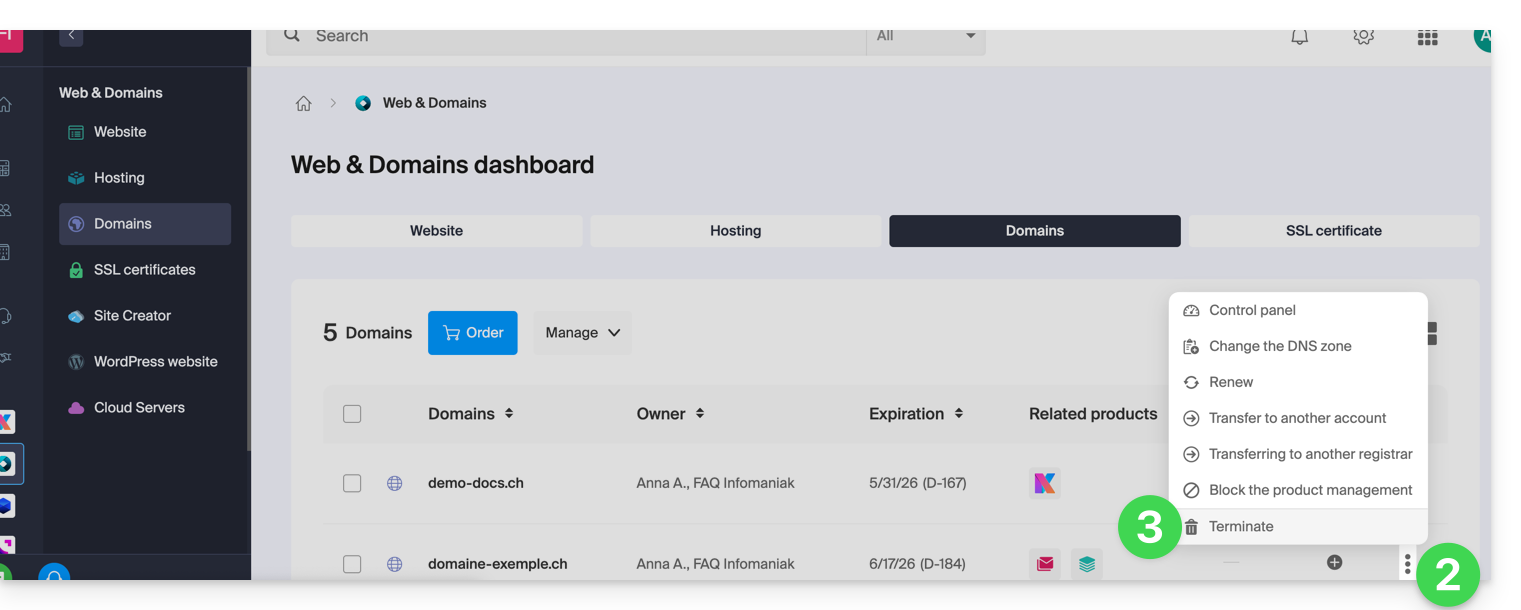
- Siga o procedimento até o fim.
Link para esta FAQ: https://faq.infomaniak.com/2086
Esta seção de perguntas frequentes foi útil?