Base de conhecimento
1000 perguntas frequentes, 500 tutoriais e vídeos explicativos. Aqui, você encontra apenas soluções!
Display Streaming Radio Logs
This guide concerns the listening information of Infomaniak Streaming Radio that can be exported using the FTP protocol; these logs (from which the listening statistics are also derived after "cleaning" or "purification") are then automatically transferred by FTP to be processed.
Preamble
- The logs of your radio will be provided in the form of a compressed file
xyz.mp3-20140805.log.gz(the log date is in the formYYYYMMDD). - Each log starts at 04:00 Swiss time and ends at 03:59:59 the next day.
- The log is in the form
ip user-identifier authuser [date-time] "request" status octets "referer" "useragent" listening-time:81.56.215.98 - - [09/Apr/2019:08:23:18 +0200] "GET /toto.mp3 HTTP/1.1" 200 1211297 "-" "Mozilla/5.0 (X11; U; Linux i686; en-US; rv:1.9.0.8) Gecko/2019032711 Ubuntu/8.10 (intrepid) Firefox/3.0.8" 69- It may happen that the log line is malformed, due to a referer that is too long, for example; this behavior of Icecast cannot be modified.
- The IP addresses in the range 84.16.67.128/25 must be ignored as they are the streaming servers.
- From the settings page on the Manager, you can request the logs of past days.
- You can also directly export them to ACPM or Mediapulse.
Enable FTP log sending
To do this:
- Click here to access the management of your product on the Infomaniak Manager (need help?).
- Click directly on the name assigned to the product concerned.
- Click on the name of the audio stream concerned.
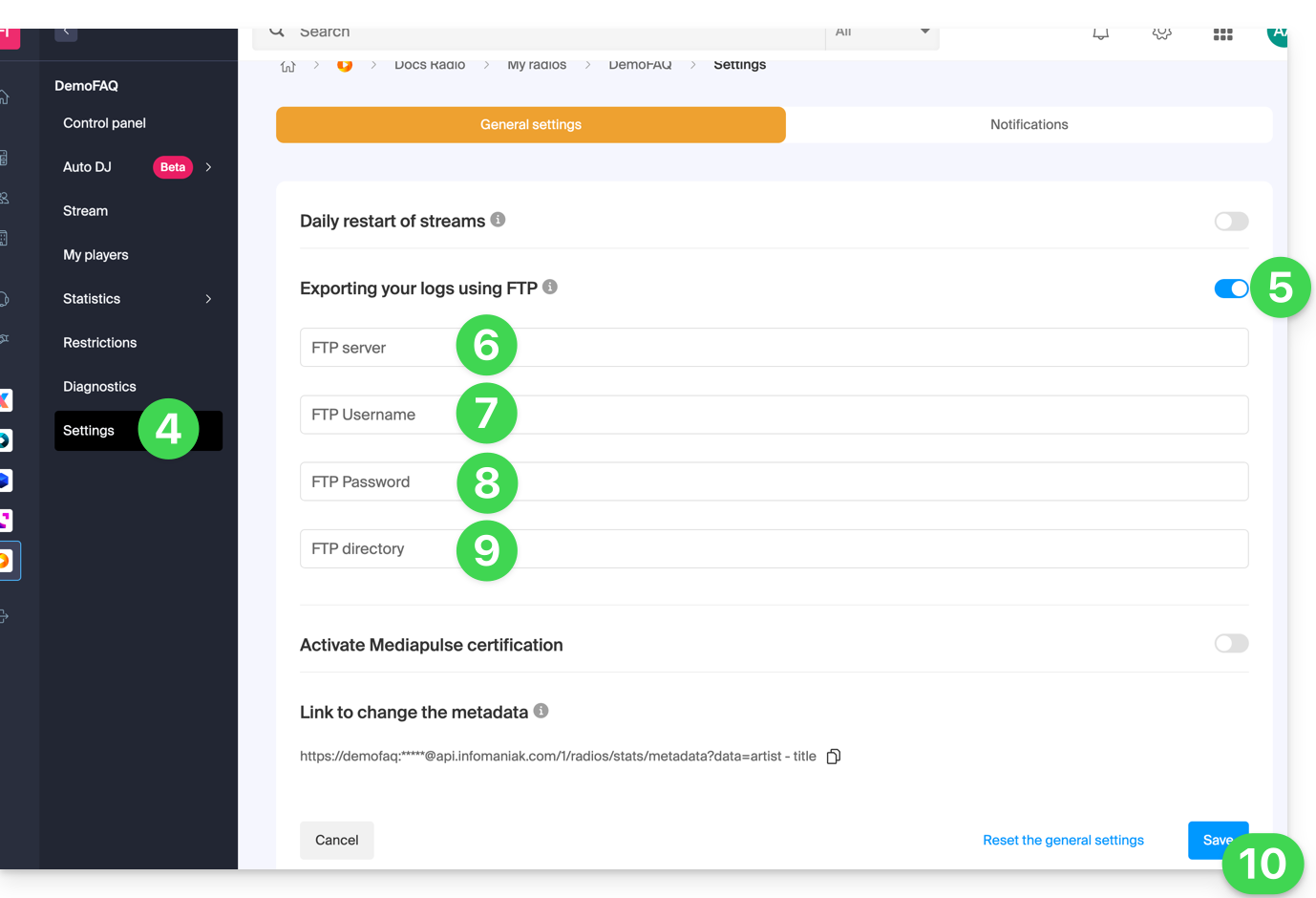
- Click on Settings in the left sidebar.
- Activate the FTP log export with the toggle switch.
- Enter a host name: server address.
- Enter a username: FTP account name.
- Enter a password: that of the FTP account.
- Enter the directory on the server where the logs will be stored.
- Click on the Save button at the bottom of the page:
To retrieve your logs, use only the standard FTP protocol in Passive mode. The service is not compatible with SFTP, FTPS, or SSH keys. The system allows 3 connection attempts in case of interruption.
Process logs
The best approach is to use a regular expression like the one below:
"/^(\S+)\s(.+)\s(\S+)?\s\[((\d\d)\/([a-zA-Z]{3,3})\/(\d\d\d\d)\:(\d\d)\:(\d\d)\:(\d\d)\s\+\d\d\d\d)\]\s"GET\s\/([\-a-z0-9]{1,40}(\.)?(mp3|aac|ogg){0,1})(.*)?"\s(\d{3,3})\s(\d+)\s"(.+)"\s"(.+)"\s(\d+)$/i";This syntax is for the PHP function preg_match and will need to be adapted if other functions/languages are used.
The function preg_match returns an array with the following significant positions:
| 1 | ip |
| 4 | full date - time |
| 5 | day |
| 6 | month |
| 7 | year |
| 8 | hour |
| 9 | min |
| 10 | seconds |
| 11 | mount point |
| 15 | result (HTTP code) |
| 16 | length in bytes |
| 18 | user agent |
| 19 | listening duration (seconds) |
Link para esta FAQ: https://faq.infomaniak.com/1954
Esta seção de perguntas frequentes foi útil?