Base de conhecimento
1000 perguntas frequentes, 500 tutoriais e vídeos explicativos. Aqui, você encontra apenas soluções!
Associar um serviço de e-mail Infomaniak a um serviço externo
Atualização 13/10/2026
Este guia explica como associar a sua conta de e-mail Infomaniak a um site na Internet externo (por exemplo, um site alojado por um serviço de criação tudo incluído).
Introdução
- Esta configuração é necessária se os servidores de nomes (DNS) do seu domínio foram alterados para apontar para o seu provedor de hospedagem web externo à Infomaniak, o que pode causar uma interrupção dos seus serviços de e-mail.
Ajustar os registros DNS no seu provedor
Pré-requisitos
- Certifique-se de que o gerenciamento da sua zona DNS está configurado corretamente no seu provedor de serviços web externo.
- Tenha à mão as seguintes informações:
- O servidor MX da Infomaniak:
mta-gw.infomaniak.ch(alguns provedores exigem um ponto final:mta-gw.infomaniak.ch.). - O registro SPF da Infomaniak:
v=spf1 include:spf.infomaniak.ch -all - O registro DKIM da Infomaniak: gere-o a partir do seu painel de controle Infomaniak (❓ ajuda).
- O servidor MX da Infomaniak:
- Compreenda que qualquer adição/modificação de DNS pode levar até 48 horas para ser propagada (❓: ajuda).
Seu provedor de hospedagem web atual é:
- Wix (❓: ajuda).
- Wordpress.com (❓: ajuda).
- Shopify (❓: ajuda).
- Jimdo (❓: ajuda - ajuda secundária).
Se o seu provedor não estiver na lista acima, aceda à interface de gestão deste e aceda ao editor da zona DNS ou a qualquer interface equivalente:
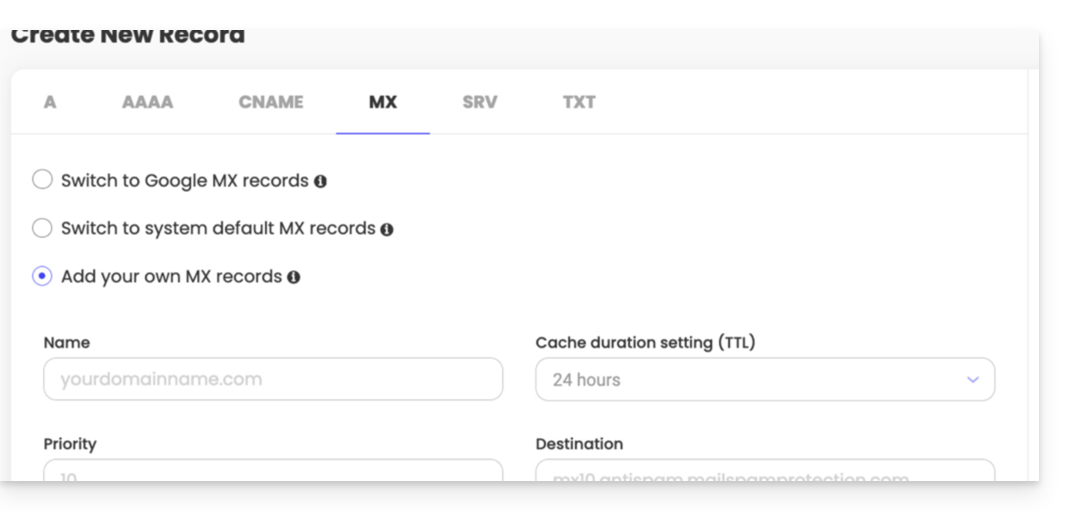
Para (re)estabelecer o tráfego do seu serviço de e-mail para a Infomaniak, você deve adicionar os 3 registros mencionados nos pré-requisitos:
- O registro MX: indica ao seu nome de domínio para encaminhar os e-mails recebidos para os servidores da Infomaniak.
- O registro SPF (tipo TXT): permite autenticar o servidor de envio para combater o spam e a falsificação de identidade, garantindo que o e-mail realmente provém do remetente legítimo.
- O registro DKIM (tipo CNAME ou TXT): adiciona uma assinatura criptográfica aos seus e-mails; sua configuração é hoje indispensável para garantir a entrega e o funcionamento ideal do seu serviço de e-mail.
Link para esta FAQ: https://faq.infomaniak.com/1775
Esta seção de perguntas frequentes foi útil?