Base de conhecimento
1000 perguntas frequentes, 500 tutoriais e vídeos explicativos. Aqui, você encontra apenas soluções!
Restaurar um serviço de hospedagem (dados específicos)
Atualização 13/10/2026
Este guia explica como aceder às cópias de segurança automáticas e restaurar um ficheiro específico de um site num serviço de alojamento Infomaniak.
Restaurar ficheiros ou pastas específicas
Para isso:
- Acesse o servidor FTP através do Web FTP (precisa de ajuda?).
- Acesse a pasta
/backups. - Selecione os arquivos e/ou pastas que deseja restaurar.
- Clique no botão Copiar:
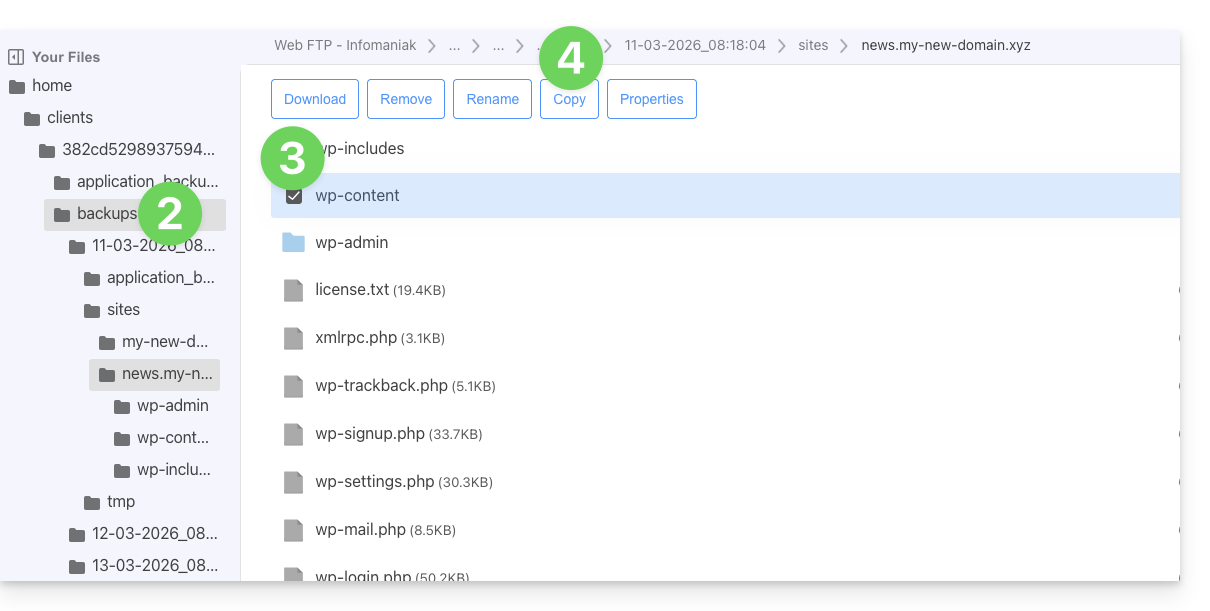
- Selecione o local para onde copiar/restaurar os dados (os dados existentes serão substituídos pelos dados selecionados).
Link para esta FAQ: https://faq.infomaniak.com/1655
Esta seção de perguntas frequentes foi útil?