Base de conhecimento
1000 perguntas frequentes, 500 tutoriais e vídeos explicativos. Aqui, você encontra apenas soluções!
Exibir a atividade da sua Organização Infomaniak
Atualização 12/10/2026
Este guia explica como obter informações sobre as atividades realizadas na sua Organização através do Manager.
O mesmo tipo de registos, mas relativo apenas à atividade da sua conta Infomaniak, está disponível no seu Manager (❓: ajuda).
Pré-requisitos
- Alterne previamente para a Organização desejada (❓: ajuda).
- Ser, no mínimo, Administrador da Organização (❓: ajuda).
Obter o registo de atividades da Organização
Para consultar um registo de atividades que contém as ações realizadas no Gestor Infomaniak dentro da Organização à qual pertence:
- Clique aqui para aceder aos registos da Organização no Gestor Infomaniak.
- Leia as informações.
- As opções de pesquisa e filtragem de logs estão disponíveis: termo, produto ou tipo de ação:
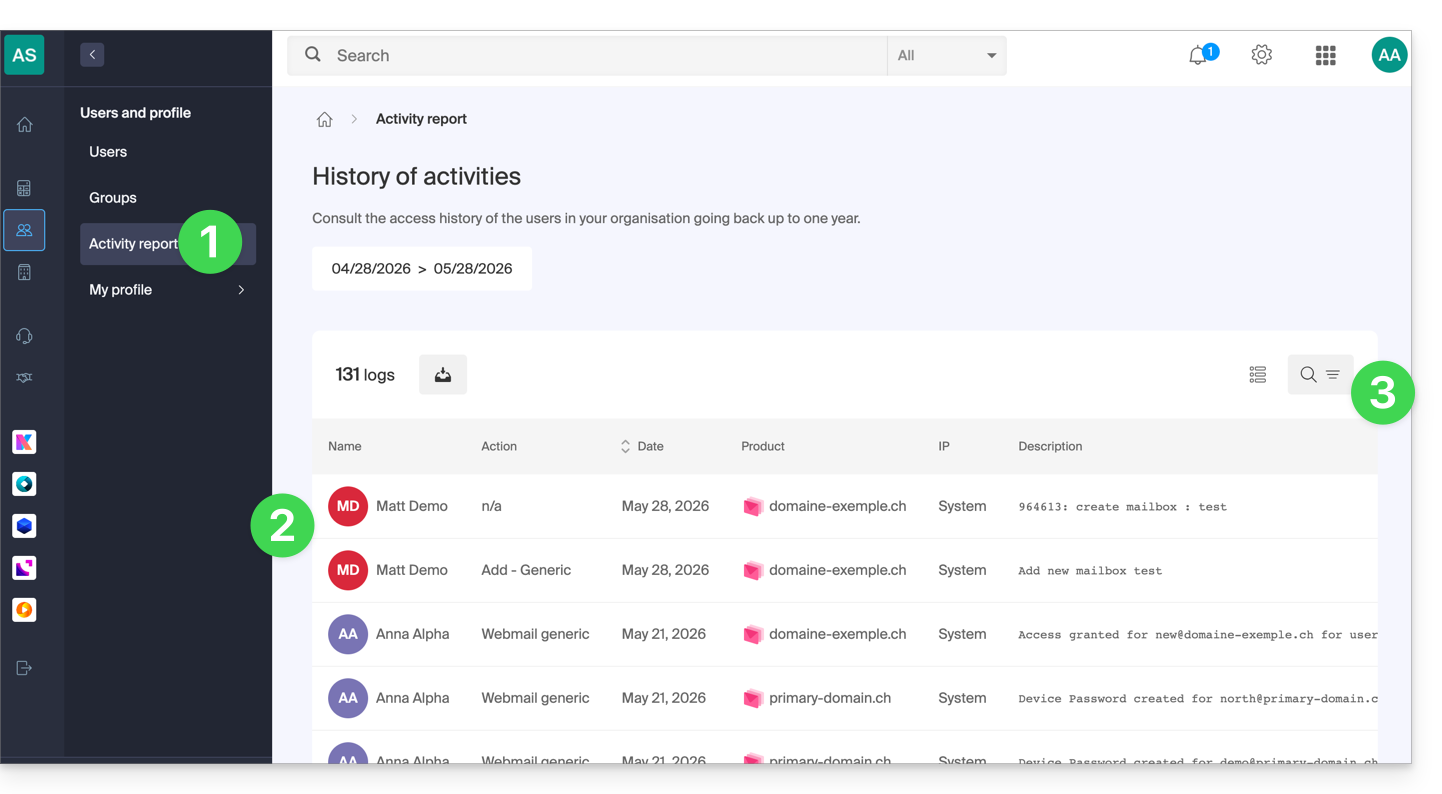
Aqui estão os tipos de ações que podem ser listadas nesta tabela:
- Tentativa de login
- Conexão bem-sucedida
- Conexão por cookie bem-sucedida
- Ativar conexão automática
- Desativar conexão automática
- Pedido de recuperação de senha
- Senha recuperada
- Alterar senha
- Alterar nome de usuário
- Pedido de recuperação de e-mail
- Endereço de e-mail recuperado
- Alteração do endereço de e-mail
- Atribuição do papel de proprietário
- Remover o papel de proprietário
- Atribuir o papel de administrador
- Remover o papel de administrador
- Adicionar um servidor
- Modificação de um servidor
- Exclusão de um servidor
- Ação servidor-cliente
- Criação de um repositório
- Pedido recebido com sucesso
- Gestão de um pedido
- Geração de fatura
- Ativação da faturação
- Desativação da faturação
- Transferência de fundos
- Adicionar um elemento
- Modificar um elemento
- Exclusão de um item
- Bloqueio de um item
- Desbloquear um item
- Gravar transmissão de vídeo
- Utilização do webmail
- E-mail enviado automaticamente
- Envio de SMS
- Erro genérico do sistema
Link para esta FAQ: https://faq.infomaniak.com/1504
Esta seção de perguntas frequentes foi útil?