Base de conhecimento
1000 perguntas frequentes, 500 tutoriais e vídeos explicativos. Aqui, você encontra apenas soluções!
Adicionar um utilizador a uma Organização
Atualização 12/10/2026
Este guia explica como adicionar um utilizador a uma Organização existente no Manager Infomaniak. Desta forma, poderá autorizar este utilizador a aceder a determinados produtos Infomaniak, de acordo com as suas necessidades.
Introdução
- Desde que abriu a sua conta na Infomaniak, faz parte de pelo menos uma Organização (❓: ajuda).
- Se estava sozinho e não se tratava de um convite, foi criada uma Organização em seu nome e você se torna automaticamente o responsável legal.
- Caso contrário, você pertence à Organização que o convidou (para participar da sua kSuite, para gerenciar um produto, etc.).
- Você pode definir se um utilizador…
- … faz parte da sua Organização e se deve se tornar:
- Responsável legal
- Administrador
- Colaborador
- … é externo à sua Organização (direitos limitados):
- Os utilizadores externos não são considerados nos partilhamentos de calendários e agendas com toda a Organização.
- … faz parte da sua Organização e se deve se tornar:
Convidar o novo utilizador
Pré-requisitos
- Se não encontrar a lista de utilizadores esperada, altere primeiro para a Organização desejada (❓: ajuda).
- Deve ser, no mínimo, Administrador da Organização (❓: ajuda).
- Consulte as diferentes permissões (direitos de acesso aos produtos, por exemplo) e as preferências de contato administrativode um utilizador dentro de uma Organização (❓: ajuda).
Para adicionar e, se necessário, criar o novo utilizador da sua Organização:
- Clique aqui para acessar o gerenciamento de usuários no painel de controle Infomaniak (❓: ajuda).
- Clique no botão Adicionar usuário:
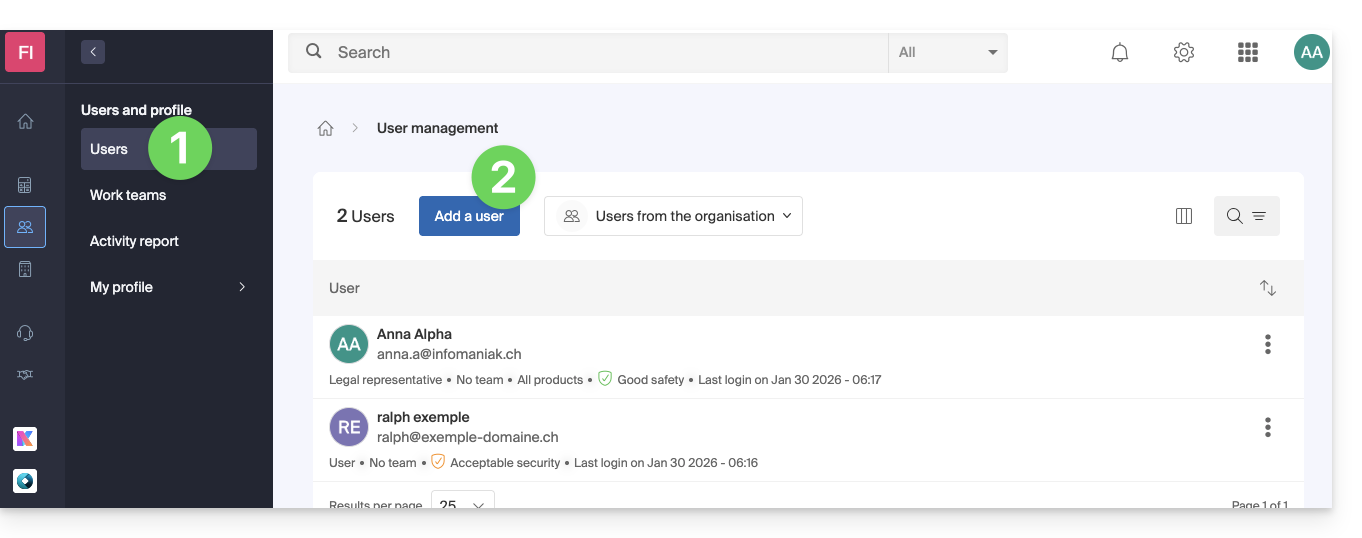
- Siga o assistente para concluir o processo:
- Se o utilizador adicionado ainda não tiver uma conta de utilizador na Infomaniak, será solicitado que crie uma.
- Se o utilizador adicionado já tiver uma conta Infomaniak, será solicitado que faça o login e, em seguida, poderá migrar da sua organização original para a nova (❓: ajuda).
Link para esta FAQ: https://faq.infomaniak.com/1404
Esta seção de perguntas frequentes foi útil?