Base de conhecimento
1000 perguntas frequentes, 500 tutoriais e vídeos explicativos. Aqui, você encontra apenas soluções!
Create a "catch-all" email address
This guide explains how to create a "catchall" email address (or universal forwarding) on a Mail Service.
✘ NOT AVAILABLE with
kSuite Free
my kSuite / my kSuite+ (ik.me, etik.com, ikmail.com)
Mail Service Starter
Introduction
- A "catchall" email address collects all emails sent to email addresses that do not exist on the domain.
- This is ideal if you want to receive all messages for which no specific address exists on your domain.
- This type of address cannot be used to send emails.
- If you configure an out-of-office message (❓: help) on a catchall@ address, no automatic replies will be sent to senders who contacted a non-existent email address on your domain.
- This restriction prevents reply loops and the sending of unwanted messages.
Create a catchall address
Prerequisites
- You must have a Mail Service on your Infomaniak Manager.
- Have a number of available addresses or adjust itif necessary.
Then, the administrator of a Mail Service creates a new generic email address:
- Click here to access the Mail Service management in your Infomaniak Manager (❓: help).
- Click on the name of the Mail Service in question.
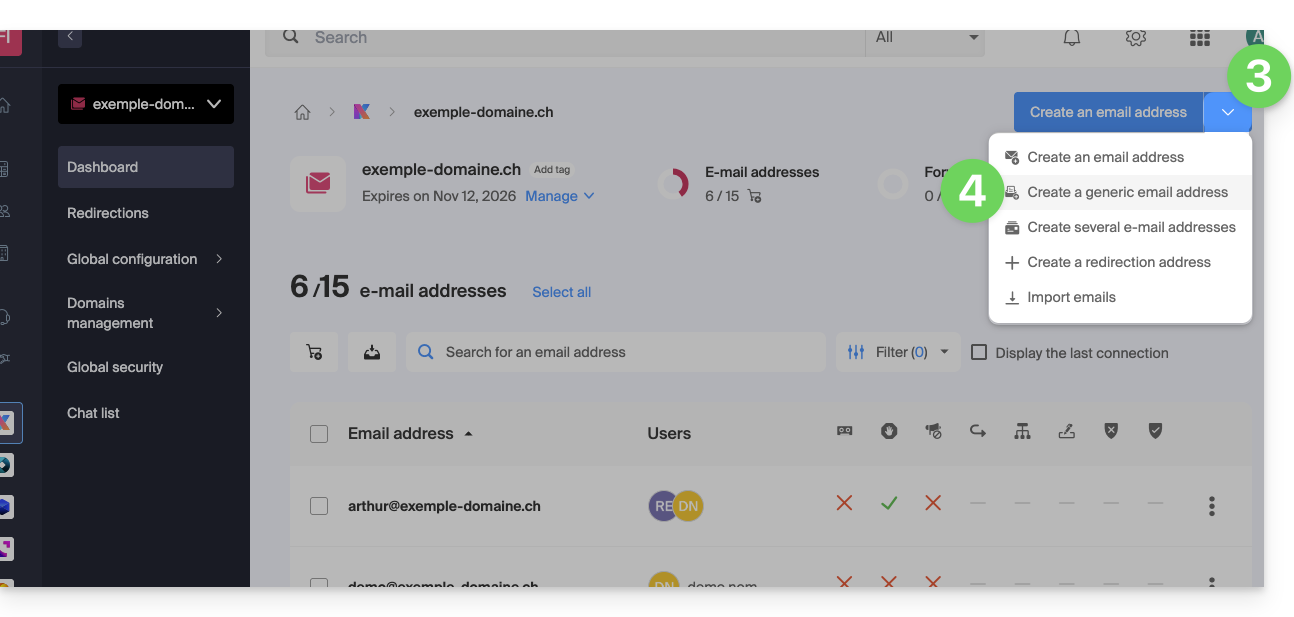
- Click on the chevron to the right of the blue Create a mail address button.
- Click on Create a generic mail address:
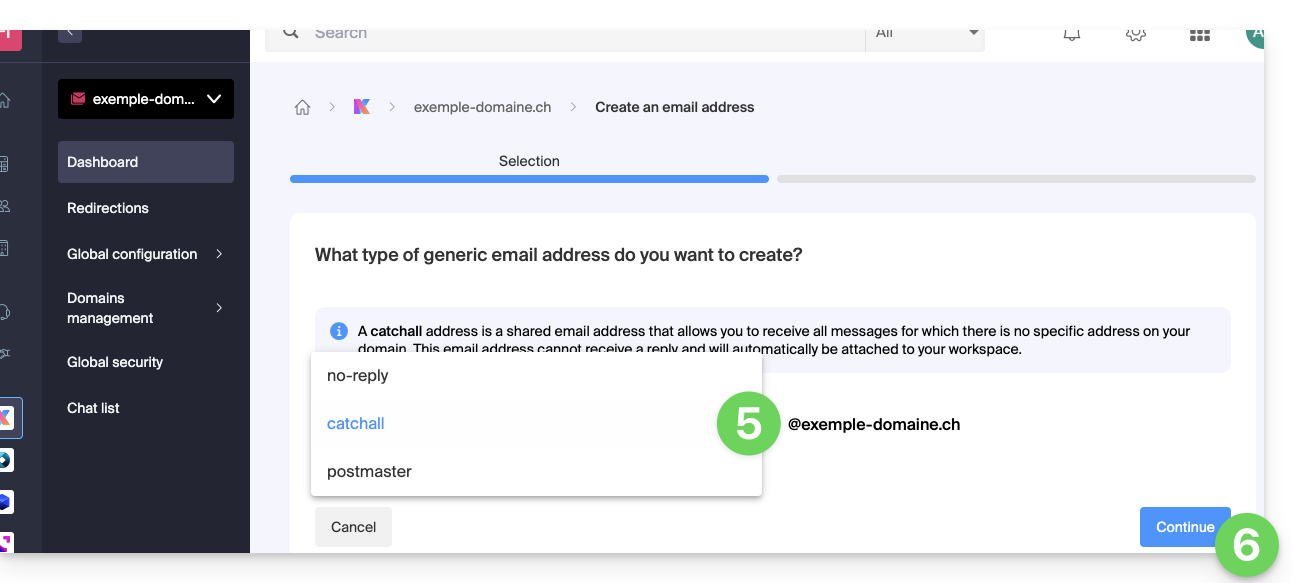
- Choose Catchall.
- Click on Continue:
To use it on the Mail app or elsewhere, you need to add a user and/or password for your devices (❓: help).
Example of use
Once the catchall address is created:
- You use the email address
jonnie.smith@domain.xyz, which works and exists on the Mail servicedomain.xyz.- You have also created an address
catchall@domain.xyzon the Mail servicedomain.xyz.
- You have also created an address
- An email is sent to
smith.johnny@domain.xyzbecause the sender misspelled the recipient's address.. - The email will still arrive in the
catchall@domain.xyzinbox, which you can simply check in your preferred Mail interface. - The same applies if you delete the
jonnie.smith@domain.xyzaddress one day: if you keep thecatchalladdress, then it will receive all emails still addressed to the now non-existent email address...
Important recommendations
However, creating this type of account is not recommended. :
- “Catchall” addresses receive all messages sent to any address within your domain, which quickly exposes them to a massive influx of spam.
- Due to this high volume of spam, legitimate messages risk being lost in the flood and going unnoticed, leading to the loss of important communications.
- Since the server, by definition, accepts any prefix, these addresses become a prime target for dictionary attacks and automated mailbox enumeration.
In summary, managing a catch-all address quickly becomes cumbersome and time-consuming, especially for organizations that manage many employees or services.
Link para esta FAQ: https://faq.infomaniak.com/126
Esta seção de perguntas frequentes foi útil?