Base de conhecimento
1000 perguntas frequentes, 500 tutoriais e vídeos explicativos. Aqui, você encontra apenas soluções!
Configurar o Gmail (aplicativo iOS/Android) em IMAP (e-mail)
Este guia explica como usar o aplicativo móvel Gmail (aplicativo para smartphone ou tablet iOS/Android) para consultar um endereço de e-mail hospedado pela Infomaniak.
Introdução
- Em vez da configuração manual abaixo, recomenda-se usar o aplicativo Infomaniak Mail (iOS / Android) para usufruir dos benefícios de segurança da Infomaniak.
Usar o aplicativo móvel Gmail para Infomaniak
Pré-requisitos
- Criar o endereço de e-mail (❓: ajuda my kSuite | Serviço de E-mail/kSuite).
- Criar uma senha para o dispositivo (❓: ajuda my kSuite | Serviço de e-mail/kSuite).
- Verificar se a configuração do domínio está correta (❓: ajuda).
Para adicionar, via IMAP, o endereço de e-mail gerenciado na Infomaniak no seu aplicativo móvel Gmail (❓: ajuda oficial):
- Acesse as Configurações do Gmail.
- Toque em Adicionar conta.
- Escolha Outro:
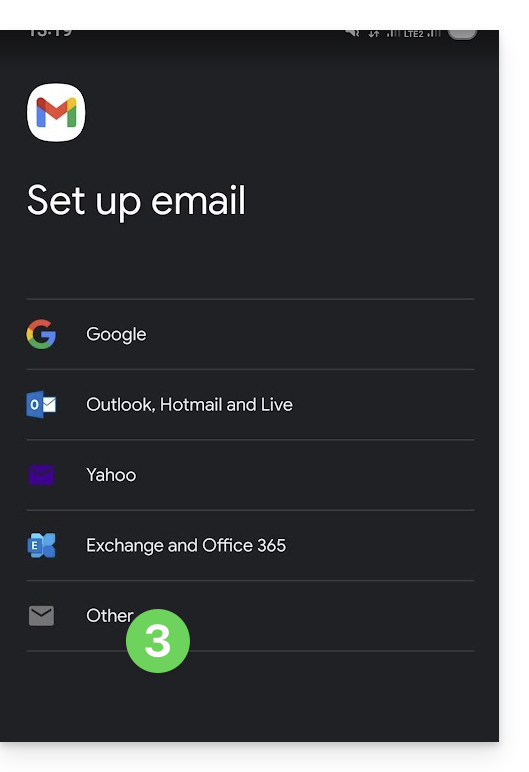
- Insira o endereço de e-mail que deseja usar.
- Escolha o tipo de conta IMAP.
- Insira a senha (consulte os pré-requisitos) do endereço de e-mail:
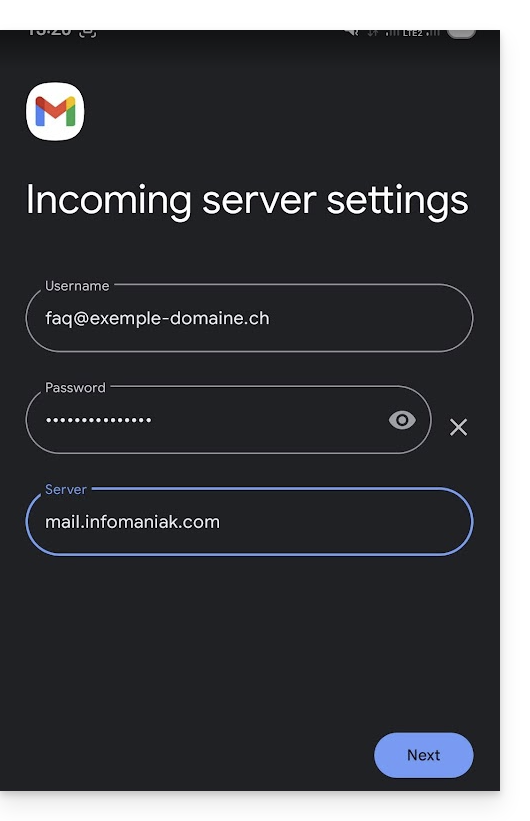
- Utilize o nome de servidor
mail.infomaniak.compara:- Servidor de entrada IMAP (recepção)
- Servidor de saída SMTP (envio)
- Conclua a adição do endereço.
Link para esta FAQ: https://faq.infomaniak.com/1208
Esta seção de perguntas frequentes foi útil?