Kennisbank
1.000 veelgestelde vragen, 500 tutorials en uitlegvideo's. Hier vind je alleen maar oplossingen!
kDrive synchroniseren via WebDAV op Linux
Bijwerken 13-08-2026
Deze handleiding geeft instructies voor het synchroniseren van kDrive met Linux met behulp van het WebDAV-protocol.
✘ NIET BESCHIKBAAR voor
kSuite Free / kSuite Standard
my kSuite / my kSuite+ (ik.me, etik.com, ikmail.com)
Inleiding
- De meeste recente software die het WebDAV-protocol ondersteunt, is compatibel met de kDrive-diensten die WebDAV ook ondersteunen. Infomaniak kan de compatibiliteit van de dienst met externe applicaties niet garanderen en biedt geen ondersteuning voor dit protocol.
- Het wordt aanbevolen omde kDrive-app te installeren om gegevensverlies te voorkomen.
Verbinden met kDrive via WebDAV op Linux (Gnome)
Hiervoor:
- Open Bestanden.
- Klik in de zijbalk op Netwerk:
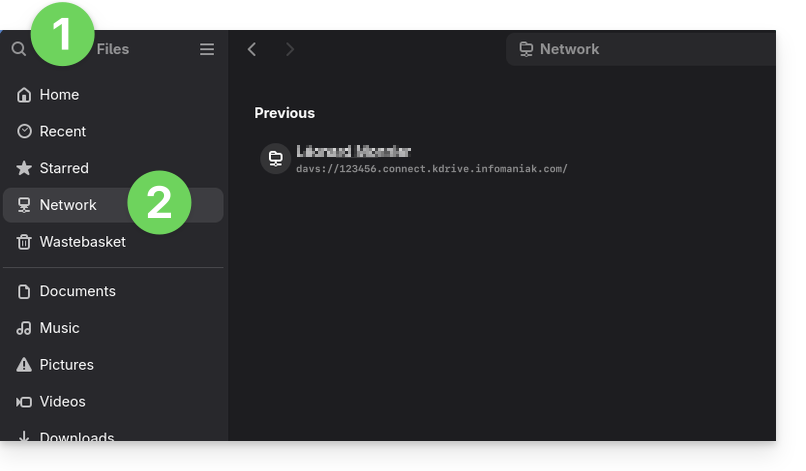
- Voer het serveradres in:
davs://IDkDrive.connect.kdrive.infomaniak.com(hulp nodig?). - Klik op Verbinden.
- Gebruik voor de accountinstellingen de volgende gegevens:
- Gebruikersnaam: het e-mailadres waarmee u inlogt op uw Infomaniak-account.
- Wachtwoord: maak een app-wachtwoord aan voor dit specifieke doel.
- Klik op Inloggen.
Link naar deze veelgestelde vragen: https://faq.infomaniak.com/2894
Is deze veelgestelde vragenlijst nuttig geweest?