Kennisbank
1.000 veelgestelde vragen, 500 tutorials en uitlegvideo's. Hier vind je alleen maar oplossingen!
Restrict access to a video stream based on the country
Bijwerken 02-11-2026
This guide explains how to restrict access to Infomaniak video streaming based on geographical criteria (geolocation).
Restrict access to streams via GeoIP
To do this:
- Click here to access the management interface for your product in the Infomaniak Manager (need help?).
- Click directly on the name assigned to the product in question.
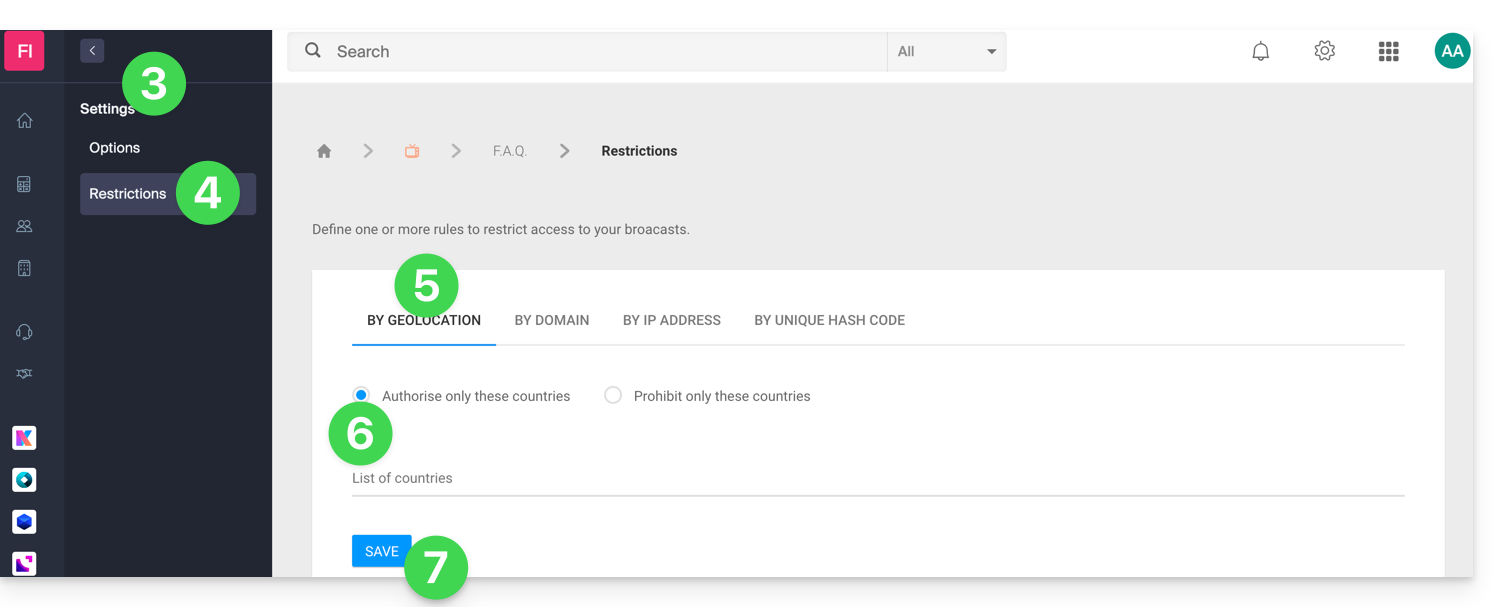
- Click on Settings in the left-hand menu.
- Click on Restrictions in the left-hand menu.
- Click on the Geolocation restriction tab.
- Define the countries that should be specifically allowed or blocked.
- Click the Save button:
Refer to this other guide to customize the replacement image offered to viewers who are blocked.
Link naar deze veelgestelde vragen: https://faq.infomaniak.com/2863
Is deze veelgestelde vragenlijst nuttig geweest?