Kennisbank
1.000 veelgestelde vragen, 500 tutorials en uitlegvideo's. Hier vind je alleen maar oplossingen!
Site Creator van Infomaniak opzeggen
Bijwerken 07-09-2026
Deze handleiding gaat over Site Creator. Het hulpmiddel is gratis bij een webhostingpakket of is beschikbaar in verschillende abonnementen wanneer het apart wordt besteld.
Inleiding
- Wanneer Site Creator als een website op een van uw webhostingaccounts is geïnstalleerd, verwijdert u de website (en de inhoud ervan) die met Site Creator is gemaakt, net als bij elke andere website die u op een webhostingaccount heeft.
- Een bevestiging van de beëindiging wordt naar eventuele andere beheerders van de organisatie gestuurd.
- Bij het beëindigen van een Site Creator-abonnement worden de back-ups onherroepelijk verwijderd, waardoor een herstel niet meer mogelijk is.
Procedure voor het verwijderen van Site Creator
Om de website die u met Infomaniak Site Creator heeft gemaakt te verwijderen:
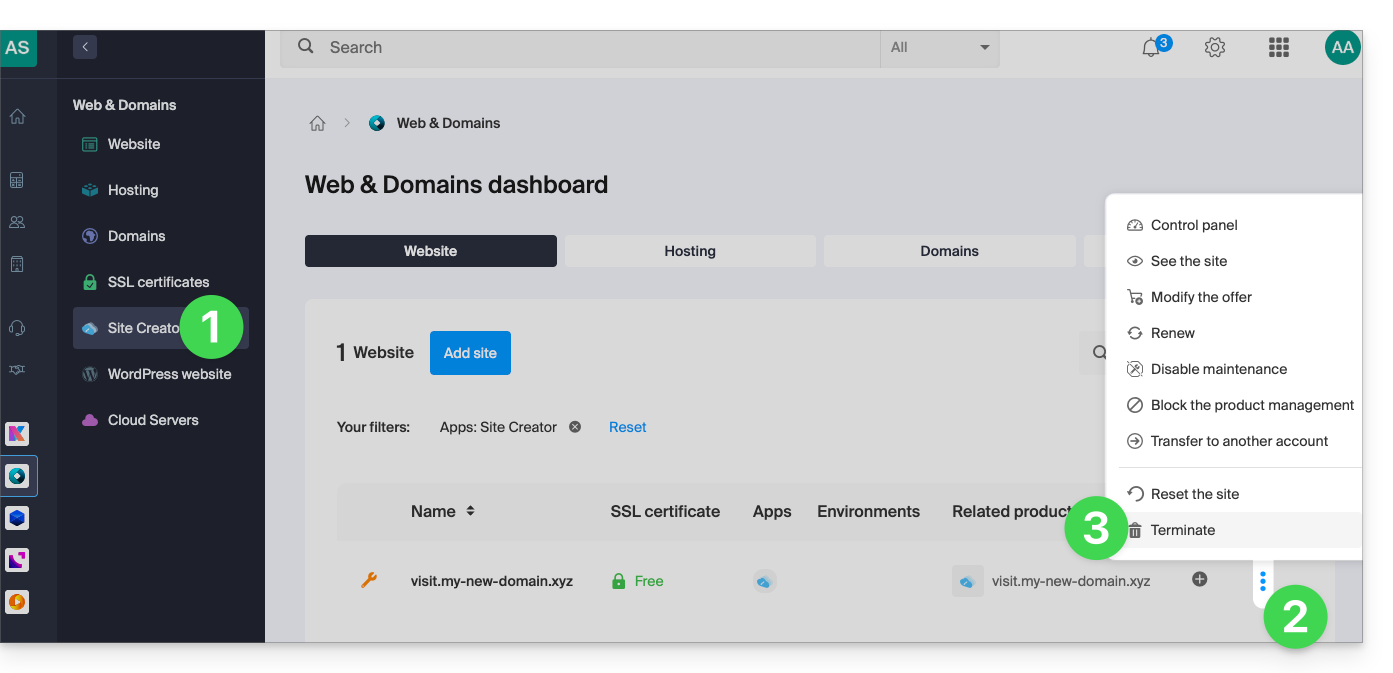
- Klik hier om naar het beheer van uw product in het Infomaniak Manager te gaan (hulp nodig?).
- Klik op het menu met acties ⋮ rechts van de betreffende website in de tabel.
- Klik op Annuleren:
U kunt een lege Site Creator opnieuw starten nadat u het hulpmiddel hebt verwijderd.
Link naar deze veelgestelde vragen: https://faq.infomaniak.com/2686
Is deze veelgestelde vragenlijst nuttig geweest?